Note
Access to this page requires authorization. You can try signing in or changing directories.
Access to this page requires authorization. You can try changing directories.
A lakehouse in Microsoft Fabric lets data engineers transform data with Spark notebooks and data analysts query it with T-SQL—all against the same Delta Lake storage. When you create a lakehouse, Fabric also generates a SQL analytics endpoint for T-SQL queries and a default semantic model for Power BI reporting.
In this article, you learn how to create and delete a lakehouse.
Prerequisites
A Fabric workspace backed by a trial or paid capacity, with Contributor or higher workspace permissions. If you don't see the option to create a lakehouse, ask your Fabric admin to assign capacity to the workspace.
Create a lakehouse
To create a lakehouse:
Open your Fabric workspace.
Select + New item.
Search for or select Lakehouse.
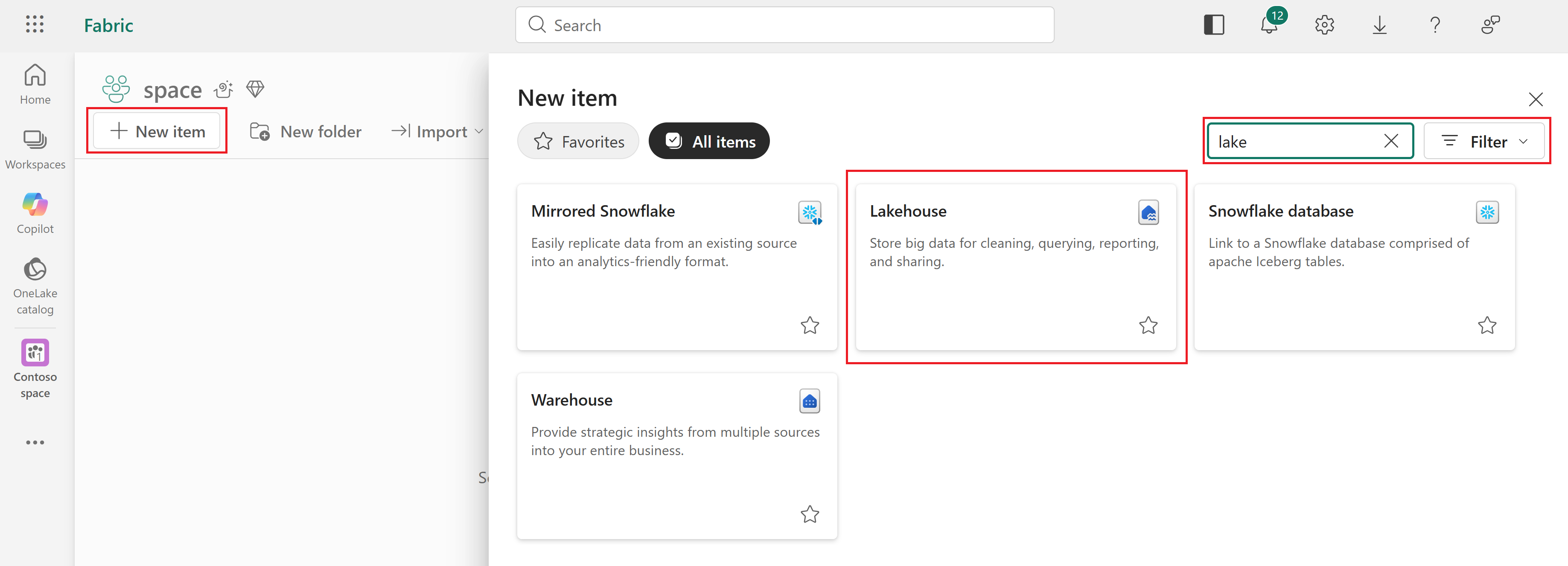
Enter a name for the lakehouse and select the workspace where you want to create it.
The Lakehouse schemas checkbox is selected by default. Schemas let you organize tables into logical groups (for example,
sales.ordersandmarketing.campaigns) instead of placing all tables in a single flat list. Clear the checkbox if you don't need schema-based organization. For more information, see What are lakehouse schemas?.Select Create.
Note
If your tenant admin configured sensitivity label policies in Microsoft Purview, you also see a Sensitivity label option in the dialog. Use it to classify the lakehouse according to your organization's data protection requirements.
The lakehouse opens in the lakehouse Explorer pane, where you can start loading data.
For information about how to create a lakehouse with the REST API, see Create Lakehouse - REST API
Delete a lakehouse
Deleting a lakehouse removes the lakehouse item, all its data, the associated SQL analytics endpoint, and the semantic model. To delete a lakehouse:
- Open the workspace that contains the lakehouse.
- Find the lakehouse in the item list.
- Select the ellipsis ... next to the lakehouse name for more options.
- Select Delete.
Caution
Deleting a lakehouse is permanent and can't be undone. The lakehouse, its data, its SQL analytics endpoint, and its semantic model are all removed.
You can't delete a lakehouse that's referenced by other items—for example, if it's used as a source in a pipeline or by a Real-Time Intelligence workflow. Remove those references before deleting the lakehouse.
Tip
If you accidentally delete a file inside a lakehouse (not the lakehouse itself), you might be able to recover it within seven days by using OneLake soft delete.