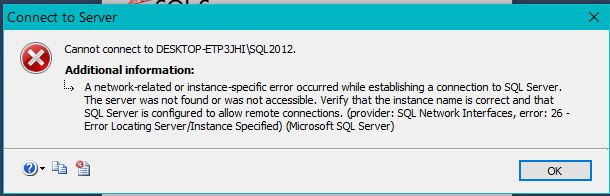
cannot open sql 2012

Maxine Nietz 1 Reputation point
2022-01-03T19:55:25.033+00:00

Windows 10. SQL Server 2012. Access 365.

Want to link some SQL tables to Access. However, suddenly cannot open SQL.

Have re-started my PC. Getting the following error:
161928-sql2021-error-message.jpg

Please help!!!!

SQL Server | Other
0 comments No comments
{count} votes

2 answers

Sort by: Most helpful
  1. Erland Sommarskog 128.7K Reputation points MVP Volunteer Moderator
    2022-01-03T21:59:50+00:00

    That error means that there is no SQL Server running where you have specified that it would be.

    That could be because SQL Server is not running, it could be because you have a typo, for example, the instance name is not SQL2012. There could be firewalls etc.

    Since we don't know your environment and nor do we know why you expect the operation to succeed, we can't really do better than to point you to a troubleshooter. Here is one: https://learn.microsoft.com/en-us/sql/database-engine/configure-windows/troubleshoot-connecting-to-the-sql-server-database-engine?view=sql-server-2017

    0 comments No comments

  2. CathyJi-MSFT 22,406 Reputation points Microsoft External Staff
    2022-01-04T01:51:18.237+00:00

    Hi @Maxine Nietz ,

    Please follow below steps to troubleshot the issue,

    1. Make sure SQL Server Service is running
    2. If a named instance, make sure SQL Server browser service is running. Make sure the instance name is spelled correct and there is actually such an instance on your target machine.
    3. Make sure SQL Server is configured to allow remote connections
    4. Examine the SQL Server error log for messages confirming that SQL is listening on the expected network interfaces and ports
    5. Test server connectivity with PING from the client machine
    6. Test port connectivity using TELNET to the server and port (from step 4) from the client machine. For example
      TELNET <server-name> 1433
    7. Check firewall settings if step 5 or 6 connectivity test fails

    If you have some confuse about the steps, please refer to Resolving could not open a connection to SQL Server errors or Troubleshoot connecting to the SQL Server Database Engine to get more information.


    If the answer is helpful, please click "Accept Answer" and kindly upvote it. If you have extra questions about this answer, please click "Comment".

    0 comments No comments

Your answer

Answers can be marked as 'Accepted' by the question author and 'Recommended' by moderators, which helps users know the answer solved the author's problem.