Microsoft Security | Microsoft Entra | Microsoft Entra External ID
Managing external identities to enable secure access for partners, customers, and other non-employees

This browser is no longer supported.
Upgrade to Microsoft Edge to take advantage of the latest features, security updates, and technical support.
' cx='32' cy='32' r='32' /%3E%3Ctext x='50%25' y='55%25' dominant-baseline='middle' text-anchor='middle' fill='%23FFF' %3EMB%3C/text%3E%3C/svg%3E)
I have set up a custom flow with a unified sign-in sign-up page with password reset link. Now I'd like to simplify the user experience by copying the email that was entered on the sign-in page to the password reset page if the password reset link was pressed.
Curiously the email is already forwarded to the password reset subjourney with a query parameter "...&hint=email" but I can't access this with claim resolvers. I tried {OIDC:LoginHint} which obviously didn't work since the paramter is hint and not login_hint but {OAUTH-KV:hint} also did not work even though it should as far as I understand it.
Is there even any use to the "hint" query parameter? Or did I overlook another way to prepopulate the email field?
Relevant code excerpts:
<UserJourneys>
        <UserJourney Id="SignInLevel1">
            <OrchestrationSteps>
                <OrchestrationStep Order="1" Type="CombinedSignInAndSignUp" ContentDefinitionReferenceId="api.signin">
                    <ClaimsProviderSelections>
                        <ClaimsProviderSelection TargetClaimsExchangeId="AppleExchange" />
                        <ClaimsProviderSelection TargetClaimsExchangeId="FacebookExchange" />
                        <ClaimsProviderSelection TargetClaimsExchangeId="GoogleExchange" />
                        <ClaimsProviderSelection TargetClaimsExchangeId="TwitterExchange" />
                        <ClaimsProviderSelection TargetClaimsExchangeId="ForgotPasswordExchange" />
                        <ClaimsProviderSelection ValidationClaimsExchangeId="LocalAccountSigninEmailExchange" />
                    </ClaimsProviderSelections>
                    <ClaimsExchanges>
                        <ClaimsExchange Id="LocalAccountSigninEmailExchange" TechnicalProfileReferenceId="SelfAsserted-LocalAccountSignin-Email" />
                    </ClaimsExchanges>
                </OrchestrationStep>

                <!-- Registration -->

                <OrchestrationStep Order="2" Type="ClaimsExchange">
                    <Preconditions>
                        <Precondition Type="ClaimsExist" ExecuteActionsIf="true">
                            <Value>authenticationSource</Value>
                            <Action>SkipThisOrchestrationStep</Action>
                        </Precondition>
                    </Preconditions>
                    <ClaimsExchanges>
                        <ClaimsExchange Id="SignUpWithLogonEmailExchange" TechnicalProfileReferenceId="SetRegistrationValues" />
                        <ClaimsExchange Id="GoogleExchange" TechnicalProfileReferenceId="Google-OAUTH" />
                        <ClaimsExchange Id="FacebookExchange" TechnicalProfileReferenceId="Facebook-OAUTH" />
                        <ClaimsExchange Id="TwitterExchange" TechnicalProfileReferenceId="Twitter-OAUTH1" />
                        <ClaimsExchange Id="AppleExchange" TechnicalProfileReferenceId="Apple-OIDC" />
                        <ClaimsExchange Id="ForgotPasswordExchange" TechnicalProfileReferenceId="ForgotPassword" />
                    </ClaimsExchanges>
                </OrchestrationStep>

                <!-- Trouble sign in -->
                <OrchestrationStep Order="3" Type="InvokeSubJourney">
                    <Preconditions>
                        <Precondition Type="ClaimsExist" ExecuteActionsIf="false">
                            <Value>isForgotPassword</Value>
                            <Action>SkipThisOrchestrationStep</Action>
                        </Precondition>
                    </Preconditions>
                    <JourneyList>
                        <Candidate SubJourneyReferenceId="TroubleSignInResetPassword" />
                    </JourneyList>
                </OrchestrationStep>
                            [...]
        </UserJourney>
</UserJourneys>

<SubJourneys>
        <SubJourney Id="TroubleSignInResetPassword" Type="Call">
            <OrchestrationSteps>
                <OrchestrationStep Order="1" Type="ClaimsExchange">
                    <ClaimsExchanges>
                        <ClaimsExchange Id="VerifyMailAddress-TroubleSignIn" TechnicalProfileReferenceId="VerifyMailAddress-TroubleSignIn" />
                    </ClaimsExchanges>
                </OrchestrationStep>
                            [...]
            </OrchestrationSteps>
        </SubJourney>
</SubJourneys>


<ClaimsProvider>
            <DisplayName>Local Account Sign in</DisplayName>
            <TechnicalProfiles>
                                <TechnicalProfile Id="ForgotPassword">
                        <DisplayName>Forgot your password?</DisplayName>
                        <Protocol Name="Proprietary" Handler="Web.TPEngine.Providers.ClaimsTransformationProtocolProvider, Web.TPEngine, Version=1.0.0.0, Culture=neutral, PublicKeyToken=null"/>
                        <OutputClaims>
                            <OutputClaim ClaimTypeReferenceId="isForgotPassword" DefaultValue="true" AlwaysUseDefaultValue="true"/>
                        </OutputClaims>
                    </TechnicalProfile>

                    <TechnicalProfile Id="VerifyMailAddress-TroubleSignIn">
                        <Metadata>
                            <Item Key="ContentDefinitionReferenceId">api.trouble_email_verification</Item>
                        </Metadata>
                        <InputClaims>
                            <InputClaim ClaimTypeReferenceId="email" />
                        </InputClaims>
                        <OutputClaims>
                            <OutputClaim ClaimTypeReferenceId="objectId" />
                            <OutputClaim ClaimTypeReferenceId="email" />
                            <OutputClaim ClaimTypeReferenceId="displayName" />
                            <OutputClaim ClaimTypeReferenceId="givenName" />
                            <OutputClaim ClaimTypeReferenceId="surname" />
                            <OutputClaim ClaimTypeReferenceId="extension_personalisationname" />
                            <OutputClaim ClaimTypeReferenceId="extension_language" />
                            <OutputClaim ClaimTypeReferenceId="isRegistration"  DefaultValue="false" AlwaysUseDefaultValue="true"/>
                            <OutputClaim ClaimTypeReferenceId="authenticationSource" DefaultValue="localAccountAuthentication" AlwaysUseDefaultValue="true" />
                        </OutputClaims>
                        <ValidationTechnicalProfiles>
                            <ValidationTechnicalProfile ReferenceId="AAD-UserReadUsingEmail" />
                        </ValidationTechnicalProfiles>
                        <IncludeTechnicalProfile ReferenceId="getMailAddress" />
                        <UseTechnicalProfileForSessionManagement ReferenceId="SM-AAD" />
                    </TechnicalProfile>
            </TechnicalProfiles>
</ClaimsProvider>

Hi @Maximilian Bürgi • Thank you for reaching out.
I tested this out for my Password Reset custom policy and got it working using {OAUTH-KV:hint} claim resolver and it pre-populated the email address for me.
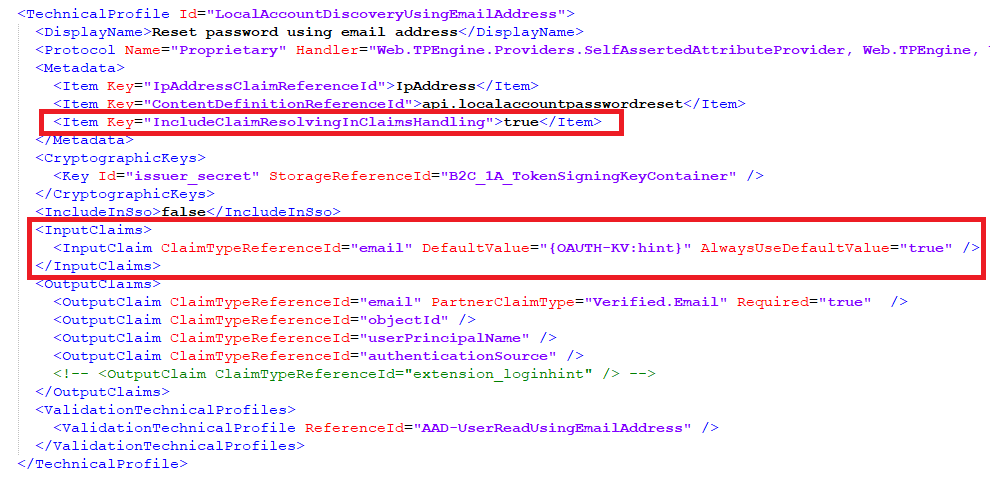
You can use THIS URL and update the value of the hint parameter at the end of the URL to see it in action.
Why I think it didn't work for you could be because the sub-journey is not redirecting you to an OAuth (oauth2/v2.0/authorize) endpoint, rather it is redirecting you to a URL like https://my.b2clogin.com/my.onmicrosoft.com/B2C_1_SuSi3/api/CombinedSigninAndSignup/unified?claimsexchange=ForgotPassword..... To run a Password Reset flow instead of the subjourney, you may consider using the Password reset policy (legacy) method.
-----------------------------------------------------------------------------------------------------------
Please "Accept the answer" if the information helped you. This will help us and others in the community as well.
Thank you for the answer Amanpreet
So am I correct in assuming that if I want to use the Recommended self-service password reset that claim resolvers can't be used? Do those only work on parameters received at the initial request to the endpoint?
Because in that case, it confuses me a bit why this "hint" parameter even appears in the URL, if it can't be accessed. But this seems to be set by default, and I can't change or even remove it.
And would there be some other way to pass on the email from the signinsignup page to the ForgotPassword claimsexchange?
@Maximilian Bürgi · Doesn't look like the ForgotPassword Technical Profile accepts the input claim. I tried to pass a hardcoded value as the input claim which didn't work as well. So it is not just related to claims resolver.
<InputClaims>
	   <InputClaim ClaimTypeReferenceId="email" DefaultValue="someone@example.com" AlwaysUseDefaultValue="true" />
</InputClaims>
I can get the claim resolver to work if I add the query parameter "hint=email" to the initial URL but this isn't helpful with the combined signin/signup/self-service flow because the email is only known during the flow. In that case the hint property only leaks potentially confidential information and has no use as far as I can tell.
@Maximilian Bürgi · Yes, it works with OAuth (oauth2/v2.0/authorize) endpoint only as I mentioned in the last line of my initial answer. You can post an idea at https://feedback.azure.com to remove the hint parameter as it may expose security risks.
I'll do that, thank you!
' cx='32' cy='32' r='32' /%3E%3Ctext x='50%25' y='55%25' dominant-baseline='middle' text-anchor='middle' fill='%23FFF' %3EAK%3C/text%3E%3C/svg%3E)
Hey @Maximilian Bürgi,
Were you able to find a solution to the question posted above??
I have a very similar request and unable to find any viable solution for the same.
TIA,
Akshay
@Maximilian Bürgi .
Were you able to find a solution to the question posted above??
I have a very similar request and unable to find any viable solution for the same.
Hi @Akshay Kumar Unfortunately no. We had to scrap this requirement as we could not find a solution.
I think I opened a request on feedback.azure.com which was never addressed: https://feedback.azure.com/d365community/idea/f2284325-c325-ec11-b6e6-000d3a4f0789
Unfortunately, it's not really understandable anymore, as Microsoft closed access to the referenced GitHub issue.
Best of luck to you,
Max
@Maximilian Bürgi, Thanks for the quick response.