Azure Logic Apps
An Azure service that automates the access and use of data across clouds without writing code.
This browser is no longer supported.
Upgrade to Microsoft Edge to take advantage of the latest features, security updates, and technical support.
' cx='32' cy='32' r='32' /%3E%3Ctext x='50%25' y='55%25' dominant-baseline='middle' text-anchor='middle' fill='%23FFF' %3EV%3C/text%3E%3C/svg%3E)
Hi,
I need to convert date into yyyy-MM-dd format and add it to sharepoint column
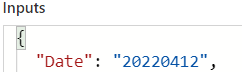
Date is in the above format
I want to convert it
Im getting error

Help me to solve this
An Azure service that automates the access and use of data across clouds without writing code.
' cx='32' cy='32' r='32' /%3E%3Ctext x='50%25' y='55%25' dominant-baseline='middle' text-anchor='middle' fill='%23FFF' %3EBL%3C/text%3E%3C/svg%3E)
Hi @Vijay ,
Just checking to see if the information above has helped you solve your problem.
Let me know if you need me to explain it further or add some extra details.
Case it helped, could you please vote or accept the answer? Feedback help validate answers for other forum users.
Cheers!
Answer accepted by question author
Hi,
That may be a bit tricky because your date is not following the ISO 8601 format neither has delimiters like / or -
If you see this thread: https://learn.microsoft.com/en-us/answers/questions/864847/mapping-data-to-sharepoint-columns-from-logic-app.html
I managed to get that in SharePoint but that date at least had a delimiter: "-"
If your date was 2022-04-12, you could use something like formatDateTime(concat(split(YOURINPUTDATEHERE, '-')[2],'-',split((YOURINPUTDATEHERE, , '-')[1],'-',split((YOURINPUTDATEHERE, , '-')[0]),'yyyy-MM-ddTHH:mm:ssZ')
you can try : parseDateTime('21052019', 'fr-fr', 'ddMMyyyy') like specidied in https://learn.microsoft.com/en-us/azure/logic-apps/workflow-definition-language-functions-reference#parsedatetime but you need to figure a way to flip your date to have day month year, like an array flip
or you can change this: formatDateTime(concat(split(YOURINPUTDATEHERE, '-')[2],'-',split((YOURINPUTDATEHERE, , '-')[1],'-',split((YOURINPUTDATEHERE, , '-')[0]),'yyyy-MM-ddTHH:mm:ssZ')
to use substrings , but you must be sure the date input will be always yyyyMMdd
This worked for me:
formatDateTime(concat(substring('20220412',0,4),'-',substring('20220412',4,2),'-',substring('20220412',6,2)),'yyyy-MM-ddTHH:mm:ssZ')
of course where you see '20220412', you pass your input date field