Note
Access to this page requires authorization. You can try signing in or changing directories.
Access to this page requires authorization. You can try changing directories.
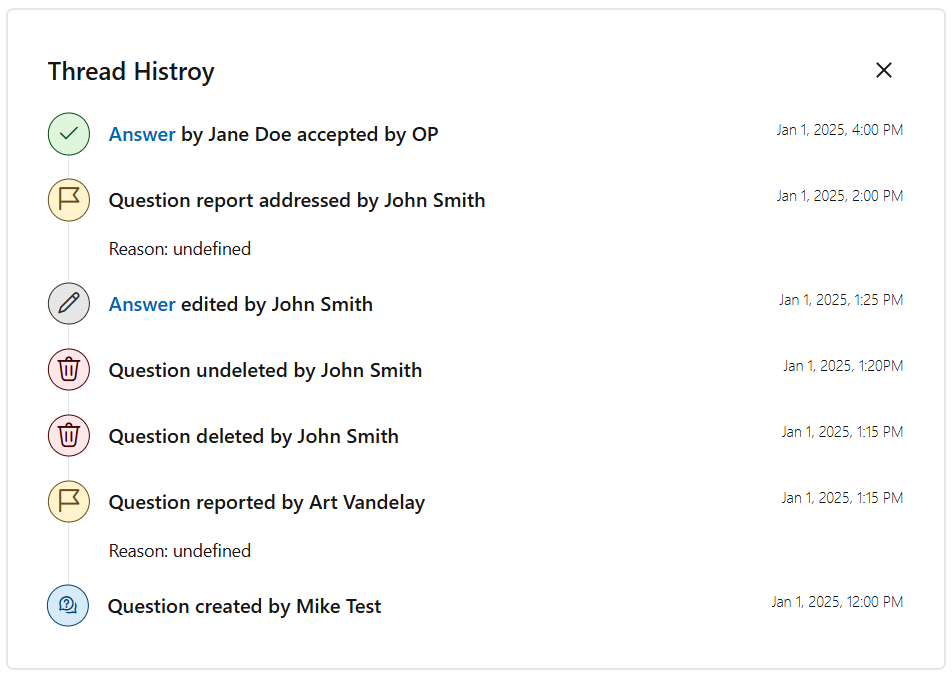
As a Microsoft Q&A moderator, you now have the ability to view the activity history on a question thread. You are able to view:
- Question creation: Created by username and timestamp.
- Edits and deletions: Edited or deleted by username and timestamp.
- Accepted answers: Answer marked as accepted, with username and timestamp.
- Reported abuse: Part of the thread reported, with the username of the reporter, timestamp, and details of the report.
Prerequisites
- You must be signed into your Microsoft Learn profile.
- You need to be a moderator in Q&A.
View history
To view the activity history on a question:
- From the Questions page, select any question you would like to edit.
- Select the overflow menu on a question.
- Select “View thread history”.
- The thread history will populate at the top of the page.