Note
Access to this page requires authorization. You can try signing in or changing directories.
Access to this page requires authorization. You can try changing directories.
This article explains how to create root and intermediate certificate authorities within your Azure Device Registry namespace. Use this workflow if you want Azure Device Registry to provision certificate authorities in Microsoft cloud PKI on your behalf.
For information about how the root and intermediate CAs establish trust, see CA hierarchy in Azure Device Registry.
Prerequisites
Before you begin, make sure you have:
- An active Azure subscription. If you don't have one, create a free account.
- An existing Azure Device Registry namespace. For setup instructions, see Get started with Azure Device Registry for Azure IoT Hub.
- Permission to create and manage certificate authorities in this Azure Device Registry namespace, such as the Azure Device Registry Administrator role. If you don't have access, ask your Azure administrator to assign you this role on the namespace.
Set up the certificate authorities
Use the Azure portal or Azure CLI to create root and intermediate certificate authorities.
Create a root CA
In the Namespaces list, select your namespace.
Under Security, select Certificate Authorities.
Select Create. Root Certificate Authority is disabled if the namespace already has one root CA by default.
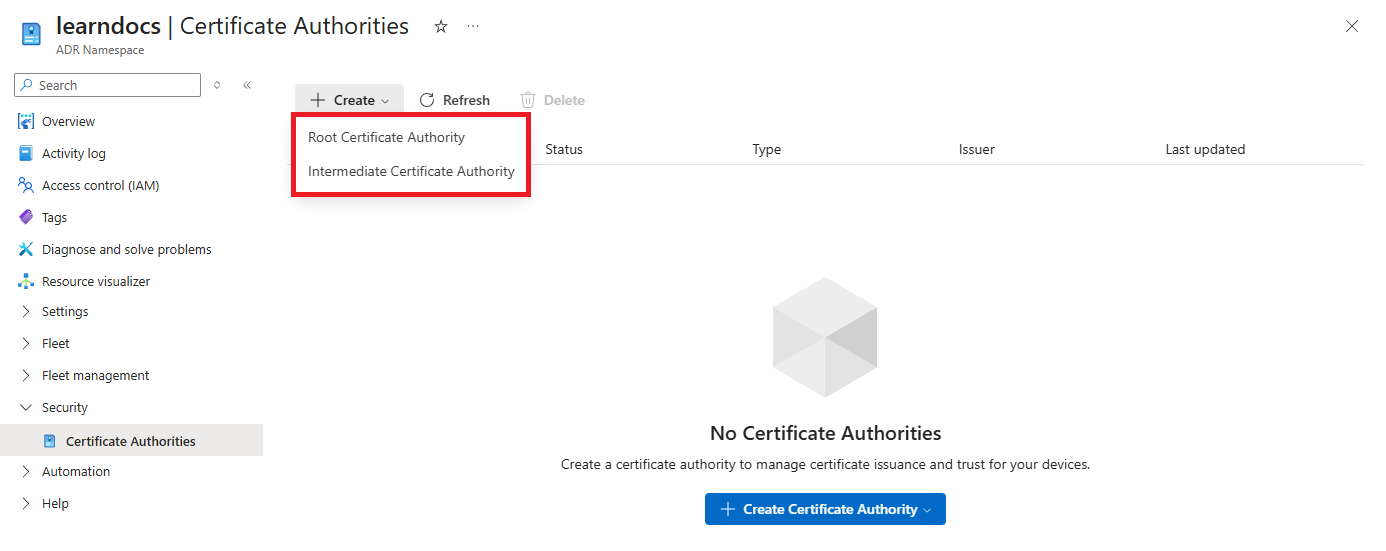
Select Root Certificate Authority.
Give the certificate authority a name that is 3-63 characters in length, then select Create.
Wait for Azure to finish provisioning the root CA. When provisioning is complete, the resource appears on the Certificate Authorities page.
Create an intermediate certificate authority
On the Certificate Authorities page, select Create.
Select Intermediate Certificate Authority.
Select Use this namespace's Root CA, enter a name for the intermediate CA, and then select Create. After you create an intermediate CA, you must create a certificate policy before you can issue device certificates. For instructions, see Create or edit a certificate policy.