Note
Access to this page requires authorization. You can try signing in or changing directories.
Access to this page requires authorization. You can try changing directories.
Client ID Metadata Documents (CIMD) are a new way to register OAuth clients with Entra ID. CIMD is primarily used by AI agents that need to connect to remote MCP servers.
Important
Client ID Metadata Document support in Microsoft Entra ID is in public preview. This preview is provided without a service-level agreement and isn't recommended for production workloads. Some features might be unsupported or have constrained capabilities. For more information, see Universal License Terms for Online Services.
Why CIMD
AI agents may use many different MCP servers to perform work. Some of these MCP servers may be secured by Entra's OAuth server — e.g. WorkIQ, Azure Storage MCP, or enterprise-built MCP servers. Others may be secured by a different OAuth server — e.g. GitHub, Workday, Slack. For general purpose AI agents, it's impractical to know all MCP servers it will use, and therefore impractical to know all OAuth servers the AI agent will encounter. The AI agent needs a way to dynamically register itself with an OAuth server and obtain a client ID.
Client ID Metadata Documents (CIMD) let an OAuth client identify itself by using an HTTPS URL as its OAuth client_id value instead of a pre-registered client ID. A JSON document at that public URL contains the client's OAuth metadata, such as its redirect URIs and client credentials. This allows an OAuth server, such as Entra ID, to fetch the JSON document and use it to securely issue access tokens to the client.
CIMD is useful when a client must connect to many authorization servers with which it has no prior relationship. For example, an AI agent can discover remote Model Context Protocol (MCP) servers at runtime, and each server might use a different authorization server. Requiring every client to be registered with every authorization server doesn't scale.
CIMD is defined by the OAuth Client ID Metadata Document specification.
How CIMD works
A typical CIMD authorization flow has the following steps:
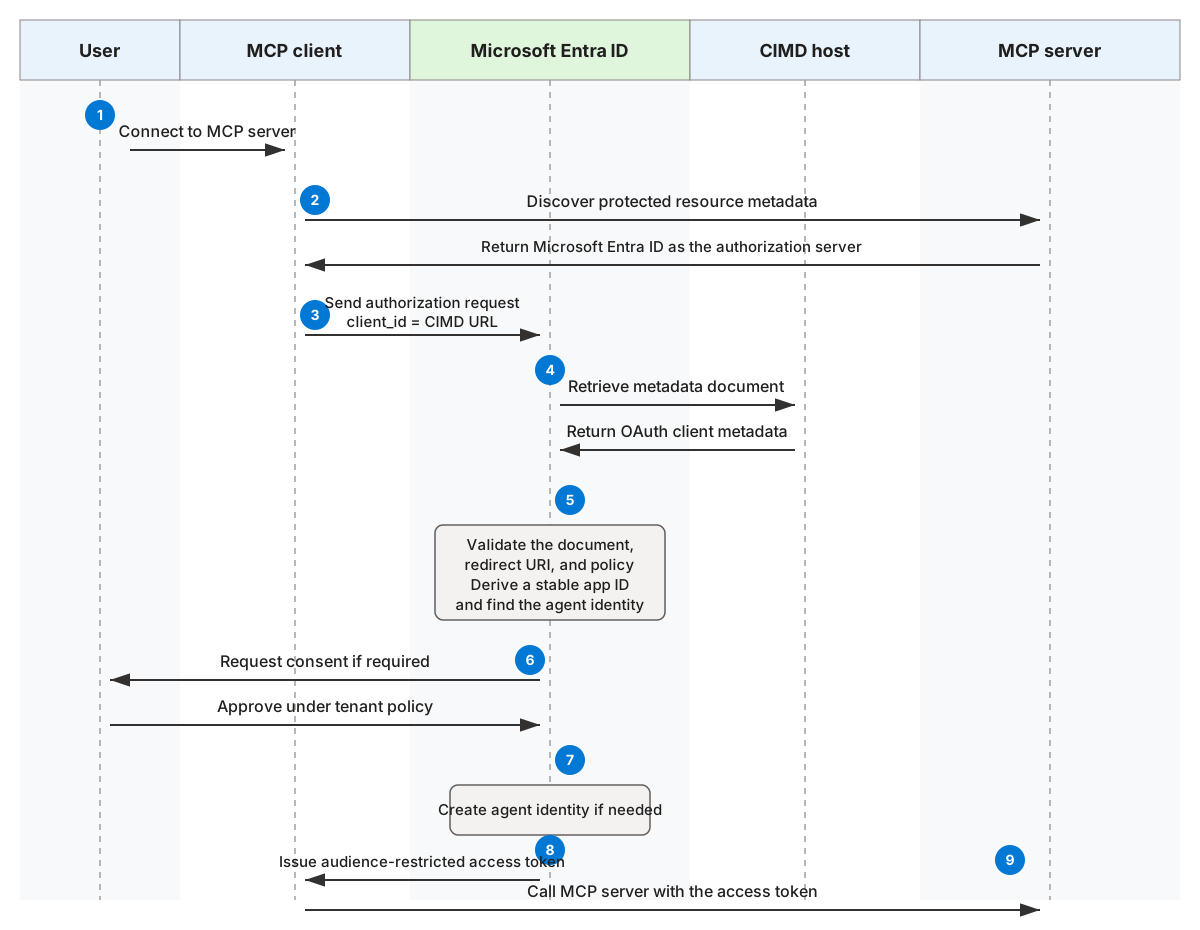
- An MCP client discovers that an MCP server uses Microsoft Entra ID as its authorization server.
- The client reads the authorization server metadata and determines that CIMD is supported.
- The client sends an authorization request. Its
client_idis the HTTPS URL of its metadata document. - Microsoft Entra ID retrieves the document and validates its contents, including an exact match between the requested
client_idand the document'sclient_id. - Microsoft Entra ID derives a stable app ID from the canonical document URL and looks for a matching agent identity in the tenant.
- If the identity doesn't exist, tenant policy determines whether it can be created through consent. An administrator can instead add the CIMD client in advance.
- Microsoft Entra ID validates the requested redirect URI and permissions, obtains any required consent, and issues an audience-restricted access token.
- The client presents the token to the MCP server.
The CIMD URL is the durable identity of the client. Moving the document to another URL creates a different identity and doesn't preserve permissions granted to the old identity.
How Microsoft Entra represents a CIMD client
Microsoft Entra ID represents a CIMD client as an agent identity in each tenant where the client is approved.
A CIMD-backed agent identity:
- Has an app ID derived from the canonical CIMD URL.
- Stores the CIMD URL as an immutable identifier.
- Has a read-only agent identity blueprint in each tenant, and no blueprint service principal.
- Uses the external metadata document as the source of truth for its OAuth configuration.
- Appears in agent identity inventory, audit logs, and sign-in logs.
Because the metadata remains in the external document, features that inspect OAuth configuration stored on an Entra application object might not evaluate a CIMD client. Review the governance considerations before adopting CIMD.
When to use CIMD
Implementers should always prefer pre-registration of a client with Entra when possible. For high-volume or strategic integrations, a conventional registered client ID provides the most stable identity and the broadest Entra capabilities. CIMD should only be used when all of the following conditions apply:
- The client must connect to many independently operated authorization servers.
- The authorization servers can't reasonably preregister the client.
- The client uses a user-present, delegated OAuth flow.
- The client can publish stable metadata on a public HTTPS URL.
- The client accepts the limitations described in this article.
An MCP client that discovers many remote servers at runtime is the primary scenario.
CIMD-enabled clients
The following table lists clients that have been tested and validated against Entra's CIMD support.
| Client | Client ID Metadata Document | Preview compatibility |
|---|---|---|
| Claude Code | https://claude.ai/oauth/claude-code-client-metadata | Supported. |
| Claude | https://claude.ai/oauth/mcp-oauth-client-metadata | Supported. |
| Codex | https://chatgpt.com/oauth/codex/client.json | Supported. |
| ChatGPT | https://chatgpt.com/oauth/client.json | Not supported. Its confidential-client authentication flow isn't supported by the Microsoft Entra preview. |
| Visual Studio Code | https://vscode.dev/oauth/client-metadata.json | Not supported. Microsoft first-party clients do not use CIMD. |
| GitHub Copilot | https://github.com/copilot/desktop/client-metadata.json | Not supported. Microsoft first-party clients do not use CIMD. |
| Custom client built with the official MCP SDKs | Host a metadata document at a stable HTTPS URL on a domain you control. | Supported. |
| Custom client implementation | Host a metadata document at a stable HTTPS URL on a domain you control. | Supported. |
CIMD-enabled MCP servers
The following table is a non-exhaustive list of Microsoft MCP servers that have confirmed CIMD support.
| MCP server | Remote MCP server URL | CIMD testing status |
|---|---|---|
| Custom enterprise-built MCP server | -- | Supported, see guide here. |
| Microsoft MCP for IT Admins | https://mcp.svc.cloud.microsoft/admin |
Not supported yet. |
| Azure Management MCP (ARM) | https://mcp.management.azure.com |
Not supported yet. |
| Azure DevOps MCP | https://mcp.dev.azure.com/{organization} |
Not supported yet. |
| Work IQ MCP | https://workiq.svc.cloud.microsoft/mcp |
Not supported yet. |
| Fabric IQ MCP | https://fabriciq.svc.cloud.microsoft/v1/mcp/fabriciq |
Not supported yet. |
| Foundry MCP | https://mcp.ai.azure.com |
Not supported yet. |
| Microsoft Sentinel MCP | https://sentinel.microsoft.com/mcp/data-exploration |
Not supported yet. |
| Dataverse MCP | https://{dataverseOrgName}.crm.dynamics.com/api/mcp |
Not supported yet. |
Supported capabilities and limitations
The following table summarizes the capabilities and limitations of CIMD-backed agent identities.
| Capability | CIMD support |
|---|---|
| OAuth authorization code flow with a signed-in user | Supported |
| Refresh tokens | Supported |
| Proof Key for Code Exchange (PKCE) | Supported |
| Client credentials flow | Not supported |
| Device code flow | Supported |
| Acting as an OAuth resource or token audience | Not supported |
| ID tokens or SAML tokens for user sign-in | Not supported |
| Shared client secrets | Not supported |
Confidential-client authentication, including private_key_jwt |
Not supported during preview; keys in the metadata document aren't processed |
| Microsoft first-party clients using CIMD | Not supported; use the existing first-party registration process |
| Publisher verification or Microsoft 365 certification | Not supported |
| Multiple agent identities sharing one blueprint | Not supported |
| Agent user accounts | Not supported |
| Windows Web Account Manager (WAM) | Not supported |
| In-place conversion to or from a conventional client ID | Not supported |
Security model
CIMD proves that a client controls a URL. It doesn't prove that the client is trustworthy or should receive access to organizational data.
Microsoft Entra ID applies the following protections:
- HTTPS-only identifiers: A CIMD client ID must be an HTTPS URL with a path. User information and fragments aren't allowed in the URL.
- Exact identity match: The
client_idin the document must exactly match the URL used as the client ID. - Exact redirect matching: The redirect URI in an authorization request must exactly match a URI in the document.
- Consent policy enforcement: Existing tenant consent policy determines whether users can add the client and which delegated permissions they can grant.
- No app-only tokens: CIMD clients can't use the client credentials grant.
- Audience restriction: Microsoft Entra ID doesn't issue tokens whose audience is the CIMD client.
Consent and permissions for clients using CIMD
Entra treats clients using CIMD as unverified, and honors existing tenant consent policy. This means that the following rules apply:
| Tenant Setting | What users can consent to |
|---|---|
| Default consent policy | Users can sign-in to CIMD clients. This creates an agent identity in the tenant. Users can only grant a very limited set of OAuth scopes to CIMD clients, such as openid and User.Read in Microsoft Graph. Risk-based step up prevents users from granting any other permissions to CIMD clients. |
| Do not allow user consent | In tenants that have disabled user consent via the Do not allow user consent setting in Entra Admin Center, users cannot consent to CIMD clients. This means they cannot add CIMD clients to their tenant, nor can they grant OAuth scopes to CIMD clients. |
| Other consent policy | Using consent policy, tenants can allow users to consent to CIMD clients. Administrators have fine-grained control over the conditions when user consent is allowed. |
Admin controls for CIMD
Tenants can prevent users from adding CIMD clients or granting them new permissions via consent policy. Use either of these approaches:
- Block all user consent, via the Do not allow user consent setting in Entra Admin Center.
- Allow user consent only for apps from verified publishers.
Either of these policies will prevent non-admin users from adding CIMD clients to a tenant. Follow Manage app consent policies to configure consent policy in your tenant.
To enable the use of a specific agent or client using CIMD, administrators can individually add agent identities to their tenant by providing the CIMD URL. This can be done via Entra Admin Center or Microsoft Graph APIs. See Managing CIMD clients.
Governance considerations
Before using CIMD, account for the following considerations:
- The client owner controls the metadata document and can change its contents.
- The document URL is immutable in Microsoft Entra ID. A URL change requires a new identity and new consent grants.
- App management policy and other controls that inspect configuration stored on an application object don't cover metadata that remains only in the CIMD document.
- CIMD clients don't support publisher verification or Microsoft 365 certification.
- Entra doesn't provide a tenant-managed domain allowlist or blocklist for CIMD URLs.
- Losing control of the document URL or its domain can affect every tenant that trusts that client identity.
Always use least-privilege delegated permissions, preapprove clients that need sensitive access, monitor their sign-ins, and remove identities that are no longer required.