Note
Access to this page requires authorization. You can try signing in or changing directories.
Access to this page requires authorization. You can try changing directories.
Use the data app template with a Fabric semantic model connector to build an analytical Fabric app. The template provides visualization, formatting, data grid, and browser-validation patterns. The connector provides typed, delegated access to a semantic model through the Fabric Apps client.
Out of the box, apps created with the template include:
- Fabric authentication.
- Higher-quality DAX (Data Analysis Expressions) generation guidance.
- Enterprise-ready visual components designed for analytical applications.
- Data grid, theming, formatting, and browser-validation patterns.
Note
Currently, the Rayfin CLI is the supported way to create apps by using the data app template.
Why use the data app template?
Without these built-in capabilities, a coding agent must solve authentication, DAX generation, and visualization design from scratch in every session. That can lead to:
- More failures and broken or empty visuals.
- Inconsistent chart behavior.
- Unnecessary DAX queries during development and runtime.
The template provides reusable patterns that improve reliability, produce more cohesive visuals aligned with reporting best practices, and reduce query overhead. The connector standardizes semantic model configuration and runtime access.
Prerequisites
- Node.js 20 or later.
- Access to Fabric.
- A Fabric workspace where you have Contributor, Member, or Admin permissions.
- The Fabric Apps workload enabled in your tenant. See Create your first Fabric app.
- The Semantic Model Execute Queries REST API tenant setting enabled.
- Build and Read permissions on a semantic model hosted on Fabric or Power BI capacity.
- The workspace ID and item ID for the semantic model.
Create the app
Create a project from the data app template:
npm create @microsoft/rayfin@latest -- "<app-name>" --template dataapp --workspace <workspace-name>
Replace <app-name> and <workspace-name> with the names for your app and Fabric workspace. Then open the new project folder:
cd <app-name>
Add the semantic model connector
If you don't know the semantic model item ID, list semantic models in the workspace:
npx rayfin connector search --workspace-id <workspace-id> --type fabric-semanticmodel --json
Add the semantic model as a connector:
npx rayfin connector add --type fabric-semanticmodel --workspace-id <workspace-id> --item-id <semantic-model-item-id> --name salesModel --operations executeQuery
The command:
- Adds the
salesModelconnector torayfin/rayfin.yml. - Creates its schema under
rayfin/connectors/salesModel/. - Prints a version-matched
npm installcommand for the connector packages.
Run the exact install command printed by the CLI.
The generated configuration resembles the following example:
connectors:
  - name: salesModel
    type: fabric-semanticmodel
    config:
      workspaceId: "<workspace-id>"
      itemId: "<semantic-model-item-id>"
    auth:
      type: delegated
    version: "1"
    operations:
      - name: executeQuery
Keep the generated version value.
Connect the template to the semantic model
The template contains analytical components and agent guidance that you can reuse with the connector. Configure its data-access layer to create a ConnectorsRayfinClient and register the semantic model runtime:
Important
Use the connector client for semantic model queries. If the scaffold includes another semantic model client, replace calls to it instead of maintaining two data-access paths.
import { ConnectorsRayfinClient } from '@microsoft/rayfin-client';
import { fabricSemanticModel } from '@microsoft/rayfin-connector-fabric-semanticmodel';
import {
  connectorConfig,
  type SalesModelSchema,
} from '../../rayfin/connectors/salesModel/schema.js';

type AppConnectorsSchema = {
  salesModel: SalesModelSchema;
};

export const client = new ConnectorsRayfinClient<
  Record<string, never>,
  Record<string, never>,
  AppConnectorsSchema
>(
  {
    baseUrl: '<app-api-url>',
    publishableKey: '<publishable-key>',
    authStorage: true,
    connectors: {
      salesModel: connectorConfig,
    },
  },
  {
    salesModel: fabricSemanticModel(),
  }
);
Use the API URL and publishable key from your Fabric Apps project. Keep the template's existing Fabric sign-in flow.
Submit DAX through the connector:
const result = await client.connectors.salesModel.executeQuery({
  query: 'EVALUATE TOPN(10, Sales)',
});

if (result.status === 'success') {
  console.log(result.table.columns, result.table.rows);
} else {
  console.error(result.error.category, result.error.message);
}
Replace Sales with a table in your semantic model. Check the returned status before you pass columns and rows to a visual.
For more connector configuration and security guidance, see Connect Fabric Apps to Fabric data.
Build the app with a coding agent
The scaffold includes instructions and skills for coding agents. Open the project in your preferred agent, and describe the audience, questions, interactions, and visualizations for the app.
For example, you can:
- Open the project in Visual Studio Code, and then open the GitHub Copilot Chat pane.
- Open a terminal in the project, and then run
copilot.
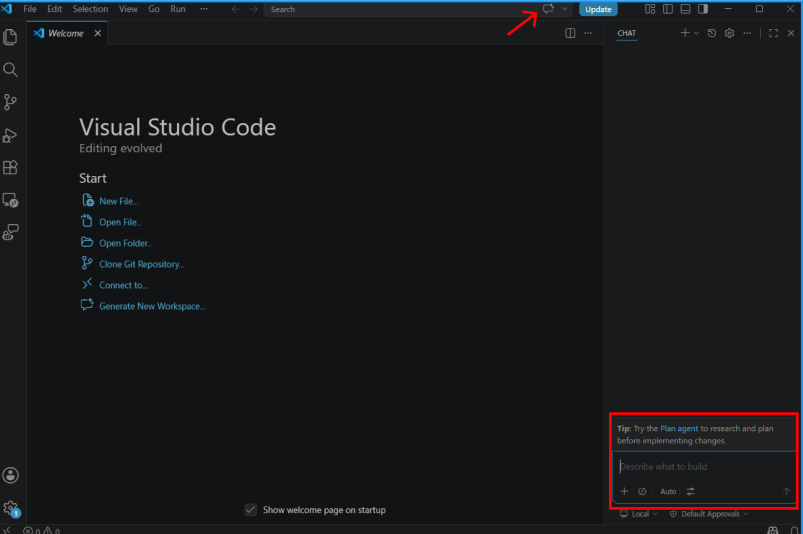
Use this prompt as a starting point:
Build an analytical Fabric app that uses the existing salesModel connector.

Before editing:
1. Read the repository instructions and skills.
2. Inspect rayfin/connectors/salesModel/schema.ts and the template's data-access,
   visualization, data grid, formatting, and validation patterns.
3. Query the semantic model metadata before writing DAX. Don't guess table,
   measure, or column names.

Requirements:
- Use ConnectorsRayfinClient and fabricSemanticModel() for semantic model access.
- Call client.connectors.salesModel.executeQuery() for DAX queries.
- Keep the existing Fabric sign-in flow. Don't add credentials, access tokens,
  another authentication flow, or direct calls to the Execute Queries REST API.
- Reuse query results where practical, and bound large result sets.
- Apply semantic model format strings consistently to cards, charts, tooltips,
  and data grids.
- Include loading, empty, and error states.
- Use the template's browser-validation workflow at desktop and mobile sizes.

Give me a short implementation plan, make the changes, run the existing build,
and report the results.
Use the template capabilities
The data app template includes reusable patterns for analytical applications.
Fabric Apps are standard web applications, so you can implement features outside these patterns. Features that aren't included in the template might require more custom engineering and validation.
Visuals
The template includes cross-highlighting and preconfigured primitives for:
- Bar charts, including vertical, horizontal, grouped, and stacked layouts.
- Line charts with optional markers.
- Area charts.
- Scatter charts.
- Pie and donut charts.
- Heatmaps.
- Bubble charts.
- Waterfall charts.
- Single-value cards for KPI callouts.
- Layered and composite visuals, such as bars with data labels and dual-axis line charts.
Use fields and measures that exist in the connected semantic model. Don't replace a failed connector query with mock data.
You can ask your coding agent to generate other visuals. Visuals without a template primitive might require more iterations and validation.
Data grid capabilities
The template includes a data grid with these preconfigured capabilities:
- Column headers derived from semantic model metadata.
- Number and date formatting applied per column through format strings.
- Sorting.
- Scrollable rows with overflow handling.
- Light and dark theme support.
- Custom cell renderers for:
- Data bars for numeric values.
- Boolean indicators.
- Clickable URLs.
- Image cells with a lightbox overlay.
- Multi-field cells, such as a name and role in one column.
You can add other data grid capabilities, but they might require more custom engineering.
Theming
Give your coding agent branding or styling requirements, such as a color palette, corner style, or font. The template keeps shared styles in one central location so changes flow to cards, buttons, charts, data grids, and tooltips.
Centralized styling avoids mismatched colors, inconsistent fonts, and layout differences that can occur when each component is styled separately.
Format strings
Define formatting once per result column. The template can reuse semantic model format strings across chart axes, tooltips, data labels, cards, and data grid cells.
For example, a single format definition keeps 1500.5 displayed as $1,500.50 and 0.25 displayed as 25% wherever those values appear.
Browser validation
Before you publish the app, use the included Playwright browser-validation workflow to open it in a real browser and check:
- Visuals render correctly.
- Charts aren't cut off or compressed.
- Text is readable.
- Data grids handle overflow.
- Loading, empty, and error states are usable.
- Filters, cross-highlighting, and data formatting work as expected.
- The browser console has no unexpected errors.
This workflow catches layout and rendering issues before users see them. Browser validation confirms the frontend behavior. Test the deployed connector separately with a user who has access to both the Fabric app and semantic model.
Deploy and verify the app
Deploy the app and connector configuration:
npx rayfin up
Open the deployed app from the Fabric portal. Sign in, run each user interaction, and compare important results with the semantic model.
If a query fails:
- Confirm the workspace and semantic model item IDs in
rayfin.yml. - Confirm the Semantic Model Execute Queries REST API tenant setting is enabled.
- Confirm the user has Build and Read permissions on the semantic model.
- Verify that the DAX references existing tables, columns, and measures.
- Check the connector result's error category and message.
- Check the browser console for client-side errors.