Note
Access to this page requires authorization. You can try signing in or changing directories.
Access to this page requires authorization. You can try changing directories.
Power Apps code apps help developers build and run custom business web apps from code-first IDEs such as Visual Studio Code on a managed platform. This overview explains key features, prerequisites, support, and limitations so you can evaluate code apps and get started.
Code apps let developers bring Power Apps capabilities into custom web apps built in a code‑first IDE. You can develop locally and run the same app in Power Platform. Build with popular frameworks (React, Vue, and others) while keeping full control over your UI and logic.
Key features include:
- Microsoft Entra authentication and authorization
- Access to Power Platform data sources and 1,500+ connectors, callable directly from JavaScript
- Easy publishing and hosting of line-of-business web apps in Power Platform
- Adherence to your organization's Managed Platform policies (app sharing limits, Conditional Access, Data Loss Prevention, and so on)
- Simplified deployment and application lifecycle management (ALM)
The managed platform accelerates safe, rapid innovation, and when ready, apps can be deployed to dedicated production environments.
Prerequisites
Code apps require an IDE, Node.js, npm, Git, and the Power Apps CLI.
Install the following developer tools
Use these tools while creating code apps:
- Your IDE of choice. For example, Visual Studio Code
- Node.js (LTS version)
- Git
- Power Apps CLI
Enable code apps on a Power Platform environment
Admins can enable code apps by setting an environment option. Power Platform admins and environment admins can set this option. The environment setting respects groups and rules set by Power Platform admins.
As an admin, go to Power Platform admin center.
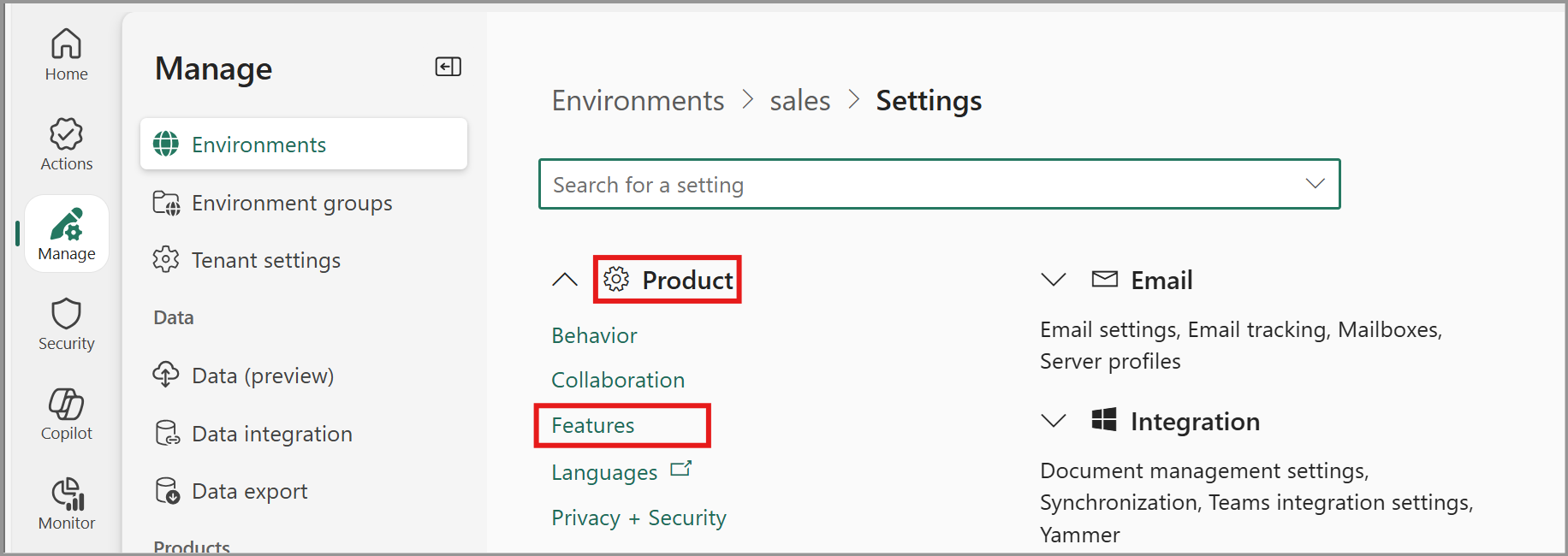
Go to Manage > Environments > select the environment where you use code apps.
Go to Settings > Expand the Product subsection > Select Features.
Go to the feature Power Apps code apps and use the Enable code apps toggle to turn it on.
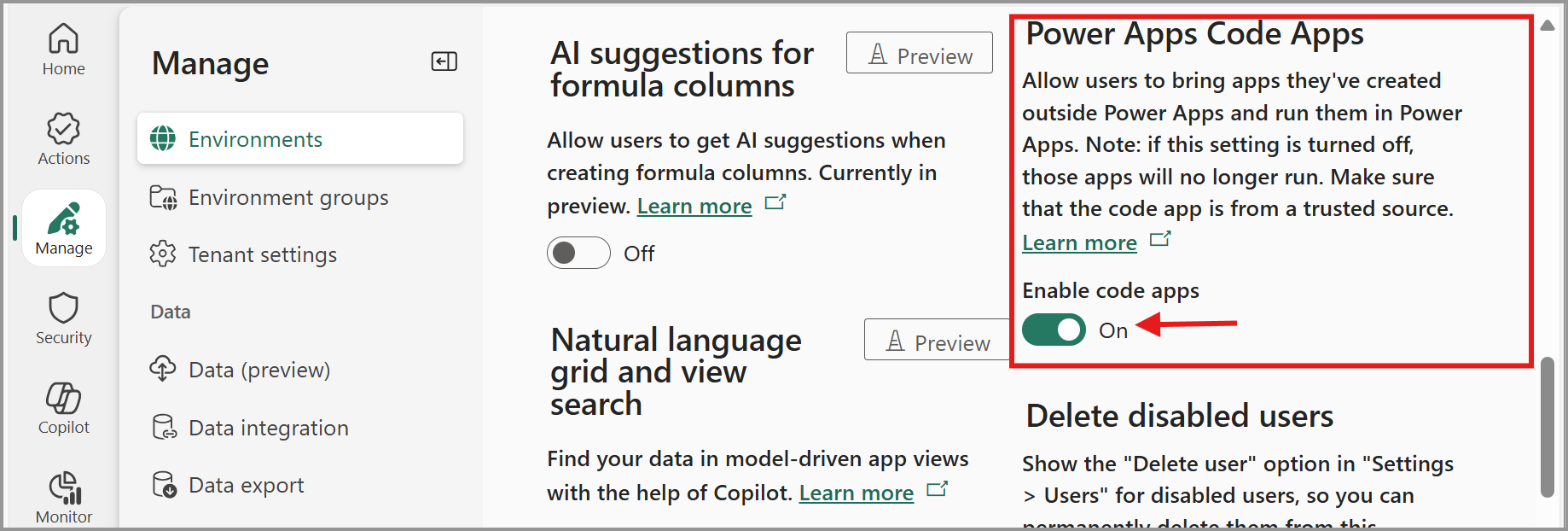
Select Save in the settings experience.
Note
For management at scale, you can configure this setting for multiple environments at once by using environment groups and rules.
License end users with Power Apps Premium
End users that run code apps need one of the following:
- Power Apps Premium license
- Pay-as-you-go enabled
- An App Pass
- Auto-claim enabled. This option automatically assigns a premium license to the user if one is available in the tenant.
Explore samples and report issues
To help you get started and stay productive, use the resources available in the Power Apps Code Apps GitHub repository.
Find samples
Browse sample projects and starter templates shared by the community and Microsoft. These examples can help you learn best practices and accelerate development.
Submit new issues
To share feedback or seek guidance, open a new issue in the repository.
For support or to report a bug, use your standard channel for Microsoft support. Learn about how to submit feedback and get support.
Tip
If you find an existing issue or enhancement that applies to you, upvote or comment on it to signal its priority to the product team.
Review completed issues
Check the Closed tab in Issues to see how other customers solved problems or requested enhancements. Closed issues are a great way to learn from real-world scenarios and confirm whether a fix or feature you need is already available.
Limitations
- Code apps don't use Storage Shared Access Signature (SAS) IP restriction, so the SAS IP Binding and Firewall environment setting doesn't apply to them. The compiled app assets are served from a publicly accessible endpoint that doesn't support IP-based restrictions today. To restrict access by IP, use Conditional Access – block access by location, since code apps authenticate with Microsoft Entra ID.
- Code apps don't yet support Secure Implicit Connections.
- Code apps don't support Power Platform Git integration.
- Code apps aren't supported in Power Apps for Windows.
- Code apps don't yet support Power BI data integration (PowerBIIntegration function), but can be embedded in Power BI Reports using Power Apps Visual.
- Code apps don't support SharePoint forms integration.
Managed platform capability support
This table lists Power Platform management capabilities that work for code apps.
| Capability | Notes |
|---|---|
| End-users see consent dialog for connector permissions | Learn more |
| Sharing limits | Code apps follow canvas app sharing limits. Learn more |
| App Quarantine | Learn more |
| Data Loss policy enforcement during app launch | Learn more |
| Conditional Access on an individual app | Learn more |
| Admin consent dialog suppression | Consent suppression works for both Microsoft connectors that use OAuth and custom connectors that use OAuth. Learn more |
| Tenant isolation | Learn more |
| Azure B2B (external user access) | End-users can share code apps and access them by using Azure B2B to access resources in a tenant, similar to canvas apps. Learn more |
| Health metrics | Operational health metrics for code apps are available in both the Power Platform admin center and the maker portal. Learn more |