Design and implement Azure load balancer using the Azure portal
- 9 minutes
Azure Load Balancer operates at layer 4 of the Open Systems Interconnection (OSI) model. It's the single point of contact for clients. Azure Load Balancer distributes inbound flows that arrive at the load balancer's front end to backend pool instances. These flows are according to configured load-balancing rules and health probes. The backend pool instances can be Azure Virtual Machines or instances in a virtual machine scale set.
This video reviews how to select a load balancer type.
Choosing a load balancer type
Load balancers can be public (external) or internal (private).
A public load balancer can provide outbound connections for virtual machines (VMs) inside your virtual network. These connections are accomplished by translating their private IP addresses to public IP addresses. External load balancers are used to distribute client traffic from the internet across your VMs. That internet traffic might come from web browsers, module apps, or other sources.
An internal load balancer is used where private IPs are needed at the frontend only. Internal load balancers are used to load balance traffic from internal Azure resources to other Azure resources inside a virtual network. A load balancer frontend can also be accessed from an on-premises network in a hybrid scenario.
This diagram shows how public and internal load balancers can work together.
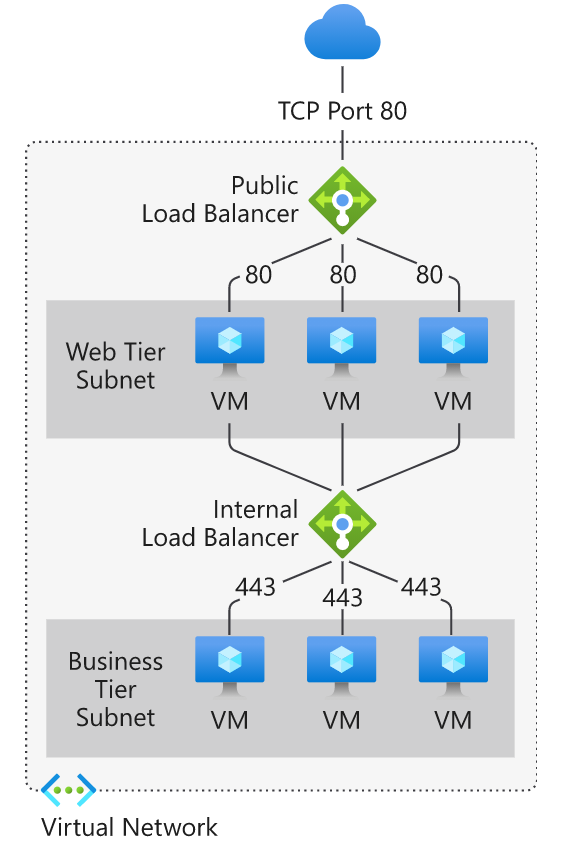
Azure load balancer and availability zones
Azure Load Balancer supports availability zones scenarios. A Load Balancer can either be zone redundant, zonal, or nonzonal.
Zone redundant
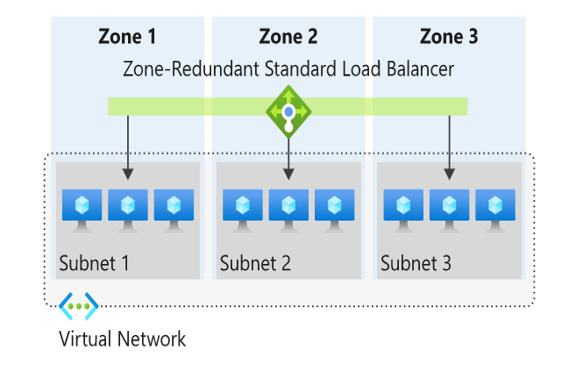
In a region with Availability Zones, a Standard Load Balancer can be zone-redundant. A single frontend IP address survives zone failure. The frontend IP can be used to reach all (nonimpacted) backend pool members no matter the zone. One or more availability zones can fail and the data path survives as long as one zone in the region remains healthy.
Zonal
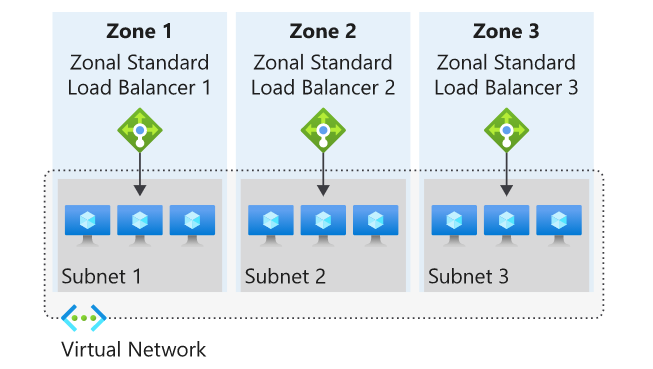
You can choose to have a frontend guaranteed to a single zone, which is known as a zonal. With this scenario, a single zone in a region serves all inbound or outbound flow. Your frontend shares fate with the health of the zone. The data path is unaffected by failures in zones other than where it was guaranteed.
Nonzonal
Load Balancers can also use a "no-zone" frontend. In these scenarios, a public load balancer would use a public IP or public IP prefix, an internal load balancer would use a private IP. This option doesn't give a guarantee of redundancy.
Selecting an Azure load balancer SKU
There are two load balancer SKUs: Standard, and Gateway. These SKUs differ in terms of their scenario scope and scale, features, and cost.
Important
On September 30, 2025, the Basic Load Balancer was retired. The Basic Load Balancer is no longer available for new deployments. Existing Basic Load Balancer resources should be upgraded to Standard Load Balancer.
| Features | Standard Load Balancer | Gateway Load Balancer |
|---|---|---|
| Primary use case | General-purpose load balancing for web applications and services | High performance and high availability scenarios with Network Virtual Appliances (NVAs) |
| Backend pool size | Supports up to 1,000 instances | Supports up to 1,000 instances |
| Backend pool endpoints | Any virtual machines or virtual machine scale sets in a single virtual network. | Network Virtual Appliances (NVAs) in a single virtual network |
| Traffic inspection | No built-in traffic inspection | Enables transparent traffic inspection and filtering through NVAs |
| Cross-region connectivity | Regional load balancing | Regional load balancing with NVA integration |
Tip
Learn more about the Load Balancer check out the Introduction to Azure Load Balancer module.
Check your knowledge
Feedback
Was this page helpful?
No
Need help with this topic?
Want to try using Ask Learn to clarify or guide you through this topic?