Note
Access to this page requires authorization. You can try signing in or changing directories.
Access to this page requires authorization. You can try changing directories.
Azure Load Balancer is a layer-4 load-balancing service for Transmission Control Protocol (TCP) and User Datagram Protocol (UDP) traffic that distributes incoming requests among healthy instances of your services. Load Balancer provides high availability and ultra-low-latency network performance.
When you use Azure, reliability is a shared responsibility. Microsoft provides a range of capabilities to support resiliency and recovery. You're responsible for understanding how those capabilities work within all of the services you use, and selecting the capabilities you need to meet your business objectives and uptime goals.
This article describes how to make Load Balancer resilient to a variety of potential outages and problems, including transient faults, availability zone outages, and region outages. It also highlights key information about the Load Balancer service-level agreement (SLA).
Important
The reliability of your overall solution depends on the configuration of the back-end instances (servers) like Azure virtual machines (VMs) or virtual machine scale sets that your load balancer routes traffic to.
This article doesn't cover your back-end instances, but their availability configurations directly affect your application's resilience. Review the reliability guides for Azure services in your solution to learn how each service supports your reliability requirements.
Production deployment recommendations
The Azure Well-Architected Framework provides recommendations across reliability, security, cost, operations, and performance. To learn how these areas influence each other and contribute to a reliable Load Balancer solution, see Architecture best practices for Load Balancer.
Reliability architecture overview
A load balancer can be either public or internal. A public load balancer is reachable from the internet through a public IP address resource. An internal load balancer is reachable only from within your virtual network and other networks that you connect to the virtual network.
Each load balancer consists of multiple components:
Front-end IP configurations that receive traffic. A public load balancer receives traffic on a public IP address. An internal load balancer receives traffic on an IP address within your virtual network.
Back-end pools that contain a collection of back-end instances that can receive traffic, like individual VMs that run your application.
Load-balancing rules that define how the load balancer distributes traffic from a front end to a back-end pool.
Health probes that monitor the availability of back-end instances.
For more information, see Load Balancer components.
For globally deployed solutions, you can deploy a global load balancer, which is a unique type of public load balancer for routing traffic among different regional deployments of your solution. A global load balancer provides a single anycast IP address and routes traffic to the closest healthy regional load balancer based on client proximity and regional health status. For more information, see Resilience to region-wide failures.
Resilience to transient faults
Transient faults are short, intermittent failures in components. They occur frequently in a distributed environment like the cloud, and they're a normal part of operations. Transient faults correct themselves after a short period of time. It's important that your applications can handle transient faults, usually by retrying affected requests.
All cloud-hosted applications should follow the Azure transient fault handling guidance when they communicate with any cloud-hosted APIs, databases, and other components. For more information, see Recommendations for handling transient faults.
When you use Load Balancer, consider the following best practices to minimize the risk of transient faults affecting your application:
Implement retry logic. Clients should implement appropriate retry mechanisms for transient connection failures, which include exponential backoff strategies.
Configure health probes with tolerance. Configure your health probes to balance rapid failure detection with the need to avoid false positives during transient problems.
Monitor SNAT port allocation. For outbound connections, monitor Source Network Address Translation (SNAT) port allocation and configure outbound rules to prevent transient connection failures that occur because of port exhaustion.
Resilience to availability zone failures
Availability zones are physically separate groups of datacenters within an Azure region. When one zone fails, services can fail over to one of the remaining zones.
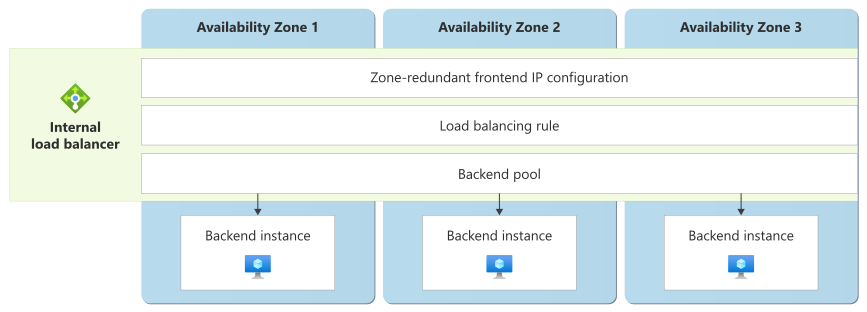
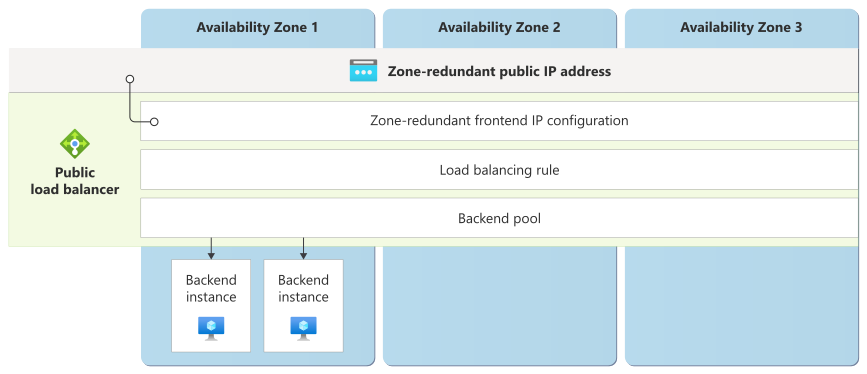
You can deploy Load Balancer as zone redundant by configuring each front-end IP configuration that you create. A zone-redundant front-end IP configuration uses independent infrastructure in multiple zones to serve traffic simultaneously. This configuration ensures that zone failures don't affect the load balancer's ability to receive and distribute traffic.
The following diagram shows a zone-redundant public load balancer, which you configure by creating a zone-redundant public IP address.

The following diagram shows an internal load balancer that uses a similar zone-redundant configuration.
Note
You can deploy zonal load balancers, but we recommend that you use zone-redundant load balancers for all workloads, including workloads that you deploy into a single zone.
In regions without availability zones, Azure creates all load balancers in a nonzonal or regional configuration by using a front-end configuration with no zone configured. If the region experiences an outage, your nonzonal load balancers might experience downtime. Public IP addresses created in a region that is later upgraded to have availability zones will be made zone-redundant once the region is in general availability status with multiple availability zones.
Back-end instances and availability zones
The availability zone configuration of your back-end instances operates independently of your load balancer's front-end IP configuration.
To distribute your back-end instances across zones, configure the relevant service according to its reliability features and your architecture requirements.
Note
To achieve resilience, distribute back-end instances across multiple availability zones. If all back-end instances run in a single zone, an outage in that zone makes your application unavailable, even if you use a zone-redundant load balancer.
For example, when you use VMs, a common design approach for production workloads is to place multiple zonal VMs in zones 1, 2, and 3 to achieve zone resiliency. For load balancing, you can then create a zone-redundant load balancer and configure those VMs as the back-end instances within the load balancer. The load balancer's health probes automatically remove unhealthy VMs from rotation regardless of their zone location.
If you deploy your VMs in the same availability zone, you can deploy a zone‑redundant front-end IP configuration on your load balancer, as the following diagram shows.
Requirements
Region support: You can deploy zone-redundant load balancers into any region that supports availability zones.
Cost
Availability zone configuration doesn't change the way Azure bills a load balancer. Azure bases billing on the number of rules that you configure and the data that it processes, regardless of zone configuration. For more information, see Load Balancer pricing.
Configure availability zone support
When you use Load Balancer, you set the availability zone support on the front-end IP configuration.
Create a new load balancer with availability zone support.
For public load balancers, the front-end IP configuration automatically adopts the availability zone configuration of the public IP address resource that you associate with it. To make the front-end IP configuration zone redundant, create or choose a zone-redundant public IP address. Azure configures public IP addresses as zone redundant by default. For more information, see Create a public load balancer to load balance VMs by using the Azure portal.
For internal load balancers, when you configure the front-end IP address of the load balancer, you set the availability zone support type on the front-end IP configuration. For more information, see Create an internal load balancer to load balance VMs by using the Azure portal.
Change the availability zone configuration of an existing load balancer. To change the availability zone configuration of an existing load balancer, replace the front-end IP configuration. You can use this approach to move from a zonal configuration to a zone-redundant front-end IP configuration:
Create a new front-end IP configuration that has the desired availability zone configuration.
For public load balancers, create a new public IP address that uses your desired availability zone configuration. Then reconfigure your load balancer to add a front-end IP configuration that references that public IP address.
For internal load balancers, reconfigure your load balancer to add a new front-end IP configuration with your desired availability zone configuration. This step assigns a new private IP address from within your subnet.
Reconfigure your load-balancing rules to use the new front-end IP configuration.
Important
This operation requires you to reconfigure your clients to send traffic to the new front-end IP address. Depending on your clients, the process might require downtime.
Remove the old front-end IP configuration.
Behavior when all zones are healthy
This section describes what to expect when a load balancer uses a zone-redundant front-end IP configuration and all availability zones operate normally.
Traffic routing between zones: Load balancing can occur in any availability zone. The load balancer sends traffic to healthy back-end instances that you specify in the back-end pool, without regard for which availability zone contains the back-end instance.
Data replication between zones: Load Balancer operates as a network pass-through service that doesn't store or replicate application data. Even if you set up session persistence on the load balancer, the load balancer stores no state. Session persistence adjusts the hashing process to route requests to the same back-end instance, but the load balancer doesn't guarantee session persistence. When the back-end pool changes, the load balancer recomputes the distribution of client requests and doesn't store or sync state.
The service maintains its configuration state through synchronous replication across zones, which ensures immediate consistency of load-balancing rules, health probe configurations, and back-end pool membership across all zones.
Behavior during a zone failure
This section describes what to expect when a load balancer uses a zone-redundant front-end IP configuration and an availability zone outage occurs.
- Detection and response: The Azure platform is responsible for detecting a failure in an availability zone and responding. You don't need to do anything to initiate a zone failover.
- Notification: Microsoft doesn't automatically notify you when a zone is down. However, you can use Azure Resource Health to monitor the health of an individual resource, and you can set up Resource Health alerts to notify you of problems. You can also use Azure Service Health to understand the overall health of the service, including any zone failures, and you can set up Service Health alerts to notify you of problems.
Active requests: When a zone fails, any existing TCP and UDP flows within the zone are automatically reset, and your clients must retry those flows. Your clients should implement sufficient transient fault handling, including automated retries.
Expected data loss: Load Balancer is a stateless network service, so it doesn't store application data and no data loss occurs at the load balancer layer.
Expected downtime: No downtime is expected for zone-redundant load balancers because the load balancer continues to work from healthy zones.
If the failure affects compute services in the zone, any VMs or other resources in the affected zone might be unavailable. The load balancer's health probes detect these failures and route traffic to alternative instances in another zone based on the load-balancing algorithm and the back-end instances' health status.
Traffic rerouting: The load balancer continues to operate from the healthy zones. Load Balancer maintains the same front-end IP address during zone failures. This behavior means that you don't need to apply Domain Name System (DNS) updates or reconfigure clients. The Azure platform establishes new client connections through remaining healthy zones.
Zone recovery
When an availability zone recovers, Load Balancer automatically resumes normal operations. The zone-redundant front end automatically begins to serve traffic from the recovered zone along with other operational zones. Health probes from the recovered zone resume evaluating the back-end instances.
If the zone failure also affects your compute services in that zone, Load Balancer automatically adds back-end instances to the healthy back-end pool after they recover and pass health checks. Traffic distribution rebalances across all available zones based on the load-balancing algorithm and the back-end instances' health status.
Test for zone failures
The Azure platform manages traffic routing, zone-down response, and recovery, so you don't need to initiate or validate availability zone failure processes.
You can use Azure Chaos Studio to simulate the failure of VMs in a single zone. In Chaos Studio Workspaces, the Compute Zone Down Scenario shuts down VMs and virtual machine scale set instances in a target availability zone. You can use this Scenario to simulate zone failures and test your failover processes.
Resilience to region-wide failures
Public and internal load balancers are deployed into a single Azure region. If the region becomes unavailable, your load balancers in that region also become unavailable. Load Balancer provides native multiregion support through a global load balancer, which supports load balancing across Azure regions. You can also deploy other load-balancing services to route and fail over across Azure regions.
Global load balancers
Global load balancers provide a single static anycast IP address that automatically routes traffic to the optimal regional deployment based on client proximity and regional health. Global load balancers improve your application's reliability and performance.
With global load balancers, you deploy multiple public load balancers in different regions, and a global load balancer serves as the global front end. If your back-end servers in one region have a problem, traffic automatically switches to healthy regions without DNS changes because the anycast IP address remains constant and routes traffic to another region.
For more information, see Global load balancer.
Custom multiregion solutions for resiliency
Azure provides a range of load-balancing services that suit different requirements. Choose a load balancer that meets your resiliency requirements and suits your application type. For more information, see Load-balancing options.
Service-level agreement
The service-level agreement (SLA) for Azure services describes the expected availability of each service and the conditions that your solution must meet to achieve that availability expectation. For more information, see SLAs for online services.
The Load Balancer SLA applies when you have at least two healthy VMs configured as back-end instances. The SLA excludes downtime because of SNAT port exhaustion or network security groups (NSGs) that block traffic.