Azure SQL Database
An Azure relational database service.
This browser is no longer supported.
Upgrade to Microsoft Edge to take advantage of the latest features, security updates, and technical support.
' cx='32' cy='32' r='32' /%3E%3Ctext x='50%25' y='55%25' dominant-baseline='middle' text-anchor='middle' fill='%23FFF' %3ETH%3C/text%3E%3C/svg%3E)
Hi,
When trying to log on to my server I get the error "Your client IP address does not have access to the server. Sign in to an Azure Account and create a new firewall rule enable access." After adding the my client address to the Firewall rules the same error popups. When I look in Azure at the firewall setting I see several rows of rules, all with the same ip addresses. I also add the client ip address but no luck. What do I need to change in setting so I can open my database with SSMS.
An Azure relational database service.
Answer accepted by question author

Change the authentication type please:
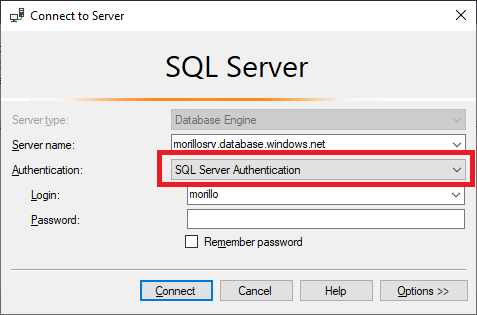
Thank you for your patience.

I solved it by:
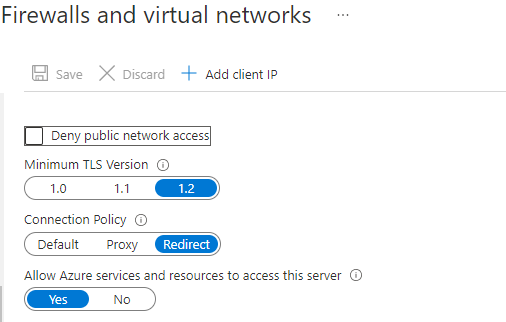
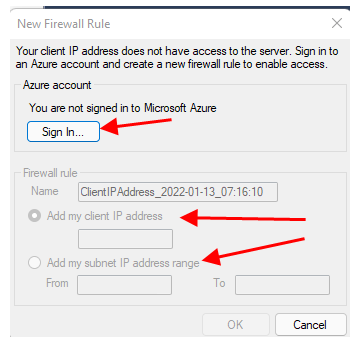
Thank you Samuel for adding your solution to the same issue/problem.
' cx='32' cy='32' r='32' /%3E%3Ctext x='50%25' y='55%25' dominant-baseline='middle' text-anchor='middle' fill='%23FFF' %3EMD%3C/text%3E%3C/svg%3E)
Thanks a bunch @Samuel Prince Chaane worked for me too!!
Please make sure you specify the database when you connect to Azure SQL.
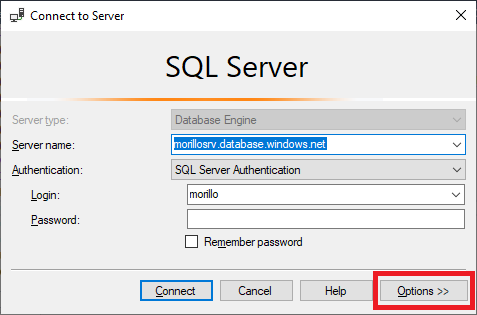
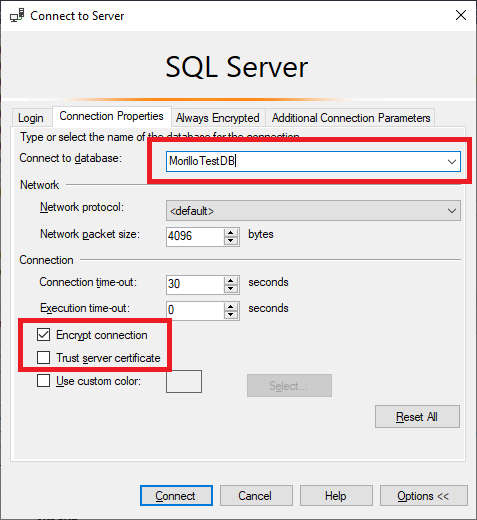
Hi Alberto, thanks for replying. The IP Address returned by the site is already been added.
Please make sure you are adding the correct client IP Address. Please add the IP Address returned by this site on Azure SQL Database firewall.