Note
Access to this page requires authorization. You can try signing in or changing directories.
Access to this page requires authorization. You can try changing directories.
When an AI agent calls your API through the Microsoft Entra SDK auth sidecar, the request includes a Bearer token. Your API validates this token to confirm the request comes from an authenticated agent with the correct permissions. If validation fails, your API returns HTTP 401 with a reason.
This article explains the validation checks and shows how to configure and run a sample weather API that validates agent identity tokens end-to-end.
Prerequisites
- Docker Desktop (macOS / Windows) or Docker Engine (Linux).
- A Microsoft Entra tenant with an agent identity blueprint and an agent identity. For setup steps, see Create an agent blueprint and Create and delete agent identities.
- An agent identity token for testing. You can get one from the sidecar local development sample or from the scripts in the Microsoft Entra Agent ID samples repository.
Token validation checks
Your downstream API should perform four checks on every incoming agent identity token:
| Check | What it verifies | Details |
|---|---|---|
| Signature | The token isn't tampered with. | Verify the RS256 signature against the JSON Web Key Set (JWKS) at https://login.microsoftonline.com/<tenant>/discovery/v2.0/keys. |
| Issuer | Microsoft Entra ID issued the token. | The iss claim matches https://sts.windows.net/<tenant>/ or https://login.microsoftonline.com/<tenant>/v2.0. |
| Audience | The token is intended for your API. | The aud claim matches your API's expected audience value. |
| Agent identity marker | The token was issued to an agent, not a regular app. | The xms_par_app_azp claim is present in agent identity tokens and absent in standard app-only tokens. This claim identifies the blueprint that created the agent. |
When all four checks pass, your API can trust and process the request.
How the sample weather API works
The Microsoft Entra Agent ID samples repository includes a sample weather API that demonstrates these validation checks. The sample API is a minimal Flask app that acts as the downstream API your agent calls. It validates incoming agent identity tokens and returns real weather data from Open-Meteo.
Both the local development (Ollama) and AWS (Bedrock) sidecar samples call the same weather API container. The sample consists of three files:
app.py: Flask app with route handlers, token validation logic, and Open-Meteo client.Dockerfile: Usespython:3.13-slimas the base image. Runsgunicorn app:appon port 8080.requirements.txt: Dependencies:flask,pyjwt[crypto],cryptography,requests,gunicorn.
The API exposes two endpoints:
GET /weather?city=<name>: Validates theAuthorization: Bearer <token>header and returns weather data for the specified city.GET /healthz: Returns a health status without requiring token validation.
The following diagram shows how tokens flow from the agent through the sidecar to the weather API. The agent never contacts Microsoft Entra ID directly. Instead, the sidecar acquires a token (TR) on behalf of the agent identity, and the agent passes that token to the weather API in the Authorization: Bearer header.
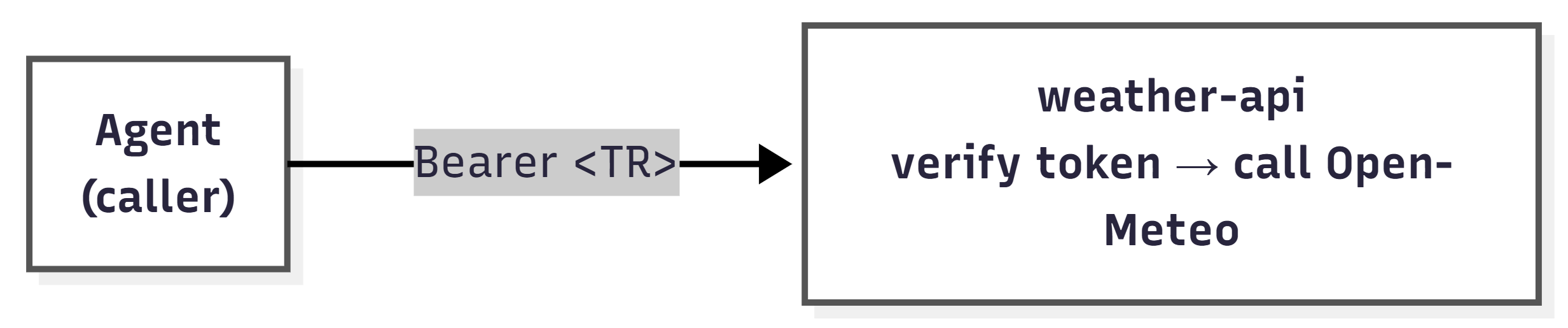
TR is the agent identity token issued by Microsoft Entra ID through the sidecar. It contains the claims your API validates, including the xms_par_app_azp agent identity marker. For a detailed breakdown of all tokens in the flow, see Run the sidecar for local development.
Token validation libraries differ across ecosystems (Python, Node.js, .NET). This sample uses PyJWT with the cryptography backend for RS256 signature verification. When you build your own downstream API, choose the equivalent JWT validation library for your technology stack.
Configure the sample weather API
The sample weather API accepts the following environment variables:
| Variable | Required | Default | Purpose |
|---|---|---|---|
TENANT_ID |
Yes | — | Your Microsoft Entra tenant ID, used to build the JWKS URL and verify the issuer claim. |
EXPECTED_AUDIENCE |
No | https://graph.microsoft.com |
The expected aud claim value. Defaults to Microsoft Graph so that the same agent tokens work for local testing. |
PORT |
No | 8080 |
The HTTP port the API listens on. |
Run the sample weather API
To run the weather API as a standalone container and test token validation:
Clone the repository and navigate to the weather API directory:
git clone https://github.com/microsoft/entra-agentid-samples.git
cd entra-agentid-samples/sidecar/weather-api
Build and run the container:
docker build -t weather-api:local .
docker run --rm -p 8080:8080 \
  -e TENANT_ID=<your-tenant-id> \
  -e EXPECTED_AUDIENCE=https://graph.microsoft.com \
  weather-api:local
Send a request with an agent identity token:
curl -H "Authorization: Bearer $TOKEN" \
     "http://localhost:8080/weather?city=Dallas"
The API returns a JSON response that includes both the weather data and the token validation results:
{
  "city": "Dallas",
  "temperature": 61,
  "temperature_unit": "F",
  "condition": "Overcast",
  "humidity": 93,
  "wind_speed": 8,
  "is_agent_identity": true,
  "agent_app_id": "<agent-app-id from xms_par_app_azp>",
  "validated_by": "Agent Identity Token",
  "data_source": "Open-Meteo API (Real-time)"
}
The is_agent_identity, agent_app_id, and validated_by fields confirm token validation:
is_agent_identity: Set totruewhen thexms_par_app_azpclaim is present, which confirms the token was issued to an agent identity rather than a standard app registration.agent_app_id: The value of thexms_par_app_azpclaim, which identifies the blueprint application that created the agent identity.validated_by: The validation method applied to the token. DisplaysAgent Identity Tokenwhen the agent marker claim is present.