Note
Access to this page requires authorization. You can try signing in or changing directories.
Access to this page requires authorization. You can try changing directories.
This article shows how to run the Microsoft Entra Auth SDK sidecar in your local environment by using Docker Compose. You start a four-container stack - chat agent, sidecar, downstream weather API, and a local LLM (Ollama). Then you send a query through the chat UI and observe the full token flow from agent to API.
The sample demonstrates two execution modes and two identity flows:
| Autonomous (app-only) | OBO (on behalf of user) | |
|---|---|---|
| Direct (no LLM) | Agent fetches a token and calls the weather API directly. | Same, but the sidecar exchanges the signed-in user's token. |
| Ollama + LangChain | LangGraph ReAct agent decides when to call the get_weather tool. |
Same, but the agent passes the user token through. |
Prerequisites
This sample works on macOS, Linux, and Windows 10/11.
| Requirement | macOS | Linux | Windows |
|---|---|---|---|
| Docker | Docker Desktop | Docker Engine + Compose v2 | Docker Desktop (WSL 2 backend recommended) |
| PowerShell 7+ | brew install --cask powershell |
Install PowerShell on Linux | Built-in (or install PowerShell 7+) |
| Azure CLI | brew install azure-cli |
Install the Azure CLI | winget install -e Microsoft.AzureCLI |
You also need a Microsoft Entra tenant with these objects:
- An agent identity blueprint with a client secret. Record the values for
BLUEPRINT_APP_IDandBLUEPRINT_CLIENT_SECRET. - An agent identity created from that blueprint. Record the
AGENT_CLIENT_ID. - (OBO flow only) A SPA app registration. Record the
CLIENT_SPA_APP_ID.
To create these objects, follow the PowerShell workflow in the Microsoft Entra Agent ID samples repository. The workflow creates the blueprint app, the agent identity, and optionally the SPA app for OBO sign-in.
Ollama is not a prerequisite on your host - it runs inside the compose stack and pulls qwen2.5:1.5b automatically.
Clone the sample repository
Clone the repository and navigate to the sidecar/dev directory:
git clone https://github.com/microsoft/entra-agentid-samples.git
cd entra-agentid-samples/sidecar/dev
Architecture
The stack runs four containers on an internal Docker network: llm-agent-dev (Flask chat UI, exposed on port 3003), agent-id-sidecar-dev (Microsoft Entra SDK auth sidecar), weather-api-dev (downstream API that validates agent tokens), and ollama-dev (local LLM). Only the chat UI is exposed to your host; the sidecar and weather API are reachable only from within the Docker network.

All four containers run on a shared Docker bridge network (agent-network-dev). Only the chat UI (port 3003) is exposed to your host. The sidecar and weather API have no host port, which keeps the token endpoint inside a trust boundary.
The request path works like this:
- You open
http://localhost:3003in your browser and send a query. - The agent (
llm-agent-dev) receives the query and decides to call theget_weathertool. - The tool asks the sidecar for an authorization header at
GET /AuthorizationHeader...?AgentIdentity={agentId}. - The sidecar (
agent-id-sidecar-dev) performs an OAuth 2.0 exchange with Microsoft Entra ID and receives a token (TR). - The sidecar returns the
Authorization: Bearer TRheader to the agent. - The agent calls the weather API (
weather-api-dev) with that header. - The weather API validates TR (JWKS, RS256, issuer, expiry, audience) and returns weather data.
The agent never contacts Microsoft Entra ID directly and never sees a credential. It asks the sidecar for an Authorization header, receives a Bearer token, and passes that token to the weather API. Only the sidecar communicates with login.microsoftonline.com.
Understand the token flow
The autonomous flow uses two tokens: T1 (blueprint app token from client credentials) and TR (agent token for the downstream API). The OBO flow adds a third: Tc (user access token from MSAL.js browser sign-in). The sidecar handles all token acquisition and caching so your agent code never manages credentials directly.
Autonomous flow
No user sign-in is required. The agent authenticates as itself by using the blueprint's client credentials.
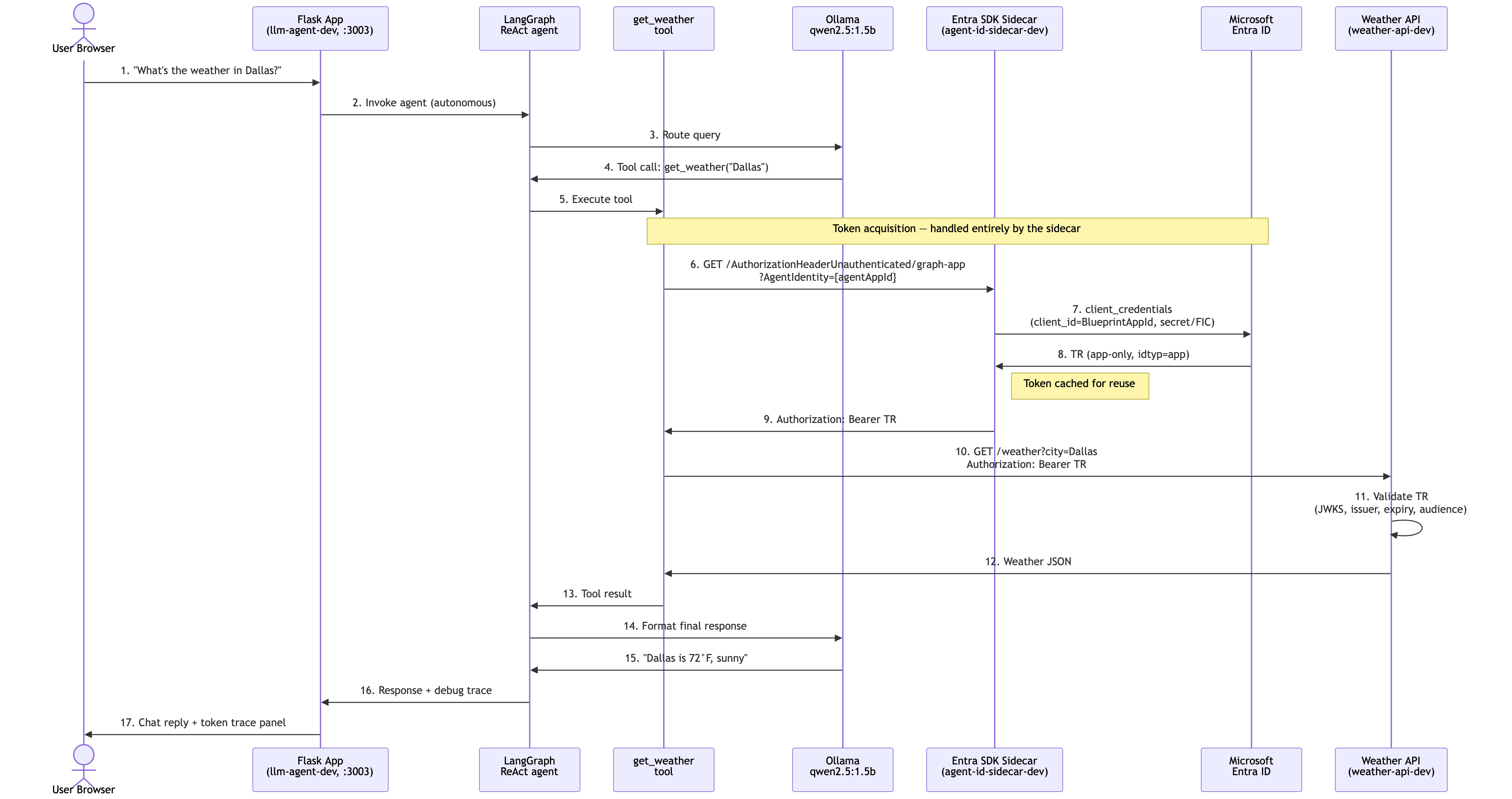
- The user sends a query through the chat UI.
- The agent (or LangGraph ReAct agent) decides to call the
get_weathertool. - The tool requests an authorization header from the sidecar at
GET /AuthorizationHeaderUnauthenticated/graph-app?AgentIdentity={agentAppId}. - The sidecar performs a client credentials exchange with Microsoft Entra ID and receives TR (app-only,
idtyp=app). - The tool calls the weather API with
Authorization: Bearer TR. - The weather API validates TR (signature, issuer, expiry, audience) and returns weather data.
OBO flow
The agent acts on behalf of a signed-in user. The sidecar performs a three-step token exchange.
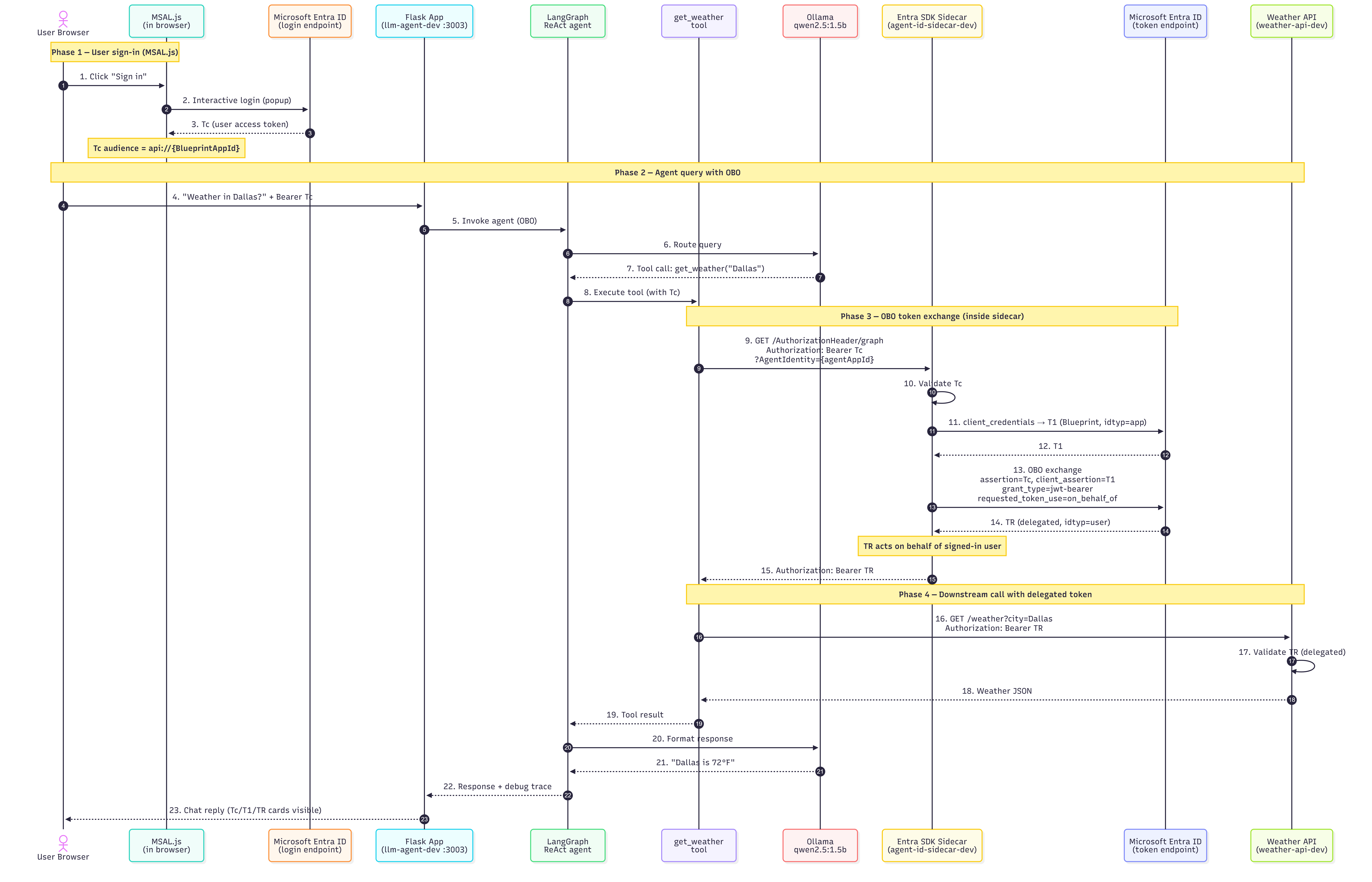
- The user signs in through MSAL.js in the browser and receives Tc (user access token, audience =
api://{BlueprintAppId}). - The user sends a query. The agent receives Tc with the request.
- The tool requests an authorization header from the sidecar at
GET /AuthorizationHeader/graph, passingAuthorization: Bearer Tcand?AgentIdentity={agentAppId}. - The sidecar validates Tc, performs a client credentials exchange to get T1, then performs an OBO exchange to get TR (delegated,
idtyp=user). The OBO exchange usesassertion=Tc,client_assertion=T1, andgrant_type=jwt-bearer. - The tool calls the weather API with
Authorization: Bearer TR. - The weather API validates TR and returns weather data. TR acts on behalf of the signed-in user.
Configure environment variables
Tip
If you already have a .env file from a previous run with TENANT_ID, BLUEPRINT_APP_ID, BLUEPRINT_CLIENT_SECRET, and AGENT_CLIENT_ID populated, skip to Start the stack. The Microsoft Entra objects survive container restarts and docker compose down.
Copy the example environment file and add your Microsoft Entra values:
cp .env.example .env
Open .env in your editor and set the following values:
| Variable | Description |
|---|---|
TENANT_ID |
Your Microsoft Entra tenant ID. |
BLUEPRINT_APP_ID |
The blueprint app registration client ID. The sidecar authenticates as this app. |
BLUEPRINT_CLIENT_SECRET |
The blueprint client secret. Used for local development only. |
AGENT_CLIENT_ID |
Your agent identity client ID. Passed as the AgentIdentity query parameter to the sidecar. |
CLIENT_SPA_APP_ID |
The SPA app registration client ID. Required only for the OBO flow. |
OLLAMA_MODEL |
The Ollama model to use. Defaults to qwen2.5:1.5b. |
The autonomous flow requires TENANT_ID, BLUEPRINT_APP_ID, BLUEPRINT_CLIENT_SECRET, and AGENT_CLIENT_ID. The OBO flow also requires CLIENT_SPA_APP_ID.
This sample uses ClientSecret as the credential source type. The sidecar supports the following credential types through the AzureAd__ClientCredentials__0__SourceType setting in docker-compose.yml:
ClientSecret: Local development only. This type is the default for this sample.SignedAssertionFromManagedIdentity: Deployed on Azure. Zero secrets, recommended for production.KeyVault: Certificate from Azure Key Vault.StoreWithThumbprint: Certificate from local machine store.
Set up OBO sign-in (optional)
To test the on-behalf-of flow, create the SPA app and configure OBO consent. Run one of the following script pairs from the repository root:
# Create the SPA app registration for MSAL.js browser sign-in
bash ../../scripts/setup-obo-client-app.sh
# → prints CLIENT_SPA_APP_ID

# Wire up the OBO scope + admin consent on the Blueprint
bash ../../scripts/setup-obo-blueprint.sh
Add the CLIENT_SPA_APP_ID value to your .env file after running the scripts.
Start the stack
Start all four containers:
docker compose up --build -d
The first run takes about 30 seconds while Ollama pulls the qwen2.5:1.5b model. To verify the stack is ready:
curl http://localhost:3003/api/status
The response shows ollama_available: true when the stack is ready.
Send a query through the chat UI
Open
http://localhost:3003in your browser.In the header bar, verify that your Tenant ID and Agent ID appear.
Use the two toggles to select your demo configuration:
- Execution Mode: Select Direct to skip the LLM and call the weather API directly, or select Ollama to use a LangChain ReAct agent.
- Identity Flow: Select Autonomous for an app-only token, or OBO to act on behalf of a signed-in user. For OBO, choose Sign in to authenticate through an MSAL.js popup.
Send the prepopulated query "Weather in Dallas?" and review the result.
In the right panel, expand Identity Trace to inspect each step of the token flow:
- The token request to the sidecar, including the
AgentIdentityparameter. - Decoded JWT claims for each token (Tc, T1, TR for OBO; T1 and TR for autonomous).
- Downstream API validation results, including signature (JWKS, RS256), issuer, expiry, and audience checks.
- The token request to the sidecar, including the
Troubleshoot common issues
| Symptom | Likely cause | Fix |
|---|---|---|
/api/status returns ollama_available: false |
Model is still downloading. | Wait about 30 seconds. Check logs by using docker logs ollama-dev. |
Weather API returns 401 Unauthorized |
Token tenant mismatch, expired secret, or signature check failed. | Verify TENANT_ID matches the blueprint's tenant. Check sidecar logs by using docker logs agent-id-sidecar-dev. |
| LLM returns weather without calling the tool | The qwen2.5:1.5b model is too small for reliable tool calling. |
Change OLLAMA_MODEL to qwen2.5:7b or llama3.1:8b in your .env file. |
| OBO sign-in popup is blocked | Browser popup blocker is active. | Allow popups for localhost:3003. |
4xx error from sidecar during OBO |
CLIENT_SPA_APP_ID is missing or the SPA redirect URI doesn't match. |
Rerun the OBO setup scripts. Verify http://localhost:3003 is listed in the SPA's redirect URIs. |
To view container logs for any service:
docker logs llm-agent-dev
docker logs agent-id-sidecar-dev
docker logs weather-api-dev
Clean up resources
Stop the containers when you're done:
# Stop containers, keep volumes and images
docker compose down

# Stop containers and remove the Ollama model cache
docker compose down -v

# Remove containers, volumes, and images
docker compose down -v --rmi all