Note
Access to this page requires authorization. You can try signing in or changing directories.
Access to this page requires authorization. You can try changing directories.
The ai.extract function extracts fields such as names, locations, or custom entities from each input row.
Note
- This article covers
ai.extractwith PySpark. For pandas, see Use ai.extract with pandas. - For all AI Functions and prerequisites, see AI Functions overview.
- Change default configuration for AI Functions with PySpark.
Overview
The ai.extract function is available for Spark DataFrames. You must specify the name of an existing input column as a parameter, along with a list of entity types to extract from each row of text.
The function returns a new DataFrame, with a separate column for each specified entity type that contains extracted values for each input row.
Schema-driven extraction
aifunc.ExtractLabel supports JSON Schema definitions for structured extraction. Beyond basic types (string, number, integer, and boolean), you can use:
- Enums: Constrain values to a fixed set (for example,
"enum": ["midfielder", "striker", "defender"]). - Arrays: Define element schemas via
items(for example,"type": "array", "items": {"type": "string"}). - Objects with properties: Specify nested fields with
propertiesand their types. - Required fields: Mark mandatory fields with
requiredto ensure they're always present in the output. - No extra fields: Set
additionalProperties=falseto prevent the model from returning fields outside the defined schema. - Nullable values: Express nullable types (for example,
type=["string", "null"]) for optional data.
When used in PySpark, ai.extract runs as a distributed Spark transformation across Fabric Spark partitions.
Syntax
from synapse.ml.spark import aifunc
Note
The PySpark import path is from synapse.ml.spark import aifunc. For pandas, use from synapse.ml import aifunc.
df.ai.extract(labels=["entity1", "entity2", "entity3"], input_col="input")
Parameters
| Name | Description |
|---|---|
labels Required |
An array of strings that represents the set of entity types to extract from the text values in the input column. |
input_col Required |
A string that contains the name of an existing column with input text values to scan for the custom entities. |
aifunc.ExtractLabel Optional |
One or more label definitions describing the fields to extract. See ExtractLabel parameters. |
error_col Optional |
A string that contains the name of a new column to store any OpenAI errors that result from processing each input text row. If you don't set this parameter, a default name generates for the error column. If an input row has no errors, the value in this column is null. |
ExtractLabel parameters
| Name | Description |
|---|---|
label Required |
A string that represents the entity to extract from the input text values. |
description Optional |
A string that adds extra context for the AI model. It can include requirements, context, or instructions for the AI to consider while performing the extraction. |
max_items Optional |
An int that specifies the maximum number of items to extract for this label. |
type Optional |
JSON schema type for the extracted value. Supported types for this class include string, number, integer, boolean, object, and array. |
properties Optional |
Additional JSON Schema properties for the type, such as items, properties, enum, required, and additionalProperties. Express nullable values with type=["string", "null"]. See Structured Outputs: Supported schemas. |
raw_col Optional |
A string that sets the column name for the raw LLM response. The raw response provides a list of dictionary pairs for every entity label, including "reason" and "extraction_text". |
Returns
The function returns a Spark DataFrame with a new column for each specified entity type. The column or columns contain the entities extracted for each row of input text. If no match is found, the result is null.
The default return type is a list of strings for each label. When max_items isn't specified, multiple matches are returned as a list. If you specify a different type in the aifunc.ExtractLabel configuration (for example, type="integer"), the output is a list of values of that type. If you specify max_items=1, a single-element list is produced for that label. The element type of each list follows the schema you provide.
Example
# This code uses AI. Always review output for mistakes.

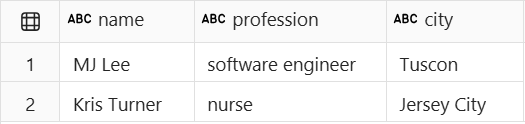
df = spark.createDataFrame([
        ("MJ Lee lives in Tucson, AZ, and works as a software engineer for Contoso.",),
        ("Kris Turner, a nurse at NYU Langone, is a resident of Jersey City, New Jersey.",)
    ], ["descriptions"])

df_entities = df.ai.extract(labels=["name", "profession", "city"], input_col="descriptions")
display(df_entities)
Output:

Multimodal input
To extract fields from images, PDFs, or text files, set input_col_type="path". For setup, see Use multimodal input with AI Functions.
# This code uses AI. Always review output for mistakes.

extracted = custom_df.ai.extract(
    labels=[
        aifunc.ExtractLabel(
            "name",
            description="The full name of the candidate, first letter capitalized.",
            max_items=1,
        ),
        "companies_worked_for",
        aifunc.ExtractLabel(
            "year_of_experience",
            description="The total years of professional work experience the candidate has, excluding internships.",
            type="integer",
            max_items=1,
        ),
    ],
    input_col="file_path",
    input_col_type="path",
)
display(extracted)
Related content
- Use ai.extract with pandas.
- Learn more about AI Functions.
- Use multimodal input with AI Functions.
- Change default configuration for AI Functions with PySpark.
- Understand billing for AI Functions.