Note
Access to this page requires authorization. You can try signing in or changing directories.
Access to this page requires authorization. You can try changing directories.
AI Functions in Microsoft Fabric apply one-line, LLM-powered transformations to large pandas or PySpark DataFrames. They run with high concurrency by default, so you can enrich, classify, summarize, and extract data quickly at scale.
Use this table to jump to examples in this overview or detailed pandas and PySpark documentation.
| Function | Description | Detailed documentation |
|---|---|---|
ai.analyze_sentiment |
Detect the emotional state of input text. Example. | pandas, PySpark |
ai.classify |
Categorize input text according to your labels. Example. | pandas, PySpark |
ai.embed |
Generate vector embeddings for input text. Example. | pandas, PySpark |
ai.extract |
Extract fields such as locations, names, or custom entities. Example. | pandas, PySpark |
ai.fix_grammar |
Correct spelling, grammar, and punctuation. Example. | pandas, PySpark |
ai.generate_response |
Generate responses based on your instructions. Example. | pandas, PySpark |
ai.similarity |
Compare text meaning with one value or another column. Example. | pandas, PySpark |
ai.summarize |
Summarize text, files, or row data. Example. | pandas, PySpark |
ai.translate |
Translate input text into another language. Example. | pandas, PySpark |
You can use AI Functions in notebooks with pandas or PySpark, in SQL queries, and in Dataflow Gen2. Fabric handles the endpoint setup for the built-in model.
Use AI Functions across Fabric experiences
AI Functions are available in multiple Fabric experiences:
- Notebooks: Use the pandas and PySpark APIs to enrich DataFrames in data science and data engineering workflows.
- Warehouse and SQL analytics endpoint: Use AI Functions in a warehouse or SQL analytics endpoint to call SQL-flavored functions such as
ai_summarize,ai_classify, andai_generate_responsedirectly in T-SQL queries. - Dataflow Gen2: Use Fabric AI Prompt in Dataflow Gen2 to add AI-generated columns in Power Query.
Use multimodal AI Functions
Multimodal AI Functions process images, PDFs, and text files in addition to text values. Use them to summarize PDFs, classify images, extract document fields, or generate responses grounded in file content.
Supported file types include JPG/JPEG, PNG, static GIF, WebP, PDF, MD, TXT, CSV, TSV, JSON, XML, PY, and other text files. Set column_type="path" in pandas, or input_col_type or col_types in PySpark. For examples, see Use multimodal input with AI Functions.
Prerequisites
- To use AI Functions with the built-in AI endpoint in Fabric, your administrator needs to enable the tenant switch for Copilot and other features that are powered by Azure OpenAI.
- Depending on your location, you might need to enable a tenant setting for cross-geo processing. Learn more about available regions for Azure OpenAI Service.
- You need a paid Fabric capacity (F2 or higher, or any P edition).
Note
- AI Functions are supported in Fabric Runtime 1.3 and later.
- Python AI Functions for pandas and PySpark now default to
gpt-5-miniwithreasoning_effortset tolow. This model has a 400,000-token context window and a 128,000-token maximum output. For model limits and rates, see the language models table. - AI Functions in Dataflow Gen2 and warehouse will receive the same model upgrade by the end of June 2026.
- Although the underlying model can handle several languages, most AI Functions are optimized for English-language text.
- AI Functions don't log or store user prompts, input data, or outputs.
Models and providers
AI Functions use the built-in Fabric endpoint by default. You can also configure pandas and PySpark AI Functions to use any LLM that supports the chat_completions or responses API, including:
- Azure OpenAI models.
- Microsoft Foundry models such as Qwen, Kimi, Grok, LLaMA, Mistral, and more.
For configuration options, see Customize AI Functions with pandas and Customize AI Functions with PySpark.
Set up AI Functions
AI Functions support pandas in Python and PySpark runtimes, and PySpark in the PySpark runtime. Install only the packages your runtime needs.
Performance and concurrency
AI Functions process up to 200 rows concurrently by default. Tune concurrency for your workload in pandas or PySpark.
Install dependencies
| Runtime | Dependencies |
|---|---|
| pandas (Python runtime) | Install the synapseml_internal and synapseml_core wheel files. Install openai version 1.99.5 or later only if you need SDK-native client behavior or Pydantic response-format examples. |
| pandas (PySpark runtime) | No installation is required for most usage. Install openai version 1.99.5 or later only if you need SDK-native client behavior or Pydantic response-format examples. |
| PySpark (PySpark runtime) | No installation is required. |
# Optional: install openai version 1.99.5 or later for SDK-native client behavior.
%pip install -q openai 2>/dev/null
Import required libraries
Import the AI Functions library for your runtime.
Use helper functions for files and schemas
AI Functions include helpers for multimodal workflows:
aifunc.load: Ingest files from a folder into a structured table. You can provide a prompt or schema.aifunc.list_file_paths: Enumerate file URLs and paths from a folder for use as input to any AI function.ai.infer_schema: Infer an extraction schema from file contents for use withai.extract.
For examples, see Use multimodal input with AI Functions.
Apply AI Functions
The following examples show the core AI Functions for pandas and PySpark. PySpark AI Functions run as distributed Spark transformations across Fabric Spark clusters.
Note
Most AI Functions support file paths with column_type="path" in pandas or input_col_type/col_types="path" in PySpark. For examples, see Use multimodal input with AI Functions.
Tip
The default Python model is gpt-5-mini with reasoning_effort="low". To change models or tune settings, see pandas configuration or PySpark configuration.
ai.analyze_sentiment: Detect sentiment
The ai.analyze_sentiment function labels each input as positive, negative, mixed, or neutral. You can also provide custom labels.
# This code uses AI. Always review output for mistakes.

df = pd.DataFrame([
        "The cleaning spray permanently stained my beautiful kitchen counter. Never again!",
        "I used this sunscreen on my vacation to Florida, and I didn't get burned at all. Would recommend.",
        "I'm torn about this speaker system. The sound was high quality, though it didn't connect to my roommate's phone.",
        "The umbrella is OK, I guess."
    ], columns=["reviews"])

df["sentiment"] = df["reviews"].ai.analyze_sentiment()
display(df)

ai.classify: Categorize text
The ai.classify function categorizes input text by using the labels you provide.
# This code uses AI. Always review output for mistakes.

df = pd.DataFrame([
        "This duvet, lovingly hand-crafted from all-natural fabric, is perfect for a good night's sleep.",
        "Tired of friends judging your baking? With these handy-dandy measuring cups, you'll create culinary delights.",
        "Enjoy this *BRAND NEW CAR!* A compact SUV perfect for the professional commuter!"
    ], columns=["descriptions"])

df["category"] = df['descriptions'].ai.classify("kitchen", "bedroom", "garage", "other")
display(df)

ai.embed: Generate vector embeddings
The ai.embed function converts text into numeric vectors that capture semantic meaning. Use embeddings for similarity search, retrieval, and machine learning workflows.
# This code uses AI. Always review output for mistakes.

df = pd.DataFrame([
        "This duvet, lovingly hand-crafted from all-natural fabric, is perfect for a good night's sleep.",
        "Tired of friends judging your baking? With these handy-dandy measuring cups, you'll create culinary delights.",
        "Enjoy this *BRAND NEW CAR!* A compact SUV perfect for the professional commuter!"
    ], columns=["descriptions"])

df["embed"] = df["descriptions"].ai.embed()
display(df)

ai.extract: Extract entities
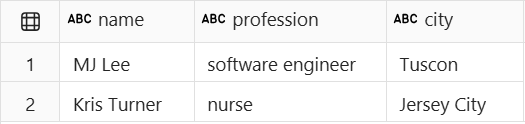
The ai.extract function extracts fields such as names, locations, or custom entities from input text.
Structured labels
Use ExtractLabel when you need typed extraction. It supports JSON Schema constructs such as typed fields, enums, arrays, nested objects, nullable values, required properties, and additionalProperties=false. For examples, see pandas or PySpark.
# This code uses AI. Always review output for mistakes.

df = pd.DataFrame([
        "MJ Lee lives in Tucson, AZ, and works as a software engineer for Microsoft.",
        "Kris Turner, a nurse at NYU Langone, is a resident of Jersey City, New Jersey."
    ], columns=["descriptions"])

df_entities = df["descriptions"].ai.extract("name", "profession", "city")
display(df_entities)
ai.fix_grammar: Fix grammar
The ai.fix_grammar function corrects spelling, grammar, and punctuation.
# This code uses AI. Always review output for mistakes.

df = pd.DataFrame([
        "There are an error here.",
        "She and me go weigh back. We used to hang out every weeks.",
        "The big picture are right, but you're details is all wrong."
    ], columns=["text"])

df["corrections"] = df["text"].ai.fix_grammar()
display(df)

ai.generate_response: Apply custom user prompts
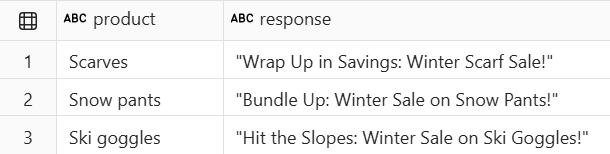
The ai.generate_response function creates custom text from your prompt and row data.
Optional parameters
Use response_format when you need structured output, including JSON objects, JSON Schema, or Pydantic models. For examples, see pandas or PySpark.
# This code uses AI. Always review output for mistakes.

df = pd.DataFrame([
        ("Scarves"),
        ("Snow pants"),
        ("Ski goggles")
    ], columns=["product"])

df["response"] = df.ai.generate_response("Write a short, punchy email subject line for a winter sale.")
display(df)
ai.similarity: Calculate similarity
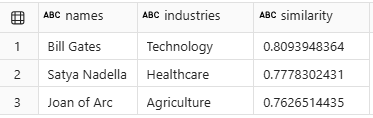
The ai.similarity function compares each input value with one reference value or with a value in another column. Scores range from -1 for opposite meaning to 1 for identical meaning.
# This code uses AI. Always review output for mistakes.

df = pd.DataFrame([
        ("Bill Gates", "Technology"),
        ("Satya Nadella", "Healthcare"),
        ("Joan of Arc", "Agriculture")
    ], columns=["names", "industries"])

df["similarity"] = df["names"].ai.similarity(df["industries"])
display(df)
ai.summarize: Summarize text
The ai.summarize function summarizes text, file content, a single column, or all columns in each row.
Customizing summaries with instructions
Use instructions to control tone, length, audience, or focus. For examples, see pandas or PySpark.
# This code uses AI. Always review output for mistakes.

df= pd.DataFrame([
        ("Microsoft Teams", "2017",
        """
        The ultimate messaging app for your organization—a workspace for real-time
        collaboration and communication, meetings, file and app sharing, and even the
        occasional emoji! All in one place, all in the open, all accessible to everyone.
        """),
        ("Microsoft Fabric", "2023",
        """
        An enterprise-ready, end-to-end analytics platform that unifies data movement,
        data processing, ingestion, transformation, and report building into a seamless,
        user-friendly SaaS experience. Transform raw data into actionable insights.
        """)
    ], columns=["product", "release_year", "description"])

df["summaries"] = df["description"].ai.summarize()
display(df)

ai.translate: Translate text
The ai.translate function translates text to another language.
# This code uses AI. Always review output for mistakes.

df = pd.DataFrame([
        "Hello! How are you doing today?",
        "Tell me what you'd like to know, and I'll do my best to help.",
        "The only thing we have to fear is fear itself."
    ], columns=["text"])

df["translations"] = df["text"].ai.translate("spanish")
display(df)

Chain PySpark AI Functions
PySpark AI Functions return DataFrames that keep the df.ai accessor bound to the result schema. Chain transformations without materializing intermediate DataFrames.
# This code uses AI. Always review output for mistakes.

output = (
    df
    .ai.summarize(input_col="review_text", output_col="summary")
    .ai.classify(
        labels=["service", "cleanliness", "location", "other"],
        input_col="summary",
        output_col="category",
    )
)
display(output)
View usage statistics with ai.stats
Use ai.stats on an AI-generated Series or DataFrame to inspect usage and execution metrics.
ai.stats returns a DataFrame with statistics such as:
num_successful: Number of rows processed successfully by the AI function.num_exceptions: Number of rows that encountered an exception during execution. These rows are represented as instances ofaifunc.ExceptionResult.num_unevaluated: Number of rows that weren't processed because an earlier exception made it impossible to continue evaluation. These rows are represented as instances ofaifunc.NotEvaluatedResult.num_harmful: Number of rows blocked by the Azure OpenAI content filter. These rows are represented as instances ofaifunc.FilterResult.cached_tokens: Total number of cached input tokens.input_tokens: Total number of input tokens used for the AI function call.output_tokens: Total number of output tokens generated by the model.reasoning_tokens: Total number of reasoning tokens used by reasoning models.model: Model deployment name used for the AI function call.
The output might look like this table:
| num_successful | num_exceptions | num_unevaluated | num_harmful | cached_tokens | input_tokens | output_tokens | reasoning_tokens | client_type | input_types | model |
|---|---|---|---|---|---|---|---|---|---|---|
| 2 | 0 | 0 | 0 | 0 | 555 | 4 | 0 | fabric_llm_endpoint | {"text": 2} |
gpt-5-mini |
Tip
Use ai.stats to track usage, error patterns, and token consumption.
Rows that hit capacity limits are surfaced as instances of aifunc.CapacityExceededResult. In pandas workflows, use aifunc.split_results to separate successful outputs from nonresults, so you can inspect capacity-limited rows and retry them after capacity is available or the limit is addressed.
Cost transparency
pandas AI Functions can show token counts and capacity unit estimates during execution with progress_bar_mode="stats". For PySpark, use df.ai.stats on the result DataFrame.
The Fabric Capacity Metrics app reports model-call consumption as the AI Functions operation. For details, see Billing for AI Functions.
Evaluate and accelerate
Use the AI Functions Starter Notebooks for end-to-end pandas and PySpark examples. Use the AI Functions Eval Notebooks to assess output quality before production.
Related content
- Use multimodal input with AI Functions.
- Customize AI Functions with pandas or PySpark.
- Understand billing for AI Functions.
- Try the AI Functions Starter Notebooks or AI Functions Eval Notebooks.
- Use AI Functions in a warehouse or SQL analytics endpoint.
- Use Fabric AI Prompt in Dataflow Gen2.