Note
Access to this page requires authorization. You can try signing in or changing directories.
Access to this page requires authorization. You can try changing directories.
The ai.generate_response function creates custom text from your prompt and row data.
Note
- This article covers
ai.generate_responsewith PySpark. For pandas, see Use ai.generate_response with pandas. - For all AI Functions and prerequisites, see AI Functions overview.
- Change default configuration for AI Functions with PySpark.
Overview
The ai.generate_response function is available for Spark DataFrames. Use a literal prompt to include all columns or a template prompt to include only columns in braces, such as {product}.
The function returns a new DataFrame, with custom responses for each input text row stored in an output column.
Tip
Learn how to craft more effective prompts to get higher-quality responses by following the OpenAI prompt engineering guide.
Syntax
df_response = df.ai.generate_response(
    prompt="Instructions for a custom response based on all column values", output_col="response",
)
Parameters
| Name | Description |
|---|---|
prompt Required |
A string that contains prompt instructions. These instructions are applied to input text values for custom responses. |
is_prompt_template Optional |
A Boolean that indicates whether the prompt is a format string. When True, the function uses only columns named in braces. When False, it uses all columns as row context. |
output_col Optional |
A string that contains the name of a new column to store custom responses for each row of input text. If you don't set this parameter, a default name generates for the output column. |
error_col Optional |
A string that contains the name of a new column to store any OpenAI errors that result from processing each row of input text. If you don't set this parameter, a default name generates for the error column. If there are no errors for a row of input, the value in this column is null. |
response_format Optional |
None, a string, a dictionary, or a class based on Pydantic's BaseModel that specifies the expected response structure. See Response format options. |
Returns
The function returns a Spark DataFrame that includes a new column that contains custom text responses to the prompt for each input text row.
Response format options
Use response_format to control response structure. It corresponds to OpenAI Structured Outputs.
| Format | Description |
|---|---|
None (default) |
Let the LLM decide response format based on the instructions and input data, which can vary per row. Responses can be plain text or JSON dict with varying fields. |
"text" or {"type": "text"} |
Forces plain text responses for all rows. |
"json_object" or {"type": "json_object"} |
Returns a JSON dictionary in text form where the LLM decides the fields. Requires the word "json" in your prompt. |
{"type": "json_schema", ...} |
Returns a JSON dictionary that conforms to your custom JSON Schema. Provides precise control over response structure. |
Class based on Pydantic's BaseModel |
Returns a JSON string that conforms to your Pydantic model definition. Pydantic is a dependency of the OpenAI package. Under the hood, the Pydantic BaseModel is automatically converted to a JSON schema and functions equivalently to the json_schema option. |
Note
The json_schema and Pydantic BaseModel options are equivalent. Use Pydantic when you want Python type hints and validation.
Examples
# This code uses AI. Always review output for mistakes.

df = spark.createDataFrame([
        ("Scarves",),
        ("Snow pants",),
        ("Ski goggles",)
    ], ["product"])

df_response = df.ai.generate_response(
    prompt="Write a short, punchy email subject line for a winter sale.", output_col="response",
)
display(df_response)
Output:
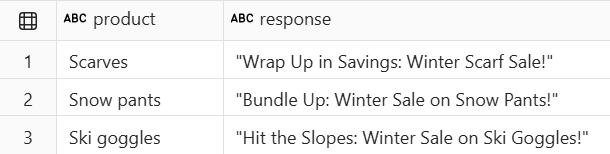

Response format example
The following example requests plain text, a JSON object, a custom JSON Schema, and a Pydantic model.
# This code uses AI. Always review output for mistakes.

df = spark.createDataFrame([
        ("Alex Rivera is a 24-year-old soccer midfielder from Barcelona who scored 12 goals last season.",),
        ("Jordan Smith, a 29-year-old basketball guard from Chicago, averaged 22 points per game.",),
        ("William O'Connor is a 22-year-old tennis player from Dublin who won 3 ATP titles this year.",)
    ], ["bio"])

# response_format : text
df_card_text = df.ai.generate_response(
        prompt="Create a player card with the player's details and a motivational quote",
        output_col="card_text",
        response_format="text",
)
display(df_card_text)

# response_format : json object
df_card_json_object = df.ai.generate_response(
        prompt="Create a player card with the player's details and a motivational quote in JSON",
        output_col="card_json_object",
        response_format="json_object", # Requires "json" in the prompt
)
display(df_card_json_object)

# response_format : specified json schema
df_card_json_schema = df.ai.generate_response(
        prompt="Create a player card with the player's details and a motivational quote",
        output_col="card_json_schema",
        response_format={
           "type": "json_schema",
            "json_schema": {
                "name": "player_card_schema",
                "strict": True,
                "schema": {
                    "type": "object",
                    "properties": {
                        "name": {"type": "string"},
                        "age": {"type": "integer"},
                        "sport": {"type": "string"},
                        "position": {"type": "string"},
                        "hometown": {"type": "string"},
                        "stats": {"type": "string", "description": "Key performance metrics or achievements"},
                        "motivational_quote": {"type": "string"},
                    },
                    "required": ["name", "age", "sport", "position", "hometown", "stats", "motivational_quote"],
                    "additionalProperties": False,
                },
            }
        },
)
display(df_card_json_schema)

# Pydantic is a dependency of the OpenAI package, so it's available when openai is installed.
# You can also install Pydantic via `%pip install pydantic` if it's not already present.
from pydantic import BaseModel, Field

class PlayerCardSchema(BaseModel):
    name: str
    age: int
    sport: str
    position: str
    hometown: str
    stats: str = Field(description="Key performance metrics or achievements")
    motivational_quote: str

# response_format : pydantic BaseModel
df_card_pydantic = df.ai.generate_response(
    prompt="Create a player card with the player's details and a motivational quote",
    output_col="card_pydantic",
    response_format=PlayerCardSchema,
)
display(df_card_pydantic)
Output:

Multimodal input
To generate responses from images, PDFs, or text files, use col_types to mark file path columns as path inputs. For setup, see Use multimodal input with AI Functions.
# This code uses AI. Always review output for mistakes.

animal_urls = [
    "<image-url-golden-retriever>",  # Replace with URL to an image of a golden retriever
    "<image-url-giant-panda>",  # Replace with URL to an image of a giant panda
    "<image-url-bald-eagle>",  # Replace with URL to an image of a bald eagle
]
animal_df = spark.createDataFrame([(u,) for u in animal_urls], ["file_path"])

results = animal_df.ai.generate_response(
    prompt="What type of animal is in this image? Give me only the animal's common name.",
    col_types={"file_path": "path"},
    output_col="animal_name",
)
display(results)
# This code uses AI. Always review output for mistakes.

# DataFrame-level: use all columns as context
results = animal_df.ai.generate_response(
    prompt="Describe this animal's natural habitat and one interesting fact about it.",
    col_types={"file_path": "path"},
    output_col="description",
)
display(results)
Related content
- Use ai.generate_response with pandas.
- Learn more about AI Functions.
- Use multimodal input with AI Functions.
- Change default configuration for AI Functions with PySpark.
- Understand billing for AI Functions.