Note
Access to this page requires authorization. You can try signing in or changing directories.
Access to this page requires authorization. You can try changing directories.
When you have an existing WPF, WinForms, or Win32 desktop app, you have three broad options for bringing it forward. This guide helps you decide which path fits your project.
For definitions of the terms used on this page, see Migration terminology.
Decision overview
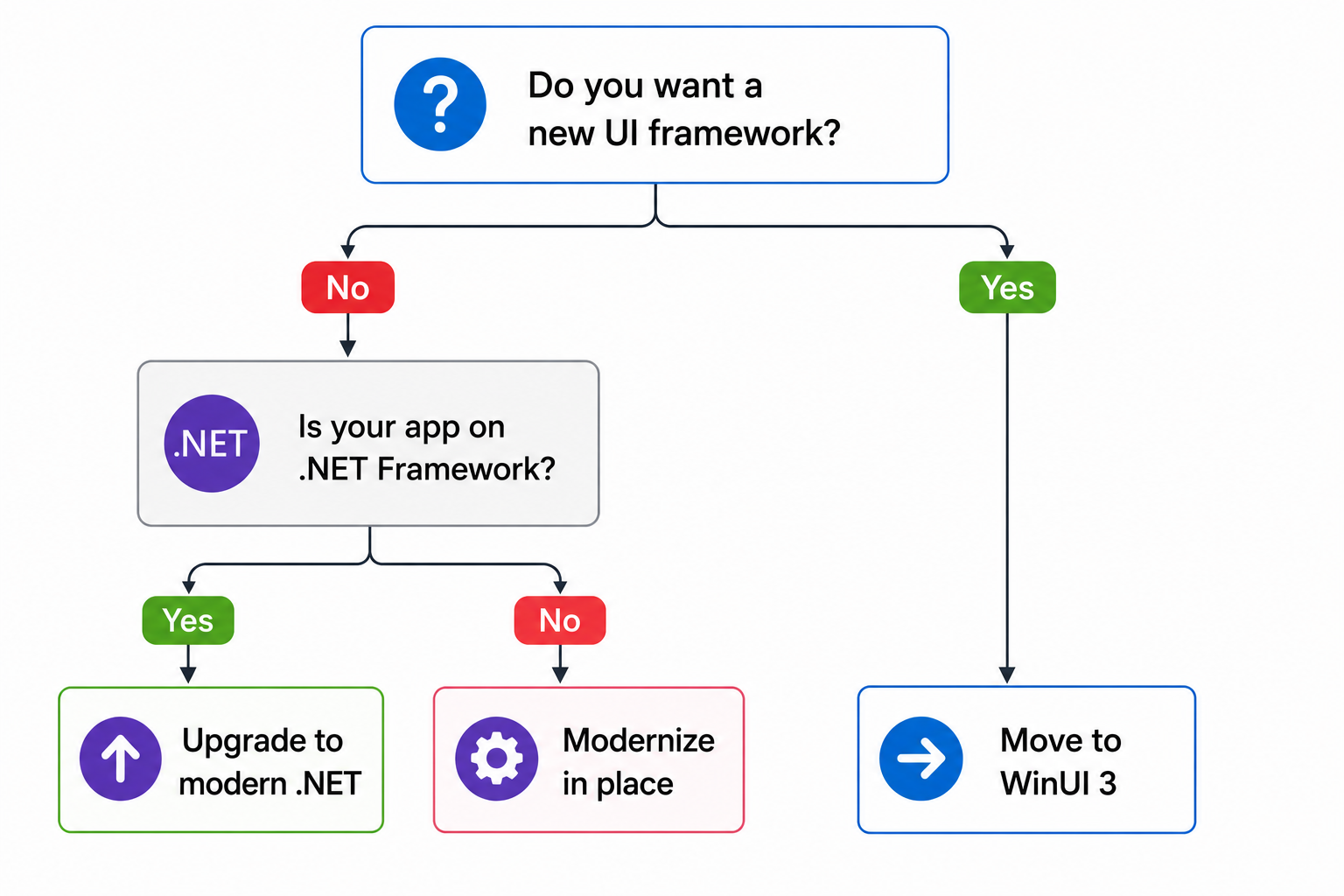
Three paths
| Path | What changes | Best for | Risk level |
|---|---|---|---|
| Upgrade in place | Runtime (.NET Framework → modern .NET), project file format, some NuGet packages | Apps that work well today and need long-term .NET support, performance improvements, or access to modern .NET APIs | Low–Medium |
| Modernize in place | Nothing — you add Windows App SDK, WinRT APIs, or MSIX packaging to your existing app | Apps that need specific platform features (notifications, widgets, AI) without changing the UI framework | Low |
| Move to WinUI 3 | UI framework, namespaces, controls, app lifecycle model | Apps where the UI layer needs a refresh — whether you port views incrementally or start a new project | Medium–High |
Note
These paths are not mutually exclusive. A common sequence is: upgrade from .NET Framework to modern .NET, then modernize by adding Windows App SDK features, and later migrate individual views to WinUI 3.
Decision criteria
Use this table to evaluate which path fits your project. Score each row and see which column has the most favorable answers.
| Criterion | Upgrade in place | Modernize in place | Move to WinUI 3 |
|---|---|---|---|
| Project size (solutions with 10+ projects) | ✅ Automated tooling handles multi-project solutions | ✅ No project restructuring needed | ⚠️ Requires per-project migration planning |
| .NET Framework dependencies | ✅ Primary goal is to move off .NET Framework | N/A — app stays on current runtime | ⚠️ Must upgrade to modern .NET first |
| WCF or ASMX services | ⚠️ Requires CoreWCF migration | ✅ No impact on service layer | ⚠️ Same WCF migration required |
| COM interop | ⚠️ Test thoroughly — most COM interop works on modern .NET | ✅ No changes needed | ⚠️ Most COM interop works; some WinRT APIs require HWND initialization |
| Third-party UI controls (Telerik, DevExpress, Syncfusion) | ✅ Most vendors support modern .NET | ✅ No UI changes | ❌ Vendors must offer WinUI 3 versions — check compatibility |
| Team capacity | Low — largely automated with .NET Upgrade Assistant | Low — incremental, no deadline | High — requires UI development and testing |
| Visual Studio XAML Designer | ✅ Supported for WPF on modern .NET | ✅ Supported | ❌ Not yet available for WinUI 3 |
| Long-term .NET support | ✅ Gains LTS support and performance | ⚠️ .NET Framework 4.8 is supported but receives only security fixes | ✅ WinUI 3 runs on modern .NET (.NET 6 or later) |
Path 1 — Upgrade in place (.NET Framework → modern .NET)
This path keeps your UI framework (WPF or WinForms) and moves the runtime from .NET Framework to modern .NET (currently .NET 10 LTS). It is the lowest-risk option for most enterprise apps.
When to choose this path
- Your app works well on WPF or WinForms and you want to keep it that way.
- You need continued .NET support, performance improvements, or access to modern .NET APIs (Span<T>, System.Text.Json, nullable reference types).
- You plan to modernize later by adding Windows App SDK features.
How to get started
- Run the .NET Upgrade Assistant against your solution.
- Resolve dependency issues — most NuGet packages have modern .NET versions.
- Address common migration blockers such as WCF or
System.Configuration. - Test thoroughly, especially COM interop and third-party controls.
AI tooling
The GitHub Copilot modernization agent can automate much of this upgrade. It analyzes your solution, resolves dependency chains, and generates pull requests.
Path 2 — Modernize in place
This path adds modern Windows features to your existing WPF, WinForms, or Win32 app without changing the UI framework.
When to choose this path
- You need a specific Windows feature (notifications, widgets, Windows AI Foundry).
- You want to replace your installer with MSIX for clean uninstall and auto-update.
- Your app is on .NET Framework and you cannot upgrade right now.
How to get started
See Modernize your desktop apps for the three modernization approaches (WinRT APIs, Windows App SDK NuGet, MSIX packaging).
Path 3 — Move to WinUI 3
This path moves your app's UI layer to WinUI 3, the native UI framework for modern Windows apps. You can port existing views incrementally or start a new WinUI 3 project and bring over your business logic — either way, the destination is the same.
When to choose this path
- You want a modern UI with Fluent Design, dark mode, and modern input support.
- Your app's UI layer is due for a refresh.
- You can invest in UI development and testing time.
How to get started
- Migrate WPF app patterns to WinUI 3 — control, XAML, and threading mappings
- Migrate WPF apps to WinUI 3 with AI — AI-assisted migration with GitHub Copilot
- Migrate from UWP to the Windows App SDK — if your starting point is UWP
Important
WinUI 3 requires modern .NET (.NET 6 or later). If your app is on .NET Framework, you need to upgrade first (Path 1), then migrate the UI. Targeting the current LTS release is recommended.
Common migration blockers
These issues frequently block or complicate upgrades and migrations. Each requires specific mitigation.
| Blocker | Impact | Mitigation |
|---|---|---|
| WCF services | WCF server is not available on modern .NET. WCF client is available via System.ServiceModel packages. | Migrate server-side WCF to CoreWCF or gRPC. Client-side WCF works on modern .NET. |
| ASMX web services | ASMX is not available on modern .NET. | Replace with ASP.NET Core Web API or minimal API endpoints. |
System.Configuration (app.config) |
ConfigurationManager works on modern .NET via a compatibility NuGet package, but does not support all features. |
For new code, use the Options pattern with appsettings.json. Migrate existing settings incrementally. |
| COM interop | Most COM interop works on modern .NET. Some scenarios involving apartment threading or registration-free COM need testing. | Test COM-dependent features early. Use ComWrappers for new interop code. |
| Third-party UI controls | Control vendors may not yet support WinUI 3. Most support modern .NET for WPF and WinForms. | Check vendor documentation for modern .NET and WinUI 3 support before starting. Telerik, DevExpress, Syncfusion, and Infragistics all publish compatibility matrices. |
| Visual Basic projects | VB.NET is supported for WPF and WinForms on modern .NET, but the .NET Upgrade Assistant has limited VB support. | Expect more manual work. The Upgrade Assistant handles project file conversion; code changes may require manual review. |
See also
Collaborate with us on GitHub
The source for this content can be found on GitHub, where you can also create and review issues and pull requests. For more information, see our contributor guide.

Windows developer