Azure Data Factory
An Azure service for ingesting, preparing, and transforming data at scale.
This browser is no longer supported.
Upgrade to Microsoft Edge to take advantage of the latest features, security updates, and technical support.
' cx='32' cy='32' r='32' /%3E%3Ctext x='50%25' y='55%25' dominant-baseline='middle' text-anchor='middle' fill='%23FFF' %3EAS%3C/text%3E%3C/svg%3E)
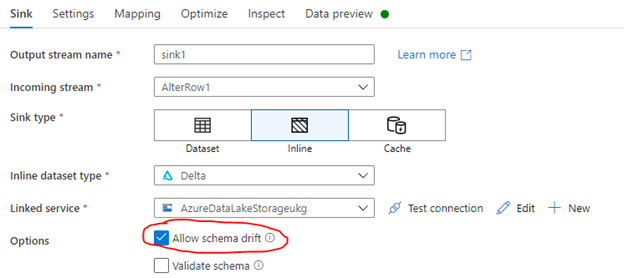
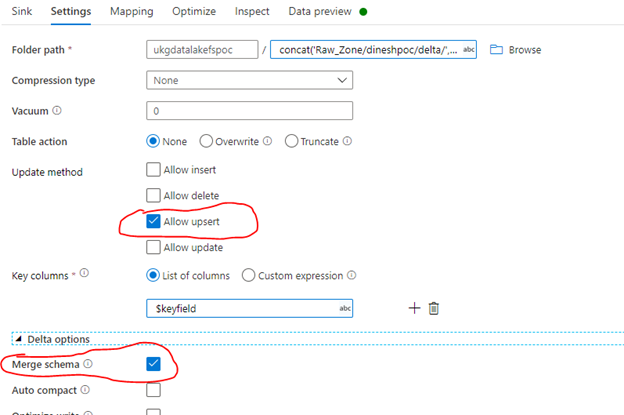
We are trying to perform a schema drift to the data bricks delta tables and it’s not working through the delta lake connecter in ADF.
If we use the Delta lake API (i.e. Merge API) using PYSPARK, it is working fine as expected. But it is not working through the ADF delta connector .
See the error we are getting from the ADF job. Is there anyone who experienced this problem and any resolution.
Error:
StatusCode":"DFExecutorUserError","Message":"Job failed due to reason: at Sink 'sink1': org.apache.spark.sql.AnalysisException: cannot resolve target.UserId in UPDATE clause given columns target.Id, target.IsActive, target.CreatedById, target.Name, target.LastModifiedById, target.Type, target.CreatedDate, target.SystemModstamp, target.LastModifiedDate;
An Azure service for ingesting, preparing, and transforming data at scale.

Hi @Asres Shiferaw ,
Just checking in to see if the below answer provided by @JikaiJackMa-MSFThelped. If this answers your query, do click Accept Answer and Up-Vote for the same. And, if you have any further query do let us know.
Answer accepted by question author
' cx='32' cy='32' r='32' /%3E%3Ctext x='50%25' y='55%25' dominant-baseline='middle' text-anchor='middle' fill='%23FFF' %3EJM%3C/text%3E%3C/svg%3E)
Hi @Asres Shiferaw ,
Yes this issue is due to the limitation of internal library used by ADF data flow. Please follow this troubleshooting guidance to resolve this issue: https://learn.microsoft.com/en-us/azure/data-factory/data-flow-troubleshoot-connector-format#delta
Thanks,
Jack
' cx='32' cy='32' r='32' /%3E%3Ctext x='50%25' y='55%25' dominant-baseline='middle' text-anchor='middle' fill='%23FFF' %3EWL%3C/text%3E%3C/svg%3E)
Thanks for the link. A fix would be highly appreciated as it would significantly reduce the additional complexity that comes with the work-around. How can we track the progress of the fix mentioned in the docs?