Hi Scott DeMott
Thank you for posting your question in the Microsoft Q&A forum.
Based on your description, I understand that while your Comcast email is working on your iPhone, it has stopped receiving new emails to your Outlook 2019 desktop application.
According to your question about how to check Account Settings, I’d like to share some information from my side, which I hope will be helpful to you:
- Close Outlook completely > Click your Windows Start button, type Control Panel, and open it.
- In the top right search bar of the Control Panel, type Mail and select Mail (Microsoft Outlook).
- Click Email Accounts > Double-click your Comcast email address > Click More Settings (bottom right) > Click the Advanced tab.
- Ensure these settings are entered exactly: (Based on Microsoft official document: POP, IMAP, and SMTP settings for Outlook.com - Microsoft Support)
- Incoming server (IMAP): 993
- Encrypted connection: SSL/TLS (Outgoing based on Set up your Xfinity Email address with an email program - Xfinity Support)
- Outgoing server (SMTP): 587
- Encrypted connection: STARTTLS (or TLS)
- Click the Outgoing Server tab and ensure "My outgoing server (SMTP) requires authentication" is checked > Click OK, then Next to test the connection.
If the issue persists after completing these steps, you can consider creating a new Outlook Profile. Sometimes creating a fresh profile usually resolves this immediately without losing your data.
For detailed steps, you can refer to: Create an Outlook profile - Microsoft Support
In the step of adding your email account, please choose manual mode by clicking 'Advanced options' and selecting the IMAP setup option.
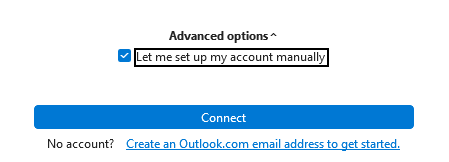
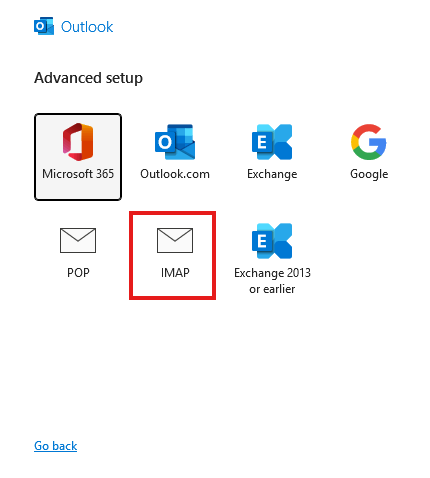
Then, you can configure the IMAP settings as I mentioned above.
Additionally, if your Comcast account has two-step verification (2FA) enabled, Outlook may prompt you for an app-specific password. To generate the App Password, you can refer to:
Create app passwords from the Security info page - Microsoft Support
11.6. Using Additional Passwords for Applications
(Note: Microsoft is providing this information as a convenience to you. These sites are not controlled by Microsoft, and Microsoft cannot make any representations regarding the quality, safety, or suitability of any software or information found there. Please ensure that you fully understand the risks before using any suggestions from the above link)
I hope these suggestions provide some helpful ideas. Please don’t hesitate to reply via comments section if you have any further questions.
If the answer is helpful, please click "Accept Answer" and kindly upvote it. If you have extra questions about this answer, please click "Comment".
Note: Please follow the steps in our documentation to enable e-mail notifications if you want to receive the related email notification for this thread.
' cx='32' cy='32' r='32' /%3E%3Ctext x='50%25' y='55%25' dominant-baseline='middle' text-anchor='middle' fill='%23FFF' %3ESD%3C/text%3E%3C/svg%3E)


' cx='32' cy='32' r='32' /%3E%3Ctext x='50%25' y='55%25' dominant-baseline='middle' text-anchor='middle' fill='%23FFF' %3EHN%3C/text%3E%3C/svg%3E)