Azure Databricks
An Apache Spark-based analytics platform optimized for Azure.
This browser is no longer supported.
Upgrade to Microsoft Edge to take advantage of the latest features, security updates, and technical support.
' cx='32' cy='32' r='32' /%3E%3Ctext x='50%25' y='55%25' dominant-baseline='middle' text-anchor='middle' fill='%23FFF' %3EB%3C/text%3E%3C/svg%3E)
Something what should be really simple getting me frustrated.
When reading from csv in pyspark in databricks the output has a scientific notation:
Name Code
AA 6.44E+11
BB 5.41E+12
how to convert it to string? Here is the expected output. Note, Code can have any lenght. Need both, Name and Code as a result in dataframe.
Name Code
AA 644217000000
BB 5413150000000
I tried this pyspark-how-to-remove-scientific-notation-in-csv-output but it getting me error on "avg".
The simpler the better. TIA
An Apache Spark-based analytics platform optimized for Azure.
' cx='32' cy='32' r='32' /%3E%3Ctext x='50%25' y='55%25' dominant-baseline='middle' text-anchor='middle' fill='%23FFF' %3EAK%3C/text%3E%3C/svg%3E)
hey @braxx , @HimanshuSinha
Even i'm facing the same issue. where you able to find any turn around for this issue ?
thanks,
abhishek
' cx='32' cy='32' r='32' /%3E%3Ctext x='50%25' y='55%25' dominant-baseline='middle' text-anchor='middle' fill='%23FFF' %3EH%3C/text%3E%3C/svg%3E)
Hello @braxx ,
Thanks for the ask and using Microsoft Q&A platform .
You mentioned that the file is CSV , but there is no comma seprated field which you have shared .
You can try the below code .
from pyspark.sql.functions import format_string
df.select('Name',format_string('%.1f',df.Code.cast('float')).alias('converted')).show()
Output :
+----+---------------+
|Name| converted|
+----+---------------+
| AA| 643999989760.0|
| BB|5409999945728.0|
+----+---------------+
Please do let me know how it goes .
Thanks
Himanshu
-----------------------------------------------------------------------------------------------------
 or upvote
  button whenever the information provided helps you. Original posters help the community find answers faster by identifying the correct answer. Here is how
Thanks for the answer. Really appreciate it.
Unfortunately, as you can see the numbers in the outputs doesn't match:
BB 5413150000000 vs BB 5409999945728.0
I guess the problem is related to the fact that a single scientific notation can be true for multiple numbers. As you can see both ones have the same scientific notation:
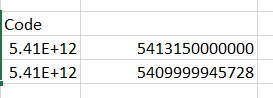
Is there a way datbricks read it correctly from a csv? In csv long numbers are I guess by default displayed as scientific while the real numbers are hidden behind. I would like to have these real numbers loaded to data frame instead scientific ones.
Is there a way databricks read it correctly from a csv?
As far as i know , the data in CSV are stored as string and so you will have to convert that to other data types .
Thanks
Himanshu
The numbers in csv are stored correctly. Here is the screenshot from csv opend by notepad++
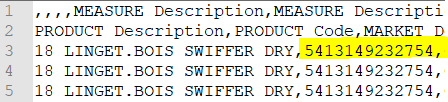
For some reason databricks converts it to scientyfic just like excel do.