Note
Access to this page requires authorization. You can try signing in or changing directories.
Access to this page requires authorization. You can try changing directories.
Microsoft Sentinel SIEM includes a range of capabilities that partners can use to create impactful solutions they can publish through Sentinel SIEM Content Hub. By building on top of Sentinel, partners can enable new scenarios that use security data and analytics capabilities to help customers detect and respond to threats.
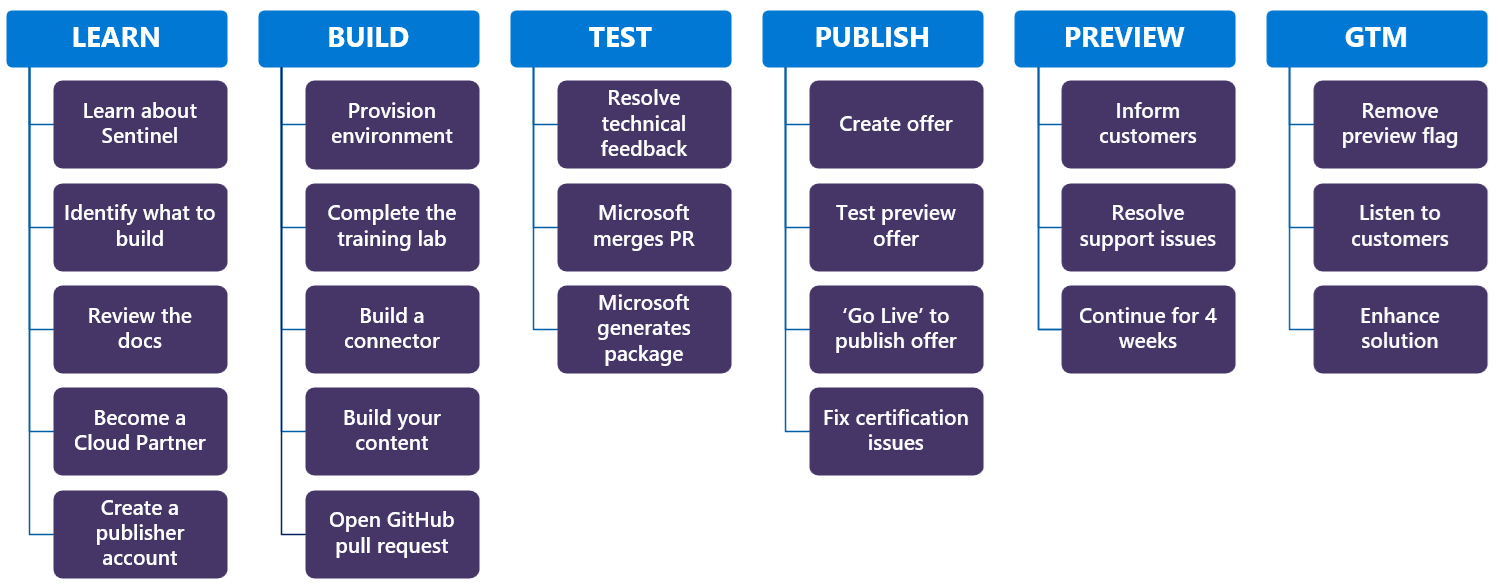
This article provides an overview of the lifecycle of building and publishing Microsoft Sentinel SIEM solutions, from learning about Sentinel and planning your solution, to building, testing, and publishing it to customers. Each section includes links to more detailed documentation to help you through each step of the process.
Prerequisites
Before you create and publish a SIEM solution to Azure Commercial Marketplace, join the Microsoft Cloud Partner Program and create an account in Partner Center. See the following resources for more information:
Join the Microsoft Cloud Partner Program. Create a Commercial Marketplace account in Partner Center.
For example, you can create a connector to bring new data into Sentinel, analyze that data with Sentinel Jupyter notebook jobs, and create an agent that uses MCP tools to analyze the new data along with other data already in the lake. The agent can then interact with other endpoints and external applications to deliver a powerful unified experience to your customers.
Learn about Microsoft Sentinel
To get started, learn about Microsoft Sentinel, identify the data and functionality you want to create, and find the resources to help you learn about the different capabilities that will help you build solutions that keep your customers secure.
| Step | Description |
|---|---|
| Learn about Sentinel | Microsoft Sentinel SIEM is a scalable, cloud-native security information and event management (SIEM) application that delivers an intelligent and comprehensive solution for SIEM and security orchestration, automation, and response (SOAR). It provides cyberthreat detection, investigation, response, and proactive hunting, with a bird's-eye view across your enterprise. For more information, see: What is Microsoft Sentinel? |
| Identify what to build | The most important step to a successful integration is deciding which types of content to include in your solution. Explore the following resources to understand Microsoft Sentinel. For more information, see: Technology Integration Scenarios with Microsoft Sentinel Building Microsoft Sentinel Integrations - Part 1: Onboarding Decide which components to include in your solution |
| Review the docs | There is a rich collection of documentation to support with your journey. Here are some key resources to get you started. For more information, see: Guide to understand Microsoft Sentinel solution repository in GitHub Guide to understand ASIM (Advanced Security Information Model) Schema Guide to understand Kusto query language |
| Become a Cloud Partner and create a Publisher Account | Microsoft Sentinel solutions are published on the Azure Commercial Marketplace. To publish to the marketplace, join the cloud partner program. For more information, see: Guide to understand Microsoft commercial marketplace Guide to create a commercial marketplace account in Microsoft Partner Center Join ISV Success program Sign up for Microsoft for Startups program, if applicable |
Build your solution
Once you have a good understanding of Microsoft Sentinel and the solution you want to building.
| Step | Description |
|---|---|
| Provisioning environment | To help you get started with building and testing your solution, we recommend you sign up for an Azure Free Trial and a Microsoft Sentinel Free Trial. For more information, see: Sign up for an Azure Free Trial Then sign up for a Microsoft Sentinel Free Trial (Scroll down to 'Free trial') |
| Complete the training lab | We highly recommend the training lab to get fully ramped up with Microsoft Sentinel. This lab provides hands-on practical experience for product features, capabilities, and scenarios. For more information, see: Complete the Microsoft Sentinel Training Lab |
| Build a connector | Microsoft Sentinel is built on data. Most solutions start with bringing the data from a customer’s environment into Microsoft Sentinel. To understand how to build a connector, refer to the following resources. For more information, see: Guide to Building Microsoft Sentinel Data Experiences Webinar: Creating Data Connectors |
| Build your SIEM content | In addition to data, your solution can offer a rich array of other components to help customers get the most out of your data. For example, you can offer detections, workbooks, playbooks, and hunting queries to make your offering readily usable by customers. For more information, see: What can you contribute and how can you create contributions? |
| Create Jupyter notebook jobs and Security Copilot agents | Security Copilot agents and Sentinel data lake jobs allow you to create powerful solutions that can reason over data in the Sentinel data lake and identify threats and surface insights. The following resources explain how to use those capabilities. Get started with Microsoft Security Copilot Create and manage Jupyter notebook jobs Running notebooks on the Microsoft Sentinel data lake |
| Using AI with Sentinel data lake | Microsoft Sentinel’s security data lake unifies long‑term, cost‑effective retention with rich, security‑specific context. That foundation pairs naturally with Model Context Protocol (MCP) tools and Microsoft Copilot for Security to deliver agentic (tool‑using, goal‑directed) workflows for Security Operations Center (SOC) teams. For more information, see: What is MCP? Microsoft Security Copilot documentation |
| Security, privacy and compliance | For details on Secure Future Initiative (SFI) requirements, see https://aka.ms/securefutureinitiative Follow the Security Development Lifecycle (SDL) practices for: - Threat modeling - Secure configuration - Dependency hygiene - Penetration testing in coordination with your security team - Use only approved tools for vulnerability tracking and patch management. For more information, see Microsoft Security Development Lifecycle |
Test your solution
Once your solution is built, you need to package and test it. After testing, validate your solution locally, submit a pull request (PR), address feedback, and have your PR approved and merged.
| Step | Description |
|---|---|
| Package and test your SIEM solution | Once your solution is built, package it and test it to ensure that it meets SIEM solution quality standards and is ready for publishing. For more information, see Develop SIEM solutions and Microsoft Sentinel SIEM solution quality guidelines. |
| Run local validation | Run validation scripts against your packaged solution to check whether your solution passes CI validation checks before you submit a PR. For more information, see Local validation scripts. |
| Open a GitHub pull request | Raise a pull request (PR) in the Microsoft Sentinel solutions repository so the Microsoft Sentinel engineering staff can review it and provide feedback. |
| Resolve technical feedback, merge PR, and generate package | The Microsoft Sentinel engineering staff reviews your solution and provides feedback. After you address all technical feedback, the engineering staff merges the pull request into the main branch and generates the final package that you submit with your offer. For more information, see Develop SIEM solutions. |
Publish
Once your solution is built, tested, and certified, you can publish it to the Azure Commercial Marketplace. This section provides guidance on how to publish your solution.
| Step | Description |
|---|---|
| Create an offer | Once you have a solution package, you’re ready to create an offer in the Security Store or Marketplace. For more information on how to publish your solution, see the following resources. For more information, see: Publish Solutions to Microsoft Sentinel |
| Test Offer Preview | We create a version of your offer that is accessible only to the preview audience you specified. Creating a preview offer ensures that specific audiences test your solution before your solution is broadly shared with all customers. We recommend keeping your solution in preview for at least four weeks to gather feedback from customers and address any issues that arise. For more information, see: Status of Microsoft Sentinel solution after publishing in the Microsoft Partner center |
| Fix certification issues | Offers submitted to the commercial marketplace must be certified before being published. If your offer fails any of the checks or if you aren't eligible to submit an offer of that type, a certification failure report is sent to your email address. The errors also show up within Action Center in Partner Center. For more information, see Certification issues. After the issues are fixed, you can resubmit the offer for certification. This triggers the review process again and once the offer passes certification. Your solution is published to the marketplace and available for customers in Microsoft Sentinel content hub within two working days. |
| Make the offer broadly available | Ensure that you validate all aspects of your solution in the test offer preview phase before you make the offer live. For more information, see: Publisher approval |
Go to Market (GTM)
After your solution has been published, you can make your solution generally available to all customers.
| Step | Description |
|---|---|
| Remove preview flag | After the preview period, you can remove the preview flag from your offer to make it generally available to all customers. |
| Listen for customer feedback | Continue to monitor feedback and support requests as your solution gains traction. |
| Enhance solution | Based on customer feedback, you might need to enhance your solution to meet customer needs. Customer feedback might require the addition of new features, improving performance, or addressing any issues that customers encounter. |
Microsoft offers the following programs to help partners approach Microsoft customers:
- Microsoft Partner Network (MPN). The primary program for partnering with Microsoft is the Microsoft Partner Network. Membership in MPN is required to become an Azure Marketplace publisher, which is where all Microsoft Sentinel solutions are published.
- Azure Marketplace. Microsoft Sentinel solutions are delivered via Azure Marketplace, where customers discover and deploy both Microsoft and partner-supplied Azure integrations. Microsoft Sentinel solutions are one of many types of offers found in Marketplace. You can also find solution offerings embedded in Microsoft Sentinel content hub.
- Microsoft Intelligent Security Association (MISA). MISA helps Microsoft Security partners create awareness about partner-created integrations with Microsoft customers and improve discoverability for Microsoft Security product integrations. Joining the MISA program requires a nomination from a participating Microsoft Security product team. Building any of the following integrations can qualify partners for nomination:
- A Microsoft Sentinel data connector and associated content, such as workbooks, sample queries, and analytics rules.
- Published Logic Apps connector and Microsoft Sentinel playbooks.
- API integrations, on a case-by-case basis.
To request a MISA nomination review or ask questions, contact AzureSentinelPartner@microsoft.com.