Enable Microsoft Defender for Key Vault
Cloud Security Posture Management (CSPM) secret scanning finds credentials that already escaped Key Vault. Microsoft Defender for Key Vault takes a different approach—it assumes the vault is properly configured and watches for threat actors trying to access what's inside it. The two capabilities are complementary: one scans the environment for misplaced secrets; the other monitors the vault itself for suspicious access patterns.
Microsoft Defender for Key Vault is a workload protection plan—part of Defender for Cloud's Cloud Workload Protection Platform (CWPP)—that provides threat detection specific to Key Vault. Being part of CWPP distinguishes it from CSPM plans, which focus on posture and exposure. CWPP plans like this one focus on active threats against running workloads.
Contoso Health's production vault had no Defender for Key Vault plan enabled. Defender for Cloud was active on the subscription, but activating Defender for Cloud doesn't automatically activate every workload protection plan. Each plan must be explicitly enabled—and leaving a plan disabled means the threat scenarios it covers go undetected.
Enable Microsoft Defender for Key Vault
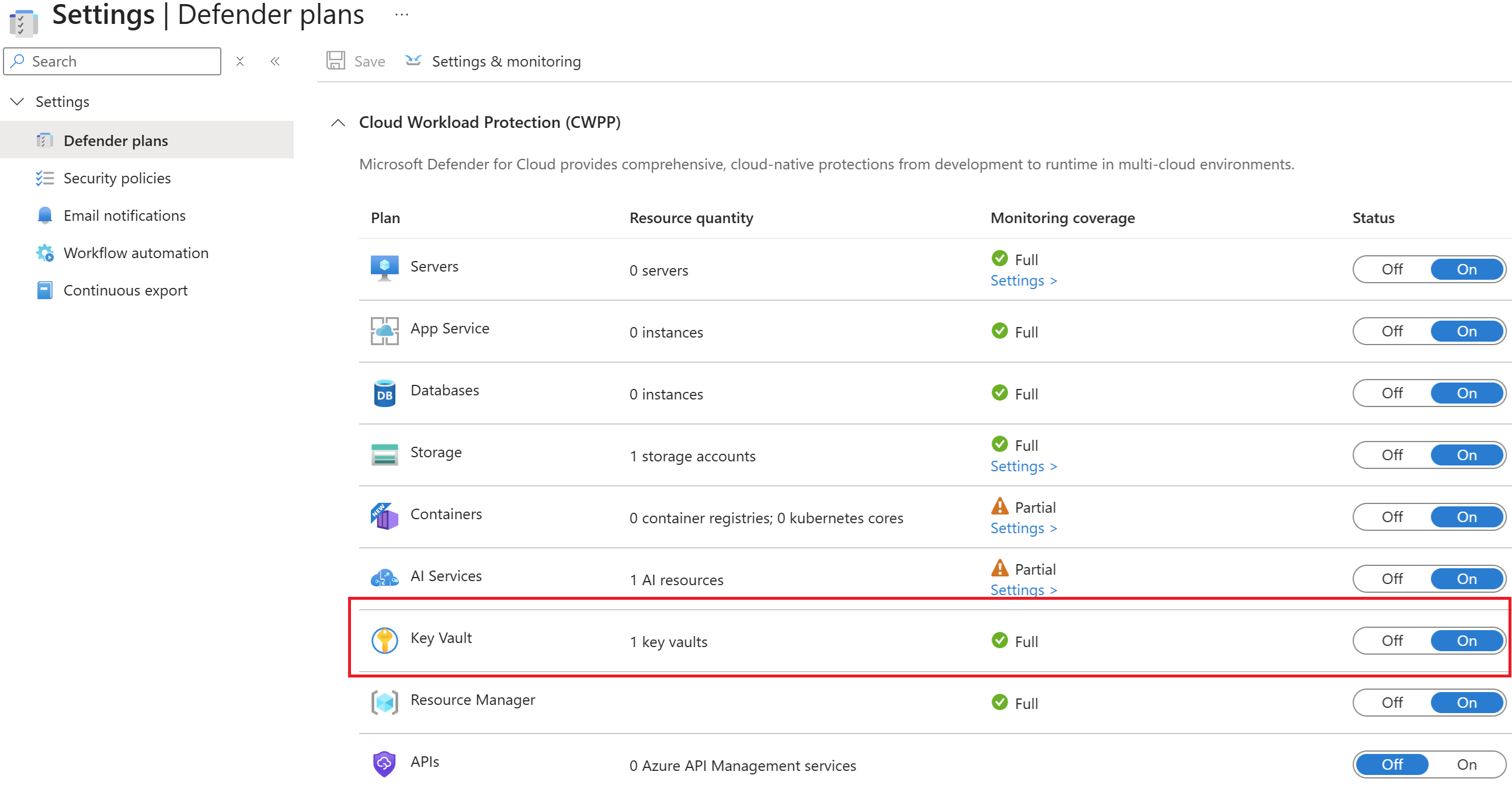
To enable Microsoft Defender for Key Vault, navigate to Defender for Cloud > Environment settings, select your subscription, and toggle on Microsoft Defender for Key Vault. The plan applies to all Key Vault resources in the subscription once enabled.
Important
Microsoft Defender for Key Vault isn't enabled by default. A subscription with Defender for Cloud active but without this plan has no anomalous access alerting for its vaults.
After the admin enables the plan, existing vaults in the subscription are immediately covered—no configuration is required on individual vaults. New vaults added to the subscription are automatically protected as well.
Tip
To enforce Microsoft Defender for Key Vault across multiple subscriptions, enable Defender for Cloud at the management group level. Management group assignment applies the plan to all child subscriptions without requiring per-subscription configuration. See Enable Defender for Cloud on multiple Azure subscriptions. Defender for Key Vault can only be enabled at the subscription level—there's no per-vault toggle.
Identify what Defender for Key Vault monitors
Defender for Key Vault analyzes access patterns and logs from Azure Key Vault's control plane and data plane operations. When an access pattern deviates from the baseline for that vault, an alert is generated. The following alert types represent the primary threat scenarios the plan is designed to detect.
Access from a suspicious IP address or TOR exit node (KV.SuspiciousIPAccess, KV.TORAccess)—Access to the vault originated from an IP address associated with a known threat actor, a scanning infrastructure, or The Onion Router (TOR) exit node. This pattern is consistent with a credential theft scenario: a threat actor who obtained valid credentials for the vault is accessing it from outside your expected network footprint. MITRE ATT&CK tactic: Credential Access.
High volume of operations (KV.OperationVolumeAnomaly)—The vault received an unusually high number of operations in a short time window. Bulk reading of secrets at a rate inconsistent with the vault's normal usage pattern is a strong indicator of data exfiltration. MITRE ATT&CK tactic: Credential Access.
Suspicious policy change followed by secret queries (KV.PutGetAnomaly)—A vault access policy was modified and then, within a short period, secrets were retrieved by an identity that typically doesn't access this vault. This pattern suggests a threat actor modified access permissions to gain access to secrets they shouldn't be able to reach, then immediately harvested them. MITRE ATT&CK tactic: Credential Access.
Unusual application usage (KV.AnomalousAccessOperation)—The vault was accessed by an application identity not previously seen on this vault, or an application that changed its access behavior. This pattern appears when a compromised service principal, managed identity, or AI agent workload identity is used to access vault secrets outside its normal scope. MITRE ATT&CK tactic: Credential Access.
Locate where alerts surface
When Defender for Key Vault generates an alert, it surfaces in three places:
- The Security page of the specific Key Vault in the Azure portal
- The Workload protections dashboard in Defender for Cloud
- The Security alerts page in Defender for Cloud
For teams that want proactive notification, Defender for Cloud supports email notification rules at the subscription level. Configure notifications under Defender for Cloud > Environment settings > Email notifications to reach the security team or on-call responders when alerts fire.
Manage alert suppression rules
Some legitimate activities can produce alerts—for example, a known security scanning tool that regularly reads secrets at high volume can trigger the operation volume anomaly alert. In those cases, you can create a suppression rule in Defender for Cloud to reduce noise for that specific tool and alert combination.
Caution
Only suppress alerts from verified, documented sources in your environment. Don't suppress alerts with unknown origins or unrecognized IP addresses. Suppression rules should be reviewed periodically—what was an expected exception this quarter can be a genuine threat indicator next quarter.
Distinguish between Defender for Key Vault and CSPM scanning
Defender for Key Vault protects the vault from external threats. Defender CSPM scanning protects the environment from secrets exposed outside the vault. An environment with Defender for Key Vault enabled but no CSPM scanning can still have credentials exposed on VM disks or in deployment templates, undetected. An environment with CSPM scanning but no Defender for Key Vault plan is unable to see threat actors using stolen credentials to access vault contents. Both plans provide full coverage for the Key Vault security posture.