Azure Firewall
An Azure network security service that is used to protect Azure Virtual Network resources.
This browser is no longer supported.
Upgrade to Microsoft Edge to take advantage of the latest features, security updates, and technical support.
' cx='32' cy='32' r='32' /%3E%3Ctext x='50%25' y='55%25' dominant-baseline='middle' text-anchor='middle' fill='%23FFF' %3EA%3C/text%3E%3C/svg%3E)
hello,
i want to use Private endpoints in my virtual network to access synapse what i must do?
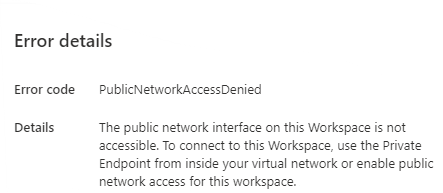
it is give me this error when i try to linked service with source from synapse
An Azure network security service that is used to protect Azure Virtual Network resources.
An Azure networking service that is used to provision private networks and optionally to connect to on-premises datacenters.
An Azure analytics service that brings together data integration, enterprise data warehousing, and big data analytics. Previously known as Azure SQL Data Warehouse.
An Azure service that provides private connectivity from a virtual network to Azure platform as a service, customer-owned, or Microsoft partner services.
' cx='32' cy='32' r='32' /%3E%3Ctext x='50%25' y='55%25' dominant-baseline='middle' text-anchor='middle' fill='%23FFF' %3EBM%3C/text%3E%3C/svg%3E)
Hello @Anonymous ,
Welcome to the MS Q&A platform.
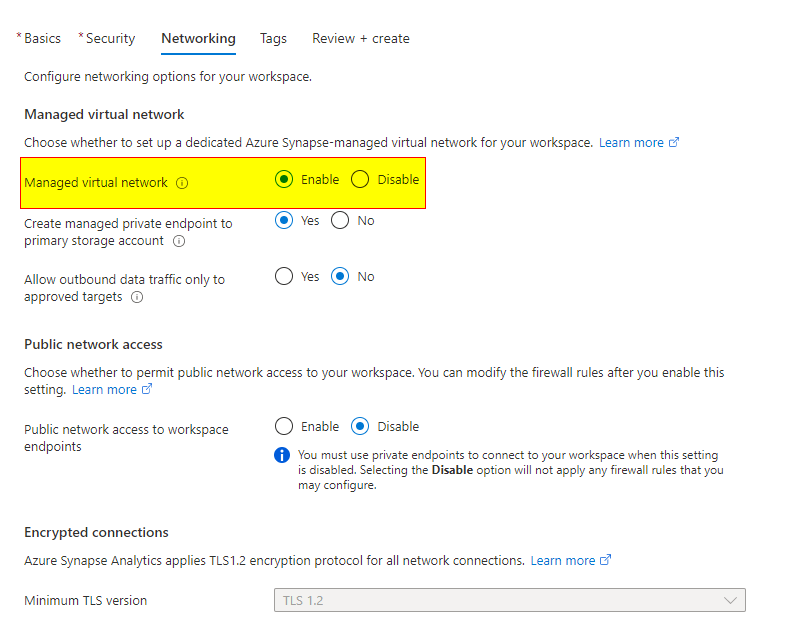
If you want to use the managed virtual networks and private endpoints in Azure synapse, you need to enable 'Managed virtual network' on the networking tab during the Synapse workspace creation.
In case, if you created the workspace without the 'Managed virtual network' enabled, then you can't go back and enable it after creating the workspace. This needs to be enabled during the workspace creation.
If you disable Public network access, You must use private endpoints to connect to your workspace when this setting is disabled.
Once you have enabled the managed virtual networks, here are the steps to use the managed Vnet and private endpoints
1) create Azure integration runtime within a managed Vnet
2) create managed private endpoint to azure services(ex: AzureSQL, blob, etc)
3) Approve private endpoint request a private link center. You can approve them from the 'Private link center' or directly from the 'Azure services'
Please let me know if you have any further questions.
Docs:
https://learn.microsoft.com/en-us/azure/synapse-analytics/security/connectivity-settings
https://learn.microsoft.com/en-us/azure/synapse-analytics/security/synapse-workspace-managed-vnet
Hello @Anonymous ,
I am just checking in to see if you have any further questions here.
Hello @Anonymous ,
I am just checking in to see if you have any further questions here.
Hello @Anonymous ,
I am just checking in to see if you have any further questions here.
------------------------------
If this answers your question, please consider accepting the answer by hitting the Accept answer button, as it helps the community.