Exchange | Exchange Server | Management
The administration and maintenance of Microsoft Exchange Server to ensure secure, reliable, and efficient email and collaboration services across an organization.
This browser is no longer supported.
Upgrade to Microsoft Edge to take advantage of the latest features, security updates, and technical support.
' cx='32' cy='32' r='32' /%3E%3Ctext x='50%25' y='55%25' dominant-baseline='middle' text-anchor='middle' fill='%23FFF' %3ED%3C/text%3E%3C/svg%3E)
we are migrating exchange 2019 to office 365 - public folders
When running source 'sidevalidation" script i receive the following error :
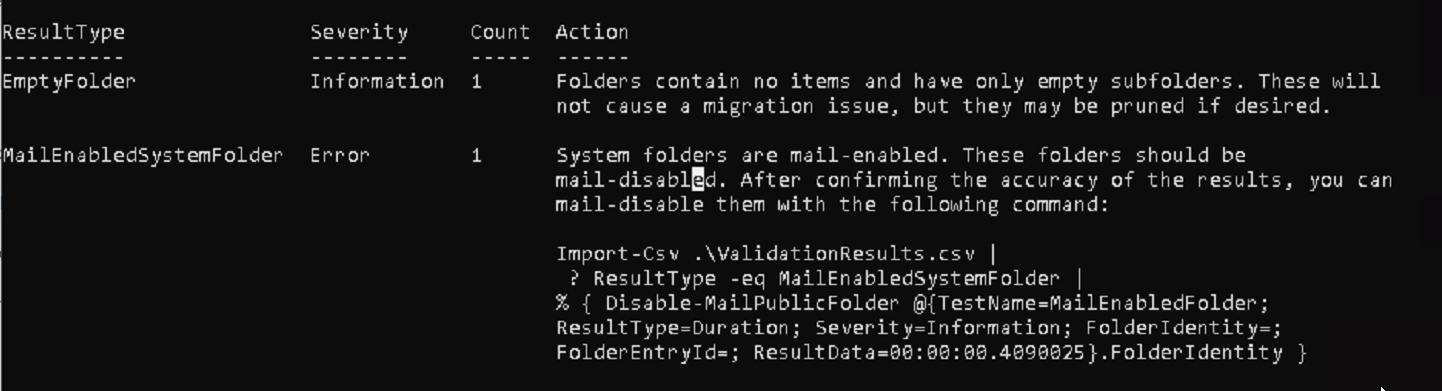
The sample command it provides does not seem to work can anyone provide me with the correct syntax to resolve the error ? (how to mail disable the system folder in question)
Import-Csv .\ValidationResults.csv |
? ResultType -eq MailEnabledSystemFolder |
% { Disable-MailPublicFolder @{TestName=MailEnabledFolder;ResultType=Duration; Severity=Information; FolderIdentity=;FolderEntryId=; ResultData=00:00:00.4090025}.FolderIdentity }
thanks,
The administration and maintenance of Microsoft Exchange Server to ensure secure, reliable, and efficient email and collaboration services across an organization.
The administration of a hybrid deployment that connects on-premises Exchange Server with Exchange Online, enabling seamless integration and centralized control.
i figured this one out after finding this article
' cx='32' cy='32' r='32' /%3E%3Ctext x='50%25' y='55%25' dominant-baseline='middle' text-anchor='middle' fill='%23FFF' %3EJS%3C/text%3E%3C/svg%3E)
Hi @dirkdigs
Glad to know that your issue is resolved and thanks for sharing the solution here! Since our forum has the policy that The question author cannot accept their own answer. They can only accept answers by others, and according to the scenario introduced here: Answering your own questions on Microsoft Q&A
I would make a brief summary of this post so that other forum members could easily find useful information here:
[Mail enable system folder error - PF migration - Summary]
Issue Symptom:
When migrating public folders from exchange 2019 to office 365, get the error:
System folders are mail-enabled. These folders should be mail-disabled. After confirming the accuracy of the results, you can mail-disable them with the following command:
Import-Csv .\ValidationResults.csv | ? ResultType -eq MailEnabledSystemFolder | % { Disable-MailPublicFolder @{TestName=MailEnabledFolder;ResultType=Duration; Severity=Information; FolderIdentity=;FolderEntryId=; ResultData=00:00:00.4090025}.FolderIdentity }
(Possible) Cause:
This problem occurs if the NON_IPM_SUBTREE system folder contains mail-enabled public folders. Public folders in the NON_IPM_SUBTREE folder don't have to be mail-enabled. They may have been previously mail-enabled because they were in a Microsoft Exchange 2000 Server environment that was running in mixed mode. In this situation, Exchange tries to mail-enable all public folders.
Solution:
To mail-disable public folders on NON_IPM_SUBTREE, run these commands:
For public folders on Exchange Server 2010
List mail-enabled public folders from NON_IPM_SUBTREE:
$pf=Get-PublicFolder \NON_IPM_Subtree -recurse -ResultSize Unlimited | ? { $_.MailEnabled }; ForEach ($i in $pf) {$mesoObj = Get-MailPublicFolder $i.identity; if ($mesoObj -eq $null) {$i }}
Mail-disable the public folders:
$pf=Get-PublicFolder \NON_IPM_Subtree -recurse -ResultSize Unlimited | ? { $_.MailEnabled }; ForEach ($i in $pf) {$mesoObj = Get-MailPublicFolder $i.identity; if ($mesoObj -eq $null) { Disable-MailPublicFolder $i -confirm:$False} }
For public folders on Exchange Server 2013 and later versions
List Mail-Enabled public folders from NON_IPM_SUBTREE:
$pf=Get-PublicFolder \NON_IPM_Subtree -recurse -ResultSize Unlimited | ? { $_.MailEnabled }; ForEach ($i in $pf) {$mesoObj = Get-MailPublicFolder $i.identity; if ($mesoObj -eq $null) {$i }}
Mail-disable the public folders:
$pf=Get-PublicFolder \NON_IPM_Subtree -recurse -ResultSize Unlimited | ? { $_.MailEnabled }; ForEach ($i in $pf) {$mesoObj = Get-MailPublicFolder $i.identity; if ($mesoObj -eq $null) { Set-PublicFolder $i -MailEnabled:$false -confirm:$False} }
To locate the system public folders, open the Exchange Management Console, go to Toolbox, open the Public Folder Management Console, and then expand System Public Folders. Mail-disable any public folder that has a mail icon next to it.
Reference Links:
Public folder couldn't be mail-enabled when you migrate public folders to Exchange Online
You could "Accept Answer" for this summary to close this thread, and your action would be helpful to other users who encounter the same issue and read this thread. Thanks for your understanding!
If an Answer is helpful, please click "Accept Answer" and upvote it.
Note: Please follow the steps in our documentation to enable e-mail notifications if you want to receive the related email notification for this thread.