fyi, what worked for me was using the Azure Hybrid Join method. once i configured windows365 for hybrid the "azure network connection" successfully provisioned and i was able to get visibility to our internal network using the azure site to site connection i created. thank you!
Windows365 using different subnet
Hello!
i've successfully created an azure site to site connection (vnet, subnets, local and virtual gateways are all good)
i've purchased a couple windows365 licenses then configured an azure network connection (join type = Azure AD Join) tied the connection to my azure resource group, vnet and subnet.
so i then fire up the cloudpc, i get a completely different ip address/subnet that is definitely not mine. im unable to ping or access my on-prem network.
i then fire up an azure vm in the same resource group. i can ping my on prem network with no prob. not sure what im missing or where the windows365 cloud pc is getting its routing or subnet information but any help would great. thanks in advance
Windows for business | Windows 365 Enterprise
Microsoft Security | Microsoft Entra | Microsoft Entra ID
A cloud-based identity and access management service for securing user authentication and resource access
2 answers
Sort by: Most helpful
-
Carlos Solís Salazar 18,376 Reputation points MVP2022-05-04T09:15:13.713+00:00 Hi @
Thank you for asking this question on the **Microsoft Q&A Platform. **
The windows 365 Cloud pc has diverse kinds of networks.
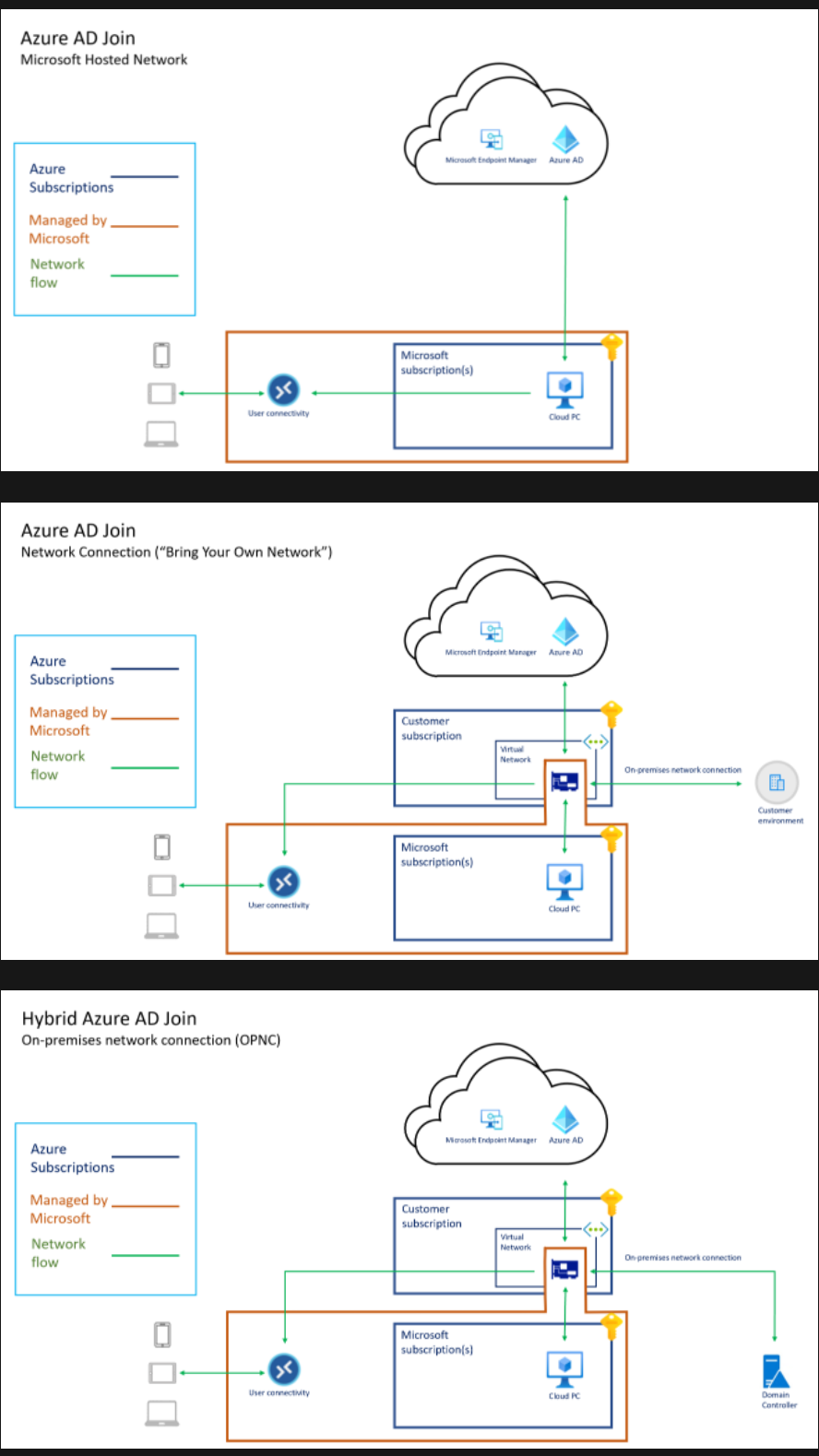
]
Source: https://learn.microsoft.com/en-us/windows-365/enterprise/architectureAccording to your explanation, you require an On-Premises network connection.
This is the documentation to create an Azure Network Connection
Azure network connections (ANC) let you provision Cloud PCs that are attached to a virtual network that you manage.
Hope this helps,
Carlos Solís Salazar
Accept Answer and Upvote, if any of the above helped, this thread can help others in the community looking for remediation for similar issues.
NOTE: To answer you as quickly as possible, please mention me in your reply.