Note
Access to this page requires authorization. You can try signing in or changing directories.
Access to this page requires authorization. You can try changing directories.
Azure Automation is a cloud-based automation service that helps you automate processes and supports consistent management across Azure and non-Azure environments. It includes capabilities such as Process automation, Configuration management, and Shared capabilities for heterogeneous environments.
By using Azure Automation, you can reduce manual effort, improve operational efficiency, and ensure consistent execution of tasks across your environment. You can apply automation across three key areas of cloud operations:
- Deploy and manage - Deliver repeatable and consistent infrastructure as code.
- Response - Create event-based automation to diagnose and resolve issues.
- Orchestrate - Orchestrate and integrate your automation with other Azure or third-party services and products.
How Azure Automation integrates with other Azure services
Several Azure services integrate with Azure Automation to support deployment and management, event response, and workflow orchestration. Each service provides a set of capabilities and serves as a programmable platform to build cloud solutions. For example, Azure Bicep and Resource Manager provide a language to develop repeatable and consistent deployment templates for Azure resources. Azure Automation executes these templates to deploy an Azure resource and then performs post-deployment configuration tasks.
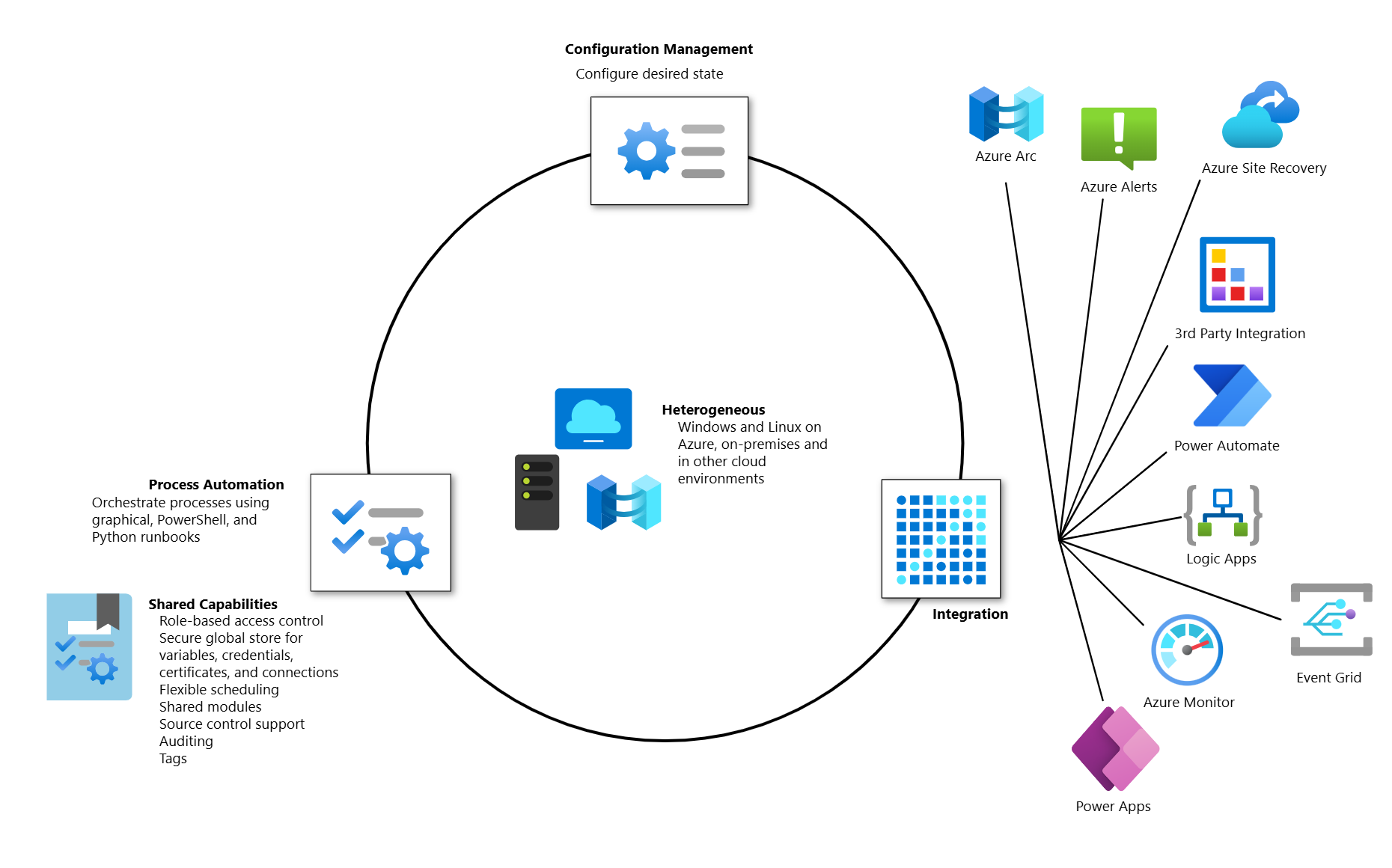
Depending on your requirements, Azure Automation can integrate with one or more of the following Azure services:
- Azure Arc-enabled servers enables simplified onboarding of hybrid machines to Change Tracking and Inventory using AMA, and the Hybrid Runbook Worker role.
- Azure Alerts action groups can initiate an Automation runbook when an alert is raised.
- Azure Monitor collects metrics and log data from your Automation account for further analysis and act on the telemetry.
- Azure Policy includes initiative definitions to help establish and maintain compliance with different security standards for your Automation account.
- Azure Site Recovery can use Azure Automation runbooks to automate recovery plans.
These Azure services can work with Automation job and runbook resources by using an HTTP webhook or API method:
Note
This service supports Azure Lighthouse, which lets service providers sign in to their own tenant to manage subscriptions and resource groups that customers have delegated.
Automation gives you complete control during deployment, operations, and decommissioning of enterprise workloads and resources.
Azure Automation provides the following core capabilities:
Process automation
Process Automation in Azure Automation helps you automate repetitive, time-consuming, and error-prone management tasks. This service helps you focus on work that adds business value. By reducing errors and boosting efficiency, it also helps lower operational costs. To learn more about the process automation operating environment, see Runbook execution in Azure Automation.
Process automation supports integration of Azure services and other third-party systems required in deploying, configuring, and managing your end-to-end processes. This capability allows you to author graphical, PowerShell, and Python runbooks. To run runbooks directly on Windows or Linux machines or against resources in on-premises or other cloud environments to manage those local resources, you can deploy a Hybrid Runbook Worker.
Webhooks let you fulfill requests and ensure continuous delivery and operations by triggering automation from Azure Logic Apps, Azure Functions, ITSM product or service, DevOps, and monitoring systems.
Configuration management
Configuration management in Azure Automation helps ensure that systems remain consistent and compliant by automatically applying and maintaining desired configurations. Azure Automation supports configuration management through the State Configuration capability.
Azure Automation State Configuration
Azure Automation State Configuration is a cloud-based feature for PowerShell desired state configuration (DSC) that provides services for enterprise environments. By using this feature, you can manage your DSC resources in Azure Automation and apply configurations to virtual or physical machines from a DSC pull server in the Azure cloud.
Shared capabilities
Azure Automation provides several shared capabilities, including shared resources, role-based access control (Azure RBAC), flexible scheduling, source control integration, auditing, and tagging.
Shared resources
Azure Automation includes a set of shared resources that help you automate and configure your environments at scale.
- Schedules - Trigger automation operations at predefined times.
- Modules - Manage Azure and other systems. Import modules into the Automation account for Microsoft, third-party, community, and custom-defined cmdlets and DSC resources.
- Modules gallery - Supports native integration with the PowerShell Gallery. You can view runbooks and import them into the Automation account. It also helps you quickly get started integrating and authoring your processes from PowerShell gallery and Microsoft Script Center.
- Python 2 and 3 packages - Support Python 2 and 3 runbooks for your Automation account.
- Credentials - Securely store sensitive information that runbooks and configurations can use at runtime.
- Connections - Store name-value pairs of common information for connections to systems. The module author defines connections in runbooks and configurations for use at runtime.
- Certificates - Define information to use in authentication and securing deployed resources when accessed by runbooks or DSC configurations at runtime.
- Variables - Hold content that you can use across runbooks and configurations. You can change variable values without modifying any of the runbooks or configurations that reference them.
Role-based access control
Azure Automation supports Azure role-based access control to regulate access to the Automation account and its resources. To learn more about configuring Azure RBAC on your Automation account, runbooks, and jobs, see Role-based access control for Azure Automation.
Flexible scheduling
Azure Automation provides flexible scheduling to automate runbooks at specified times and recurring intervals, such as hourly, daily, weekly, or monthly. You can configure schedules by specific days of the week, days of the month, or custom date patterns. A single runbook can link to multiple schedules, and vice versa. It automatically handles Daylight Saving Time adjustments, supports time zone configuration for global operations, and enables schedule creation and management through the Azure portal or PowerShell. To learn more, see Manage schedules in Azure Automation.
Source control integration
Azure Automation supports Source control integration. This feature promotes configuration as code where runbooks or configurations can be checked into a source control system.
Auditing
Azure Automation supports auditing through audit logs that capture create, update, and delete operations across Automation accounts, runbooks, and other assets. You can send these logs to an Azure Monitor workspace for security monitoring, compliance reviews, and investigation of operational changes. To learn more, see Forward Azure Automation job data to Azure Monitor logs and Data retention in Azure Automation.
Tagging
Azure Automation supports Azure Resource Manager tags to categorize and organize Automation resources. While creating an Automation account from the portal, you can specify Resource Manager tags to help organize your Azure resources. To learn more, see Tag resources, resource groups, and subscriptions for logical organization.
Hybrid automation
Automates workloads across Azure and on-premises environments, including services such as SQL Server, Active Directory, and SharePoint Server by using Hybrid Runbook Worker.
Heterogeneous support (Windows and Linux)
Automation is designed to work across Windows and Linux physical servers and virtual machines in non-Azure, on-premises environments, and other cloud providers. It provides a consistent approach to automate and configure deployed workloads and the operating systems that run them. The Hybrid Runbook Worker feature enables you to run runbooks directly on the non-Azure physical server or virtual machine hosting the role, and against resources in the environment to manage those local resources.
Through Arc-enabled servers, it provides consistent deployment and management experience for your non-Azure machines. It enables integration with the Automation service using the VM extension framework to deploy the Hybrid Runbook Worker role, and simplify onboarding Change Tracking and Inventory using AMA.
Common scenarios
Azure Automation supports management throughout the lifecycle of your infrastructure and applications. Common scenarios include:
- Schedule tasks - Stop VMs or services at night and turn on during the day, weekly or monthly recurring maintenance workflows.
- Build and deploy resources - Deploy resources across a hybrid environment using runbooks and Azure Resource Manager templates. Integrate into development tools such as Jenkins and Azure DevOps.
- Periodic maintenance - Execute tasks that need to be performed at defined intervals, such as purging stale or old data, or reindexing a SQL database.
- Respond to alerts - Orchestrate a response when cost-based, system-based, service-based, and resource utilization alerts are generated.
- Azure resource lifecycle management - Manage IaaS and PaaS resources across their lifecycle, including:
- Resource provisioning and deprovisioning.
- Add correct tags, locks, NSGs, UDRs per business rules.
- Resource group creation, deletion, and update.
- Start container group.
- Register DNS record.
- Encrypt virtual machines.
- Configure disk (disk snapshot, delete old snapshots).
- Subscription management.
- Start and stop resources to save cost.
- Monitoring and Integration - Integrate with first-party (through Azure Monitor) or third-party external systems, including:
- Ensure resource creation and deletion operations are captured to SQL.
- Send resource usage data to web API.
- Send monitoring data to ServiceNow, Event Hubs, New Relic, and so on.
- Collect and store information about Azure resources.
- Perform SQL monitoring checks and reporting.
- Check website availability.
- Dev/test automation scenarios - Stop, start, and scale resources.
- Governance related automation - Automatically apply or update tags and locks.
- Azure Site Recovery - Orchestrate pre/post scripts defined in a Site Recovery DR workflow.
- Azure Virtual Desktop - Orchestrate scaling of VMs or start/stop VMs based on utilization.
- Configure VMs - Assess and configure Windows and Linux machines with configurations for the infrastructure and application.
- Retrieve inventory - Get a complete inventory of deployed resources for targeting, reporting, and compliance.
- Find changes - Identify and isolate machine changes that can cause misconfiguration and improve operational compliance. Remediate or escalate them to management systems.
Pricing for Azure Automation
Process automation includes runbook jobs and watchers. Billing for jobs is based on the number of job run time minutes used in the month, while for watchers, it's based on the number of hours used in a month. You incur charges for process automation whenever a job or watcher runs. You create Automation accounts with a Basic SKU, where the first 500 job run time minutes are free per subscription. You pay only for minutes or hours that exceed the 500 free included units.
To learn about Azure Automation pricing, visit the pricing page.