Note
Access to this page requires authorization. You can try signing in or changing directories.
Access to this page requires authorization. You can try changing directories.
Summary
This article helps you resolve the "This feature has been disabled" error that occurs when you try to create AI prompts in Microsoft Copilot Studio. Typically, this error appears if the AI prompts feature is disabled at the environment level in Microsoft Power Platform admin center or is restricted by an organizational policy. Enabling the feature lets you create custom prompts for your Copilot Studio agents.
Symptoms
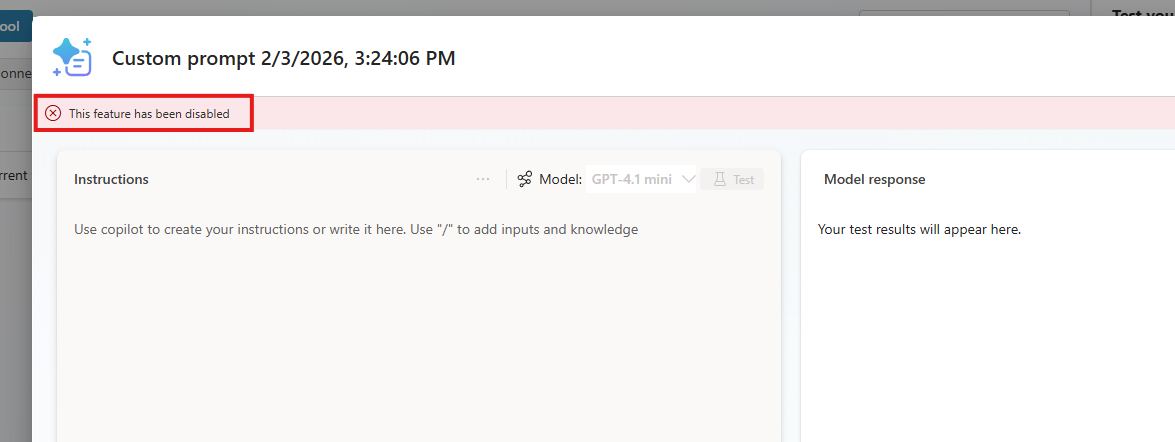
When you try to create a new prompt in Copilot Studio, the following message appears in the prompt builder:
This feature has been disabled
Cause
An administrator disabled the AI prompts feature at the environment level in Power Platform admin center or restricted it by using an organizational policy. When this feature is disabled, you receive an error message when you try to create an AI prompt.
Solution
To resolve this issue, an administrator must enable the AI prompts feature in Power Platform admin center:
Sign in to Power Platform admin center by using administrator credentials.
Select Manage > Environments.
Select the environment in which the error occurs, and then select Settings.
Go to Product > Features.
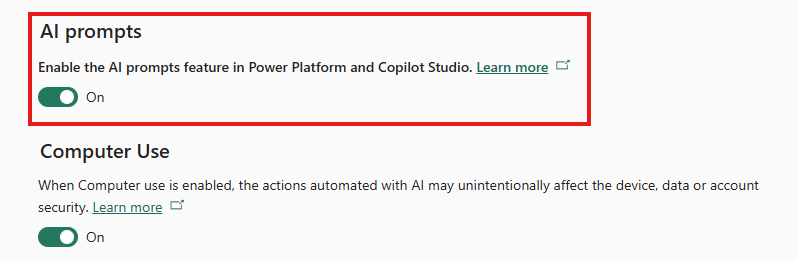
Locate and turn on the AI prompts setting.
Select Save.
Return to Copilot Studio, and verify that the prompt builder no longer shows the error message.
For more information, see Enable or disable AI prompts in Power Platform and Copilot Studio.