Note
Access to this page requires authorization. You can try signing in or changing directories.
Access to this page requires authorization. You can try changing directories.
Delta change data feed (CDF) captures inserts, updates, and deletes, then applies them to Delta Lake tables in OneLake. This flow supports near real-time analytics without full reloads or heavy ETL pipelines.
- Continuously processes incremental changes (delta-based).
- Uses change-only processing.
- Supports downstream incremental processing.
- Is available for all mirroring sources, including open mirroring partners.
Prerequisites
- A Microsoft Fabric capacity (F2 or higher) or Fabric trial.
- A mirrored database in a Fabric workspace.
- A Fabric Lakehouse exists in the same or another workspace (for querying CDF data)
Enable delta change data feed in the Fabric portal
Enable delta change data feed for each mirrored database.
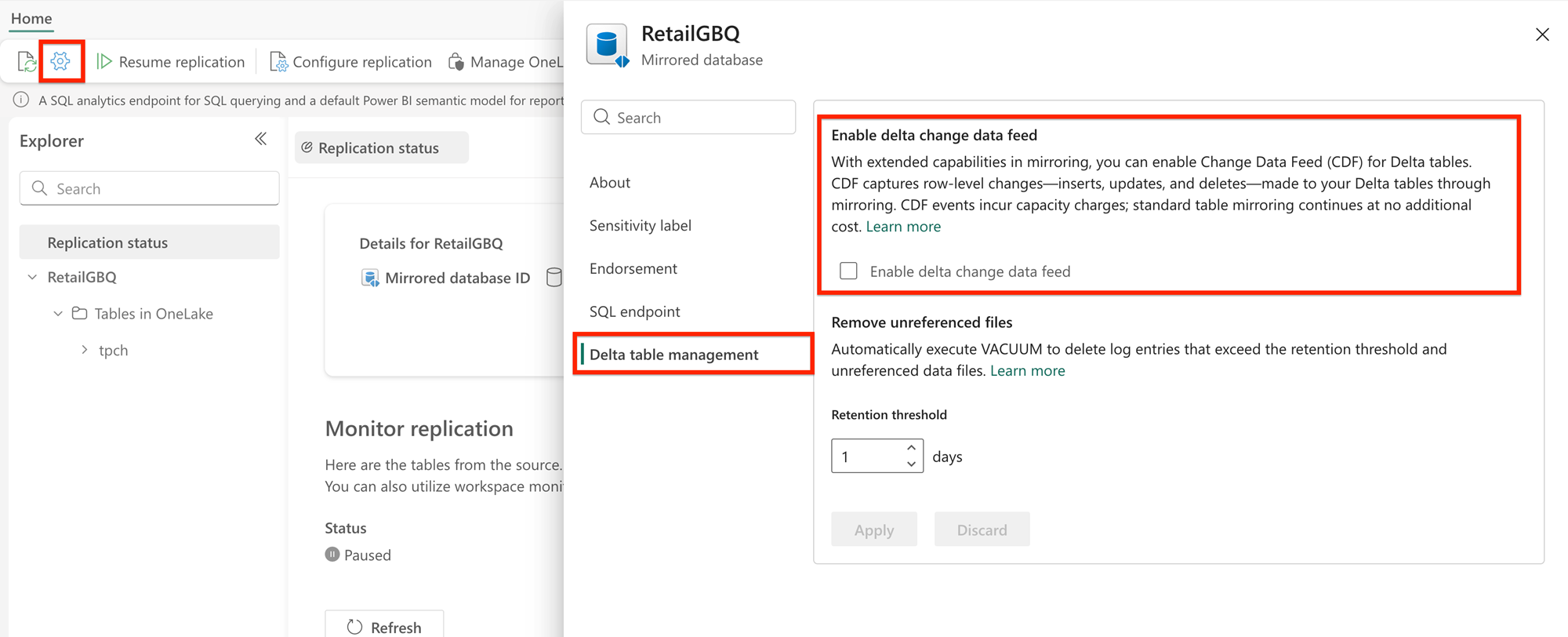
- For any mirrored source, select the gear icon to open the configuration dashboard.
- Under Delta table management, select the check box to Enable delta change data feed.
Enable delta change data feed by using APIs
To enable delta change data feed by using APIs, see Enable delta change data feed for a mirrored database.
Enable delta change data feed for existing tables
If you created your mirrored database before CDF became available, you can enable CDF by using the Fabric REST API. The process retrieves the current definition, adds the CDF property, and updates the definition.
Retrieve the mirrored database definition:
POST https://api.fabric.microsoft.com/v1/workspaces/{workspaceId}/mirroredDatabases/{mirroredDatabaseId}/getDefinitionDecode the
mirroring.jsonpayload from the response. The payload is Base64-encoded.Add
"enableDeltaChangeDataFeed": trueto thetarget.typePropertiessection:{ "properties": { "source": { ... }, "target": { "type": "MountedRelationalDatabase", "typeProperties": { "defaultSchema": "dbo", "format": "Delta", "enableDeltaChangeDataFeed": true, "retentionInDays": 1 } } } }Re-encode the updated JSON to Base64, then update the definition:
POST https://api.fabric.microsoft.com/v1/workspaces/{workspaceId}/mirroredDatabases/{mirroredDatabaseId}/updateDefinition
After you update the definition, retrieve it again and confirm that enableDeltaChangeDataFeed is true.
Folder structure
When CDF is enabled, each replicated table in OneLake contains a _change_data subfolder in addition to the standard Delta Lake _delta_log and data files.
Tables/
└── <TableName>/
    ├── _delta_log/
    ├── _change_data/
    │   ├── part-00000-<guid>.parquet
    │   └── ...
    └── part-00000-<guid>.parquet
The _change_data folder holds Parquet files with row-level change records, including metadata columns such as _change_type (insert, update_preimage, update_postimage, delete), _commit_version, and _commit_timestamp.
Query change data
Important
To query CDF data, you must first create a Lakehouse shortcut pointing to the mirrored database table. You can't query CDF data directly from the mirrored database item. The shortcut makes _change_data files accessible from Spark.
Create a Lakehouse shortcut:
- In your Fabric workspace, open or create a Lakehouse.
- In the Lakehouse explorer, select New shortcut.
- Select Microsoft OneLake as the source.
- Go to the mirrored database and select the table you want to query.
- Select Create to finish creating the shortcut.
Open a Fabric notebook attached to your Lakehouse and use one of the following options to query change data:
Option A: Read changes starting from a specific version
Use the readChangeFeed option with startingVersion to read all CDF changes from a specific Delta table version forward. Replace <lakehouse_name> and <table_name> with your Lakehouse and table names.
df = spark.read.format("delta") \
    .option("readChangeFeed", "true") \
    .option("startingVersion", 0) \
    .table("<lakehouse_name>.<table_name>")

df.show()
Option B: Read changes within a timestamp range
Use the readChangeFeed option with startingTimestamp and endingTimestamp to read CDF changes within a specific time window.
df = spark.read.format("delta") \
    .option("readChangeFeed", "true") \
    .option("startingTimestamp", "2025-01-01T00:00:00Z") \
    .option("endingTimestamp", "2025-01-02T00:00:00Z") \
    .table("<lakehouse_name>.<table_name>")

df.show()
Option C: Use SQL syntax
Use the table_changes() SQL function to query CDF data. This approach works in any Spark SQL context.
df = spark.sql("""
    SELECT * FROM table_changes('<lakehouse_name>.<table_name>', 0)
""")

df.show()
Downstream consumption options
Delta change data feed supports several downstream consumption paths:
| Consumption method | Description | Status |
|---|---|---|
| Spark Notebooks | Query change data using readChangeFeed or table_changes() through a Lakehouse shortcut. |
Available now |
| Copy Job | Use Copy Job to read CDF changes from a Fabric Lakehouse and replicate incrementally to destinations such as SQL, Snowflake, Fabric Lakehouse, and more. Create a shortcut from the mirrored database to a Lakehouse, then Copy Job reads changes from the Lakehouse. Direct mirrored database to Copy Job support is in development. | Available now (via Lakehouse shortcut); direct support coming soon |
| Eventstreams (Mirrored Database Change Feed Connector) | Stream CDF changes from mirrored databases directly into Fabric Eventstreams for low-latency, event-driven applications. Discover CDF-enabled databases in the Real-Time Hub, create an Eventstream, and route to destinations such as Eventhouse or set up Activator alerts. | Preview |
| Data Pipelines | Data pipelines don't natively support incremental copy from CDF. You can use notebooks within pipelines to achieve incremental processing. | Workaround available |
Pricing
Note
Billing for extended capabilities resumed to all regions as of the week of May 25. 2026. UX support for enabling extended capabilities is also reenabled, though you can also extend capabilities via APIs.
Mirroring without extended capabilities is free.
Key pricing clarifications:
- Billing is usage-based. You're billed only for the incremental compute used when CDF processes real changes. There are no charges for idle time or empty runs (periods where no source data changes occur).
- Core mirroring remains free. Enabling CDF doesn't change the pricing for core mirroring. Continuous replication, Delta Lake conversion, OneLake integration, and SQL analytics endpoints remain free.
- Storage for mirroring is free. Storage for mirrored data in OneLake isn't billed separately. However, enabling CDF increases storage consumption because of additional
_change_datafiles. - CDF is an add-on, not a replacement. CDF billing is for the extended capability compute only. It doesn't retroactively charge for core mirroring activity.
- You can control cost by selectively enabling CDF. CDF is enabled at the mirrored database level. Enable CDF only on the mirrored databases that need incremental processing, and leave others on core mirroring.
For the full pricing model, metering details, and billing scope, see Billing for extended capabilities in mirroring.