Note
Access to this page requires authorization. You can try signing in or changing directories.
Access to this page requires authorization. You can try changing directories.
This article answers common governance, data privacy, compliance, and AI model questions for the Azure Copilot observability agent (preview).
Important
Azure Copilot observability agent is currently in preview. See the Supplemental Terms of Use for Microsoft Azure Previews for legal terms that apply to Azure features that are in beta, preview, or otherwise not yet released into general availability.
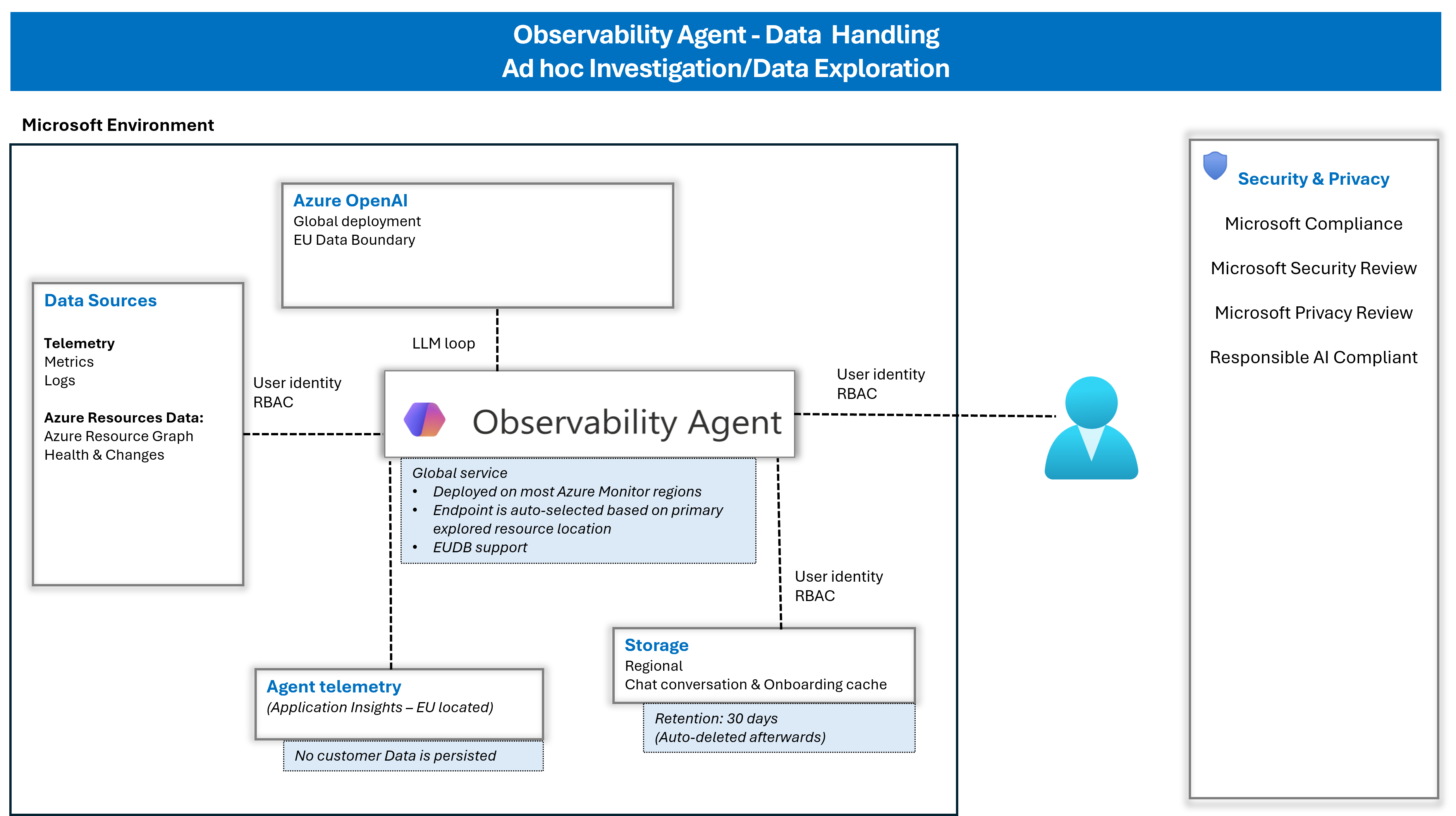
The following diagram shows data handling for ad hoc investigation and data exploration.
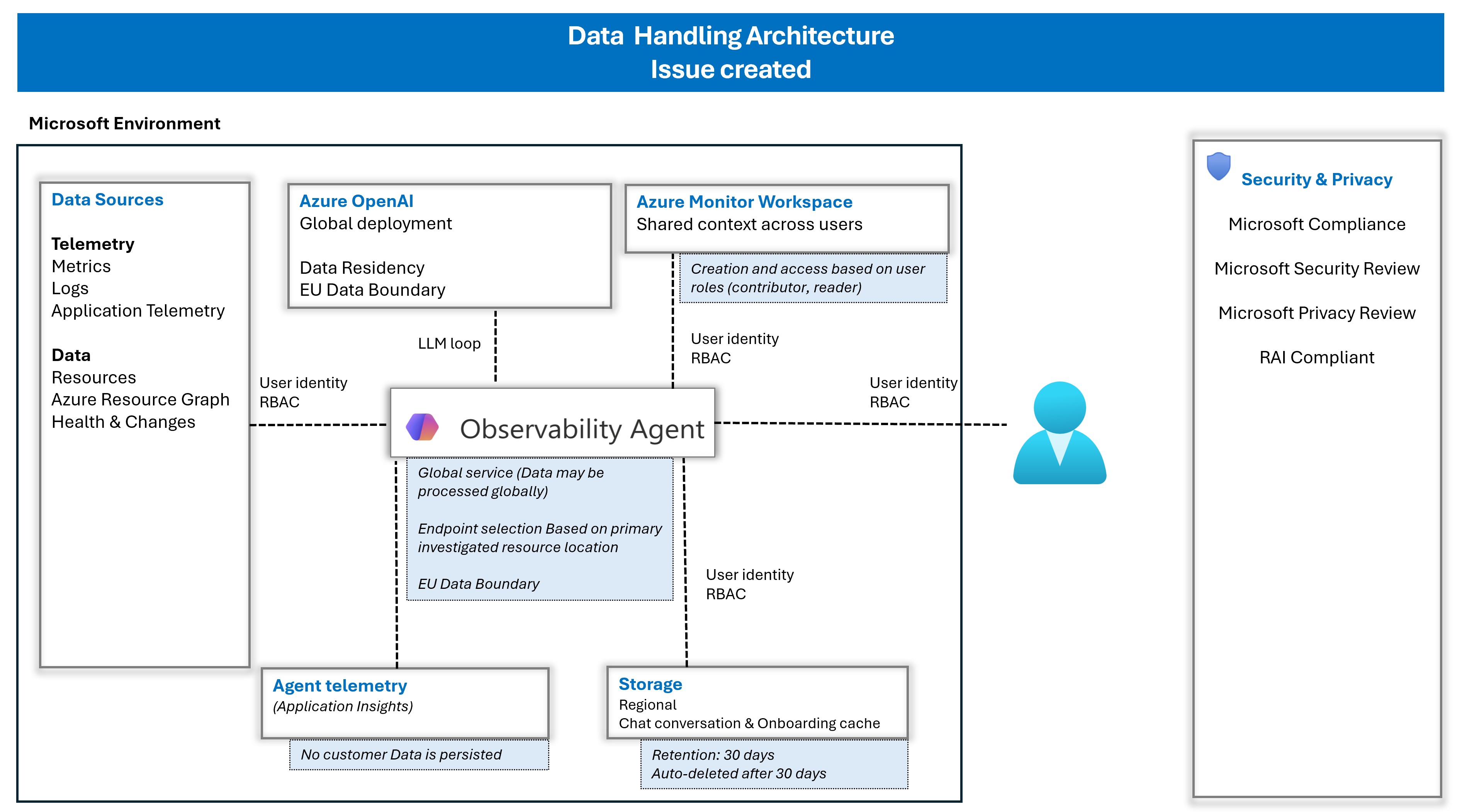
The following diagram shows data handling after an issue is created, including shared context in Azure Monitor Workspace and role-based access.
Data and privacy
This section answers questions about data access, retention, and permissions for the observability agent.
What data does the agent use?
The agent reads Azure observability signals (including logs, metrics, traces, and alerts) as well as relevant Azure data. The agent uses the identity of the user operating it - the user that initiated the investigation or chat. Therefore, the agent is limited to the RBAC and permissions of that user and can't access resources or data that the user can't access.
Is my application data and chat conversation data sent outside my tenant?
Microsoft-managed services process application and conversation data. Azure role-based access control (Azure RBAC) governs access to Azure resources and data, so the agent can access only the resources and data that the initiating user is authorized to view. Microsoft's privacy and data-processing commitments for commercial services are described in the Privacy and data management overview and Azure customer data protection guidance.
What permissions does the agent use to access the data?
The agent accesses data on behalf of the user by using the user's identity. Azure RBAC governs access to data and limits it to the permissions assigned to that user.
How does the Observability Agent retain data?
The Observability Agent might retain limited service data to support investigations and user interactions. Any such retention is subject to applicable service design and documentation, and it should be scoped, access-controlled, and time-bound. The agent handles three categories of data — conversation data, session data, and telemetry data — each with different retention behavior.
Conversation data (chat and onboarding cache):
Includes user prompts and agent responses generated during investigation or chat
Stored regionally and retained for up to 30 days
Automatically deleted after 30 days
Session behavior (when an issue doesn't exist):
Conversation access is session-scoped in the UX
If the session (tab) is closed, the conversation isn't immediately accessible in that session context
Retained data might still exist for up to 30 days
Telemetry data:
The agent doesn't retain additional copies of telemetry data
It only accesses telemetry that already exists in Azure Monitor, based on the user's permissions (Azure RBAC)
Who can access issues, and what data do they include?
Issues are part of the Azure Monitor Workspace (AMW) and follow its shared context and RBAC model. Users can access issues based on their assigned roles (for example, reader or contributor) in the Azure Monitor Workspace, and access is governed by Azure RBAC and the user's identity.
Each issue includes summarized investigation results (such as trends, anomalies, correlations, and suggested root causes), visualizations, and structured findings.
Compliance and data residency
This section covers enterprise compliance standards and data residency controls.
Is the observability agent compliant with enterprise standards?
Yes. The Observability Agent follows Microsoft's Responsible AI principles and approach. Microsoft also publishes the Microsoft Responsible AI Standard, v2, which describes the company's framework for building and reviewing AI systems, including areas such as privacy and security, transparency, reliability and safety, inclusiveness, fairness, and accountability.
For Azure AI workloads, Microsoft also provides Responsible AI guidance for Microsoft Foundry and transparency notes for Azure OpenAI.
Can I control where my data is processed?
The observability agent is a global service, and data processing follows Azure regional and compliance frameworks.
For customers in supported EU regions, data processing and storage remain within the EU, in alignment with Microsoft's EU Data Boundary commitments. For a list of supported regions, see Regions.
Model and data usage
This section covers the AI models the agent uses and how your data is handled during processing.
What AI models does the agent use?
Azure OpenAI Service provides the large language models the agent uses to analyze telemetry and generate investigation insights. Model processing occurs within Microsoft-managed infrastructure and follows Azure security and compliance practices.
Is my data used to train models?
The service doesn't use customer data to train models.
Can we control which data is shared with the LLM?
Yes, the agent can only access the Azure data of the resources in scope for investigation or chat, and in the case of Applications - monitored dependencies. The RBAC of the user initiating the investigation or chat also limits it. You can't exclude specific observability data.
Reliability and safety
This section addresses questions about the accuracy, security, and guardrails of the observability agent.
How do you prevent the model from producing incorrect root causes?
The agent follows Microsoft Responsible AI practices, including grounding responses in relevant telemetry data and applying system-level safeguards to reduce unsupported conclusions.
What guarantees do we have on the accuracy of the results?
Results are AI-generated suggestions based on the available telemetry and may not always be correct or complete.
Microsoft continuously improves the system through testing and validation. However, customers are expected to review and validate results before taking action, and treat recommendations as assistive guidance rather than definitive conclusions.
Users are encouraged to report issues or inaccuracies through feedback channels to help improve the agent's reliability.
How can we validate or verify the agent's conclusions?
The agent surfaces its analysis, evidence, and investigation steps, so you can review and validate the results.
How is the model secured from misuse or malicious prompts?
The agent operates within Azure service boundaries and existing access controls (RBAC, policies). It can only access data and perform actions that you already have permission to use. The service aligns with Microsoft's RAI (Responsible AI) initiative to reduce misuse and malicious prompts.
Is there formal documentation describing how the agent is secured?
Responsible AI and security guidance for the Observability Agent align with Microsoft's broader Responsible AI approach, Responsible AI guidance for Microsoft Foundry, and the Transparency Note for Azure OpenAI in Microsoft Foundry Models. For data handling, privacy, and model-use details, see Data, privacy, and security for Azure Direct Models in Microsoft Foundry.
Can we enforce guardrails on what the agent is allowed to do or say?
Built-in service controls, Responsible AI practices, and Azure platform governance govern the agent's behavior.
System-level controls define how the agent operates and ensure alignment with intended goals.
Organizational controls (for example, RBAC, data policies, resource scope) define what data the agent can access and act on.
Access and control
This section covers agent permissions, disabling the agent, and customer responsibilities.
What permissions does the agent use?
In interactive scenarios, the agent runs under your identity and Azure RBAC permissions. Future autonomous scenarios might use managed identities.
Can I disable the Observability Agent?
Yes, Azure Copilot access controls access to the Observability Agent. If you restrict access to Azure Copilot, you prevent use of the agent. For more information, see Manage access to Azure Copilot.
What is my responsibility when using the agent?
You're responsible for configuring access, validating results, and governing usage within your environment.
Manage access control through Azure RBAC and resource configuration.
Review and validate investigation results before taking action.
Align usage with your organization's internal policies and compliance requirements.
Are results deterministic?
Not always. The agent uses AI and might produce different investigation paths or results depending on context.