Note
Access to this page requires authorization. You can try signing in or changing directories.
Access to this page requires authorization. You can try changing directories.
Azure Data Explorer is an analytics service for ingesting, storing, and querying large volumes of data with low latency. It's commonly used for log analytics, telemetry, and time-series workloads that require fast querying over large datasets.
When you use Azure, reliability is a shared responsibility. Microsoft provides a range of capabilities to support resiliency and recovery. You're responsible for understanding how those capabilities work within all of the services you use, and selecting the capabilities you need to meet your business objectives and uptime goals.
This article describes how to make Azure Data Explorer resilient to various potential outages and problems, including transient faults, availability zone failures, and region-wide failures. It also describes backup and restore options and resilience to service maintenance, and highlights key information about the Azure Data Explorer service-level agreement (SLA).
Production deployment recommendations for reliability
For production workloads, we recommend that you take the following steps to improve the reliability of your Azure Data Explorer cluster:
Deploy a full cluster. Azure Data Explorer provides free clusters for trial purposes. For production workloads, deploy a full cluster.
Enable availability zone support. Azure Data Explorer supports availability zones. When you enable availability zone support, the service distributes compute nodes across multiple availability zones and stores data by using zone-redundant storage (ZRS). This configuration improves resilience to availability zone failures.
Reliability architecture overview
This section describes some of the important aspects of how the service works that are most relevant from a reliability perspective. The section introduces the logical architecture, which includes some of the resources and features that you deploy and use. It also discusses the physical architecture, which provides details on how the service works under the covers.
Logical architecture
The primary resource that you deploy is a cluster, which represents the infrastructure that you need to ingest, store, and query your data. With a cluster, you create databases, and those databases contain tables.
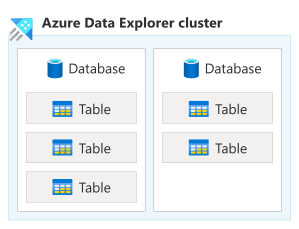
Diagram that shows an Azure Data Explorer cluster that contains two database sections placed side by side. On the left is a box labeled database, and inside it are three separate table boxes stacked vertically, each labeled table. On the right is a second box labeled database, and inside it are two table boxes stacked vertically, each also labeled table. The diagram shows a hierarchy where the cluster is the top-level container, each database is a child container within the cluster, and tables are child objects within each database. The left and right databases are parallel peers in the same cluster, and they can hold different numbers of tables.
Clusters perform ingestion to retrieve data from other data sources and load it into a table in the cluster. You can then query data by using the Kusto Query Language (KQL) syntax. Clusters also have a set of management operations that you can perform.
Physical architecture
An Azure Data Explorer cluster has two primary layers that are applicable to its reliability configuration:
Compute layer: Azure Data Explorer is a distributed computing platform and can have two-to-many node virtual machines (VMs) depending on scale and node role type. Nodes handle data ingestion and query processing work. You don't see or manage the node VMs directly. The platform automatically manages instance creation, health monitoring, and replacement of unhealthy nodes. When you configure your cluster to use multiple availability zones, the nodes are spread among different datacenters.
Storage layer: Azure Data Explorer uses Azure Storage as its durable persistence layer. Storage automatically provides fault tolerance, with the default setting offering locally redundant storage (LRS) within a datacenter. Three replicas are persisted. If a replica is lost while in use, another is deployed without disruption. When you configure your cluster to use multiple availability zones, the replicas are spread among different datacenters.
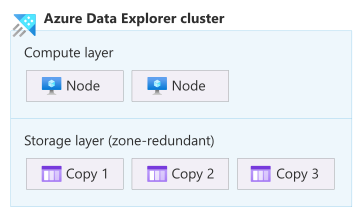
Diagram that shows an Azure Data Explorer cluster with a logical architecture of two layers. In the top layer, labeled compute layer, two node boxes are arranged side by side to show that compute work is distributed across multiple nodes within the cluster. The bottom layer is labeled storage layer (zone-redundant), with three storage copy boxes arranged from left to right as copy 1, copy 2, and copy 3. The diagram presents a layered relationship: the compute layer processes ingestion and query operations.
For more information, see How Azure Data Explorer works.
Resilience to transient faults
Transient faults are short, intermittent failures in components. They occur frequently in a distributed environment like the cloud, and they're a normal part of operations. Transient faults correct themselves after a short period of time. It's important that your applications can handle transient faults, usually by retrying affected requests.
All cloud-hosted applications should follow the Azure transient fault handling guidance when they communicate with any cloud-hosted APIs, databases, and other components. For more information, see Recommendations for handling transient faults.
To build resilience to transient faults when you use Azure Data Explorer, follow these practices:
When you use queued ingestion, rely on the built-in retry behavior.
Use Microsoft-provided client libraries and SDKs, which automatically retry when transient faults occur.
If you use Azure Data Explorer REST APIs directly, retry any queries and management operations that fail because of a transient fault.
Resilience to availability zone failures
Availability zones are physically separate groups of datacenters within an Azure region. When one zone fails, services can fail over to one of the remaining zones.
Azure Data Explorer supports two types of availability zone configuration:
Zone-redundant (recommended): When you enable availability zones on your cluster, your cluster's nodes are spread across multiple zones. Microsoft manages the distribution of nodes across the selected availability zones and handles detection and response to availability zone failures. A zone-redundant cluster is resilient to an availability zone outage.
When you configure your cluster to be zone redundant, Storage ZRS synchronously replicates at least three copies of your data across multiple availability zones.
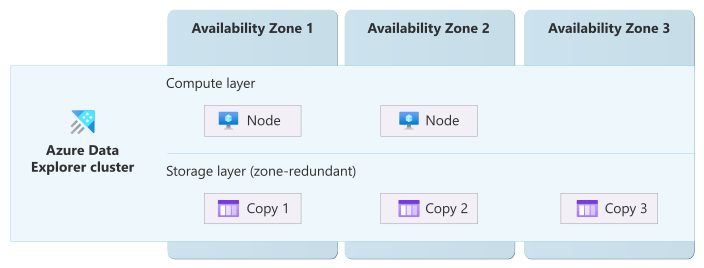
Diagram that shows an Azure Data Explorer cluster that uses multiple availability zones. Three vertical columns are labeled availability zone 1, availability zone 2, and availability zone 3. A large box labeled Azure Data Explorer cluster spans all three columns. The box is divided horizontally into two layers. The upper half is the compute layer. One node is in availability zone 1, and the other node is in availability zone 2. The lower half is the Storage layer (zone-redundant). Three storage replicas are shown as copy 1 on the left, copy 2 in the middle, and copy 3 on the right, each aligned with a different availability zone. A single Azure Data Explorer cluster stretches across multiple zones, with compute capacity spread across zones and data replicated into three zone-separated copies.
Zonal: You can optionally select a single zone when you enable availability zones on your cluster. Microsoft places all of your compute nodes into that zone. This configuration is a zonal (single-zone) cluster. A zonal cluster can reduce latency for unusually latency-sensitive workloads because all compute nodes run in the same zone, but it doesn't provide resilience to zone outages.
Important
Pinning to a single availability zone is only recommended when cross-zone latency is too high for your needs and after you verify that the latency doesn't meet your requirements. By itself, a zonal resource doesn't provide resiliency to an availability zone outage. To improve the resiliency of a zonal resource, you need to explicitly deploy separate resources into multiple availability zones and configure traffic routing and failover. For more information, see Zonal resources and zone resiliency.
Your zone selection only applies to your compute nodes. For a zonal cluster, your storage data continues to use LRS, and might be stored in a different zone than your compute nodes.
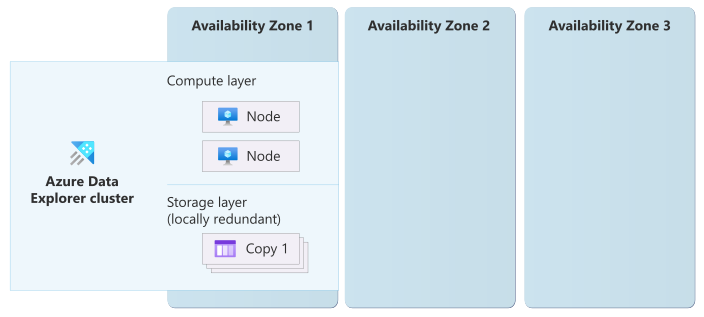
Diagram that shows an Azure Data Explorer cluster that uses a single availability zone. Three vertical columns are labeled availability zone 1, availability zone 2, and availability zone 3. A large box labeled Azure Data Explorer cluster spans only one column. The box is divided horizontally into two layers. The upper half is the compute layer: both nodes are in availability zone 1. In the lower half is the storage layer (locally redundant), with three storage replicas in the same availability zone. A single Azure Data Explorer cluster is confined to one zone, with compute and storage located in that zone.
If you don't enable availability zones, the cluster is nonzonal, which means Azure selects the availability zone for each node and your data. If any availability zone in the region has an outage, it might affect your cluster's nodes, data, or both. We don't recommend a nonzonal configuration because it doesn't provide protection against availability zone outages.
Requirements
Region support: Availability zone support is available in Azure regions that support availability zones.
However, some compute node types and sizes are only available in specific regions, or specific zones within a region.
Full clusters: Availability zone support is available with full clusters. It's not available with free clusters.
Considerations
Zone selection: For compute nodes, you choose which availability zones to use. Microsoft manages storage zone placement, and storage replicas might be in different zones from your compute nodes.
Cost
Enabling availability zone support incurs extra costs for ZRS, which is billed at a higher rate than LRS. For more information, see Azure Storage pricing.
Compute nodes are charged at the same rate whether you use availability zone support or not. For more information, see Azure Data Explorer pricing.
Configure availability zone support
Create a new cluster with availability zone support. You can enable availability zone support when you create a new Azure Data Explorer cluster. For more information, see Create a cluster and database.
When you create an availability zone-enabled cluster by using the Azure portal, it's automatically zone redundant, and Microsoft selects the zones.
To select zones yourself, or to create a zonal cluster, use another deployment approach like Azure Resource Manager APIs or Bicep. For most situations, create a zone-redundant cluster and use all of the zones in the region.
Note
When you select which availability zones to use, you're actually selecting the logical availability zone. If you deploy other workload components in a different Azure subscription, they might use a different logical availability zone number to access the same physical availability zone. For more information, see Physical and logical availability zones.
Enable availability zones on an existing cluster (preview). You can migrate an existing nonzonal cluster to use availability zones. This capability is in preview. For more information, see Migrate your cluster to support multiple availability zones.
Reconfigure availability zones on an existing cluster (preview). You can change the zones used for a cluster. This capability is in preview. For more information, see Migrate your cluster to support multiple availability zones.
Disable availability zone support on an existing cluster. After a cluster is configured with availability zones, you can't change the cluster to not use availability zones.
Verify availability zone configuration for clusters. Use the cluster's zone status property (the
zoneStatusproperty in the REST API) to verify the availability zone configuration of a cluster. A value ofZonalindicates that the cluster uses availability zones, but it doesn't mean the cluster runs in a single zone.To determine whether a cluster is zonal or zone redundant, use the
zonesproperty. If the zones list has one zone listed, the cluster is zonal (single-zone). If it has multiple zones listed, it's zone redundant.
Capacity planning and management
When an availability zone is unavailable, any nodes in that zone might be temporarily unavailable, which reduces your cluster's compute capacity until the zone recovers.
If your cluster can't tolerate the loss of capacity, consider overprovisioning your cluster. This approach allows the solution to tolerate some capacity loss and continue to function without degraded performance. However, when you overprovision your cluster, your cluster might have an unbalanced number of nodes across zones.
Instance distribution across zones
The cluster's compute layer uses a best-effort approach to evenly spread instances across the zones that you select.
Behavior when all zones are healthy
This section describes what to expect when you configure a cluster for availability zone support, and all zones are operational.
Cross-zone operation: During normal operation, Azure Data Explorer uses all available compute nodes for ingestion, query processing, and other operations. Work is distributed across nodes regardless of their availability zone.
Cross-zone data replication: The cross-zone data replication behavior depends on the availability zone configuration that your cluster uses.
Zone-redundant: Data is synchronously replicated across availability zones by using Storage ZRS, which provides a high level of data consistency and minimizes the risk of data loss during a zone failure.
Zonal: Data is stored by using Storage LRS, which means that all three copies might be in a single availability zone.
Behavior during a zone failure
This section describes what to expect when you configure a cluster for availability zone support, and there's an outage in one of the zones.
Detection and response: Responsibility for detection and response depends on the availability zone configuration that your cluster uses.
Zone-redundant: Microsoft detects availability zone failures and manages the response for Azure Data Explorer. You don't need to do anything to initiate a zone failover.
Zonal: You're responsible for detecting failures in the availability zones that your cluster uses. You're also responsible for responses that you decide to initiate, such as switching to a second cluster that you previously created in a different availability zone.
- Notification: Microsoft doesn't automatically notify you when a zone is down. However, you can use Azure Service Health to understand the overall health of the service, including any zone failures, and you can set up Service Health alerts to notify you of problems.
Active requests: Active requests that rely on compute or storage resources in the failed zone might be terminated and should be retried by the client. Ensure that your applications are prepared by following transient fault handling guidance.
Expected data loss: The expected data loss depends on the availability zone configuration that your cluster uses.
Zone-redundant: No data loss is expected during an availability zone outage because data is synchronously replicated across zones.
Zonal: Data is unavailable until the zone recovers. In the unlikely event of a permanent loss of a zone that contains all of your storage replicas, the data might be permanently lost.
Expected downtime: The expected downtime depends on the availability zone configuration that your cluster uses.
Zone-redundant: A brief service interruption might occur while traffic is redirected to healthy availability zones. Ensure that your applications are prepared by following transient fault handling guidance.
Zonal: Your cluster's compute nodes are unavailable until the availability zone recovers. You also might not be able to access your cluster's data during a zone failure.
Redistribution: The traffic rerouting behavior depends on the availability zone configuration that your cluster uses.
Zone-redundant: Azure Data Explorer routes new requests to compute and storage resources in the remaining healthy zones.
Zonal: Your cluster is unavailable until the availability zone recovers.
Zone recovery
When the failed availability zone recovers, Microsoft recreates the cluster nodes and storage replicas in that zone and restores normal traffic distribution across all zones. You don't need to take any action.
Test for zone failures
The options for testing for zone failures depend on the availability zone configuration that your cluster uses.
Zone-redundant: Microsoft fully manages availability zone failover and recovery for Azure Data Explorer. You don't need to initiate or validate availability zone failure processes.
Zonal: To partially simulate the loss of all of the compute nodes during a zone outage, you can stop your cluster. Use this approach to validate parts of your own zone-down detection and failover processes.
Resilience to region-wide failures
An Azure Data Explorer cluster is deployed into a single Azure region. If that region becomes unavailable, the cluster and its data are unavailable.
Custom multiregion solutions for resiliency
To minimize the business impact of a region outage, deploy separate Azure Data Explorer clusters in multiple regions. Each cluster is independent. You're responsible for managing each cluster, and for coordinating data replication, traffic routing, and failover between regions.
You can decide between different types of multiregion cluster configurations, which each support different levels of recovery time, potential data loss, effort, and cost. Select Azure regions for each cluster that support your latency and data residency requirements. For more information about multiregion cluster configurations and patterns you can follow, see Business continuity and disaster recovery overview.
Backup and restore
For most solutions, you shouldn't rely exclusively on backups. Instead, use the other capabilities described in this guide to support your resiliency requirements. However, backups protect against some risks that other approaches don't. For more information, see What are redundancy, replication, and backup?.
Azure Data Explorer doesn't provide a native backup and restore capability. If you need to back up your data, consider the following approaches:
Continuous export periodically exports data to external storage and provides exactly-once export for supported data types.
Data export to cloud storage supports manual export of data to external storage.
Ingest raw data to Azure Data Explorer from an upstream source, like a data lake, that you can back up separately.
Resilience to accidental deletion
Azure Data Explorer includes several mechanisms to help you protect against accidental deletion of clusters, databases, tables, and external tables:
Accidental cluster or database deletion: Accidental cluster or database deletion is an irrecoverable action. Prevent data loss by enabling a delete lock on the cluster or database resource.
Accidental table deletion: Users that have table admin permissions or higher are allowed to drop tables. If one of those users accidentally drops a table, you can recover it by using the undo drop table command. For this command to succeed, you must first enable the recoverability property in the retention policy.
Accidental external table deletion: External tables are Kusto query schema entities that reference data stored outside the database. Deletion of an external table only deletes the table metadata. You can recover it by running the table creation command again.
For Azure Blob Storage and Azure Data Lake external tables, use the soft delete capability to protect against accidental deletion or overwrite of a blob for a user-configured amount of time.
Resilience to service maintenance
Azure Data Explorer regularly applies service updates and performs routine maintenance. The Azure platform handles these activities automatically while remaining within the availability levels specified in the SLA. Ensure that your applications are prepared for occasional loss in connectivity during service maintenance by following transient fault handling guidance.
To learn about upcoming planned maintenance, use Azure Service Health.
Service-level agreement
The service-level agreement (SLA) for Azure services describes the expected availability of each service and the conditions that your solution must meet to achieve that availability expectation. For more information, see SLAs for online services.
To be eligible for the Azure Data Explorer availability SLA, your application needs to handle transient faults by retrying failed requests.