Note
Access to this page requires authorization. You can try signing in or changing directories.
Access to this page requires authorization. You can try changing directories.
An incident platform is the system that tells your agent when something goes wrong. If you connect your incident platform to your agent, your agent can receive alerts, investigate issues, and take action automatically. You don't have to wait for someone to start a chat.
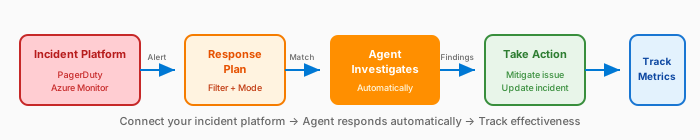
Without an incident platform, your agent is reactive: users ask questions and it investigates on demand. With a connected incident platform, your agent becomes proactive: it picks up incidents the moment they occur.
Supported platforms
| Platform | What it provides |
|---|---|
| Azure Monitor | It can connect in the wizard and alerts from your managed resource groups flow automatically. Azure Monitor merges recurring alerts into one thread. You don't need to provide any credentials. |
| PagerDuty | It alerts you to incidents and provides on-call management with API-based integration. |
| ServiceNow | It integrates with enterprise IT service management. |
Only one incident platform can be active at a time. Switching to a different platform disconnects the current one.
What connecting an incident platform enables
After you connect an incident platform to your agent, your agent gains several capabilities, including automatic incident reception and incident interaction. The next sections provide more details about these capabilities.
Automatic incident reception
Incidents flow to your agent the moment they're created in your platform. No one needs to copy and paste alerts, or manually start an investigation. The agent picks up incidents automatically.
Rich incident cards
Incoming incidents from all supported platforms, including PagerDuty, ServiceNow, and Azure Monitor, display as rich cards in the chat interface. Each card shows:
| Field | Details |
|---|---|
| Severity badge | Color-coded by priority (for example, P1/Sev0 = red, P2/Sev1 = orange) |
| Timestamp | When the incident fired |
| Title | Incident title with platform prefix |
| Status | Current status (for example, "Triggered" or "Acknowledged") |
| Description | Incident summary |
| Response plan | Link to the response plan handling the incident (if configured) |
| View details | Link to the incident in its source platform |
Rich cards replace the plain-text incident notifications used previously, making it easier to scan incident details at a glance.
Incident interaction
Your agent can read and write back to the incident. These tools are available automatically when you connect the corresponding platform.
| Platform | Read capabilities | Write capabilities |
|---|---|---|
| Azure Monitor | Alert details, severity, affected resources | Acknowledge alerts, close alerts |
| PagerDuty | Incident details, diagnostics | Acknowledge, resolve, add notes |
| ServiceNow | Incident details | Post discussion entries, acknowledge, resolve |
Response plans
Response plans define what your agent does when specific types of incidents arrive. You configure rules based on incident severity, title patterns, or other criteria, and the agent follows the plan automatically. To learn more, see Incident response plans.
A response plan can:
Run specific investigation steps.
Use particular connectors and tools.
Operate at a defined autonomy level (from "gather info only" to "take corrective action").
Retry investigation automatically (up to a configurable limit), before escalating to a human.
Response plans turn your agent from a general-purpose assistant into an incident responder, with defined procedures for known incident types.
Quickstart response plan
Important
When you first connect an incident platform, a default quickstart response plan is automatically created. If you create your own response plans, the quickstart plan runs alongside them and can cause incidents to be routed to the wrong custom agent or processed twice. To avoid conflicts, go to Builder > Incident response plans, switch to Table view, and delete the quickstart plan.
When you connect an incident platform, you can enable this feature to automatically create a default response plan. This plan gets you started immediately:
| Platform | Default plan handles | Autonomy level |
|---|---|---|
| Azure Monitor | Sev0, Sev1, Sev2 alerts | Autonomous |
| PagerDuty | P1 incidents | Autonomous |
Azure Monitor supports all severity levels (Sev0–Sev4). The quickstart plan targets the highest-priority alerts by default. You can customize this feature to include other severities or create separate plans for lower-priority alerts.
The quickstart plan creates a response plan named quickstart_handler that:
- Matches incidents by priority or severity.
- Covers all impacted services.
- Runs in fully autonomous mode.
- Can be customized or turned off later.
You can customize this default plan or create other response plans with different filters and autonomy levels.
Track incident value
You can track incident value to learn about how your agent handles incidents over time. In the Azure SRE Agent user interface, you see this information by going to Monitor > Incident metrics. For more information, see Track incident value.
| Metric | What it shows |
|---|---|
| Incidents reviewed | Total incidents that the agent processes. |
| Mitigated by agent | Incidents that the agent resolves autonomously. |
| Assisted by agent | Incidents where the agent helps and the user completes resolution. |
| Mitigated by user | Incidents that the user resolves with agent-provided information. |
| Pending user action | Incidents waiting for human input. |
Use these metrics to understand your agent's effectiveness and identify response plans that you might need to tune.
Incident platforms vs. connectors
Incident platforms and connectors work together. Your agent uses both: the incident platform triggers the investigation, and connectors provide the tools to investigate.
| Comparison | Incident platforms | Connectors |
|---|---|---|
| Purpose | Where alerts come from | Data and actions the agent can use |
| Configured in | Builder → incident platform | Builder → connectors |
| Direction | Inbound (incidents flow to the agent) | Outbound (the agent reaches out to systems) |
| Example | PagerDuty sends an alert → the agent investigates | The agent queries Kusto → finds root cause |
Related content
- Tutorial: Set up response plans: Step-by-step guide to create your first response plan.
- Incident response plans: How response plans route incidents to custom agents.
- Automate incident response: End-to-end incident automation capabilities.
- Track incident value: Measure your agent's incident resolution impact.
- Monitor agent usage: Track usage, session insights, and agent activity.
- PagerDuty: PagerDuty-specific setup and capabilities.
- ServiceNow: ServiceNow-specific setup and capabilities.
- Azure Monitor Alerts: Azure Monitor alerting, recurring alert merge, and severity mapping.
- Connectors: How connectors provide tools for investigation.