Note
Access to this page requires authorization. You can try signing in or changing directories.
Access to this page requires authorization. You can try changing directories.
A virtual network creates a security boundary around your Azure Container Apps environment. By default, environments are created with a virtual network that's automatically generated. However, using an existing virtual network provides more Azure networking features, such as integration with Azure Application Gateway, network security groups, and communication with resources behind private endpoints. This configuration is important for enterprise customers who need to isolate internal, mission-critical applications from the public internet.
As you create a virtual network, keep in mind the following situations:
If you want your container app to restrict all outside access, create an internal Container Apps environment.
If you use your own virtual network, you need to provide a subnet dedicated exclusively to your container app. This subnet isn't available to other services.
Network addresses are assigned from a subnet range that you define as the environment is created.
You can define the subnet range that the Container Apps environment uses.
You can restrict inbound requests to the environment exclusively to the virtual network by deploying the environment as internal.
Note
When you provide your own virtual network, additional managed resources are created. These resources incur costs at their associated rates.
As you begin to design the network around your container app, refer to Plan virtual networks.
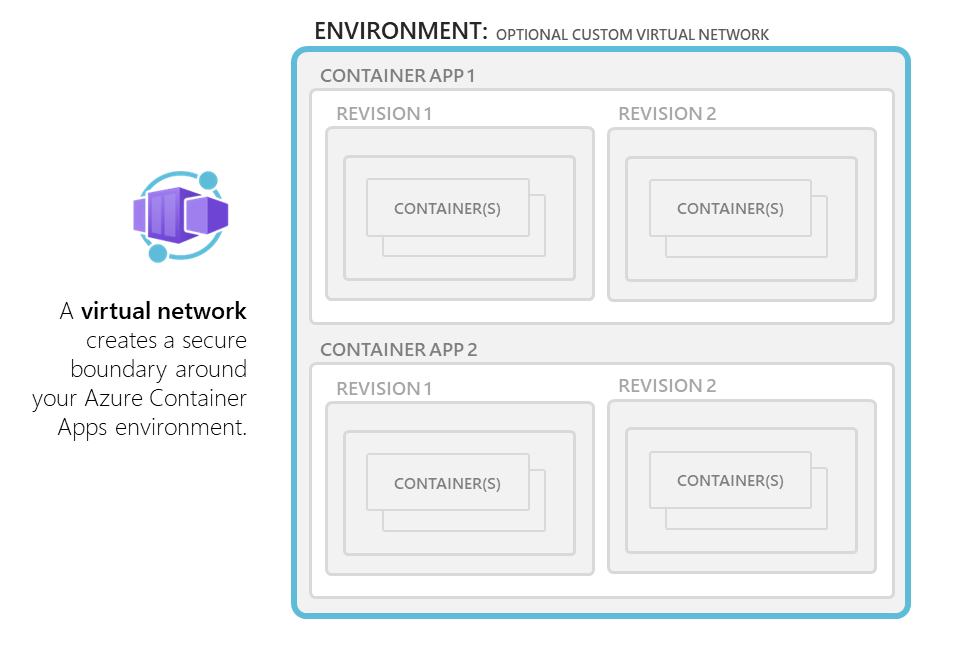
Note
Moving virtual networks among different resource groups or subscriptions isn't allowed if a Container Apps environment is using the virtual network.
Subnet
Virtual network integration depends on a dedicated subnet. The allocation of IP addresses in a subnet and the supported subnet sizes depend on the plan that you're using in Container Apps.
Select your subnet size carefully. You can't modify subnet sizes after you create a Container Apps environment.
Each environment type has its own subnet requirements:
The minimum subnet size required for virtual network integration is
/27.You must delegate your subnet to
Microsoft.App/environments.When you're using an external environment with external ingress, inbound traffic routes through the infrastructure's public IP rather than through your subnet.
Container Apps automatically reserves 12 IP addresses for integration with the subnet. The number of IP addresses required for infrastructure integration doesn't vary based on the scale demands of the environment.
Additional IP addresses are allocated according to the following rules, depending on the type of workload profile you're using:
Dedicated workload profile: As your container app scales out, each node has one IP address assigned.
Consumption workload profile: Each IP address can be shared among multiple replicas. When you're planning for how many IP addresses are required for your app, plan for one IP address per 10 replicas.
When you make a change to a revision in single-revision mode, the required address space is doubled for a short period to support zero-downtime deployments. This doubling affects the real, available supported replicas or nodes for a particular subnet size. The following table shows both the maximum available addresses per CIDR block and the effect on horizontal scale.
Subnet size Available IP addresses1 Maximum nodes (Dedicated workload profile)2 Maximum replicas (Consumption workload profile)2 /23 498 249 2,490 /24 242 121 1,210 /25 114 57 570 /26 50 25 250 /27 18 9 90 1 The number of available IP addresses is the size of the subnet minus the 14 IP addresses required for Azure Container Apps infrastructure (which includes 5 IP addresses that the subnet reserves).
2 These numbers account for apps in single-revision mode.
Restrictions for subnet address ranges
Subnet address ranges can't overlap with the following ranges that Azure Kubernetes Service reserves:
- 169.254.0.0/16
- 172.30.0.0/16
- 172.31.0.0/16
- 192.0.2.0/24
In addition, a workload profile environment reserves the following addresses:
- 100.100.0.0/17
- 100.100.128.0/19
- 100.100.160.0/19
- 100.100.192.0/19
Subnet configuration with the CLI
As a Container Apps environment is created, you provide resource IDs for a single subnet.
If you're using the Azure CLI, the parameter to define the subnet resource ID is infrastructure-subnet-resource-id. The subnet hosts infrastructure components and user app containers.
If you're using the Azure CLI with a Consumption-only environment and the platformReservedCidr range is defined, both subnets must not overlap with the IP range defined in platformReservedCidr.
Azure NAT Gateway integration
You can use Azure NAT Gateway to simplify connectivity for your outbound internet traffic in your virtual network in a workload profile environment.
When you configure a network address translation (NAT) gateway on your subnet, the NAT gateway provides a static public IP address for your environment. All outbound traffic from your container app is routed through the NAT gateway's static public IP address.
Note
The StandardV2 SKU of Azure NAT Gateway is currently not supported for integration.
Managed resources
When you deploy an internal or an external environment into your own network, a new resource group is created in the Azure subscription where your environment is hosted. This resource group contains infrastructure components that the Azure Container Apps platform manages. Don't modify the services in this group or the resource group itself.
Note
User-defined tags assigned to your Container Apps environment are replicated to all resources within the resource group, including the resource group itself.
The name of the resource group created in the Azure subscription where your environment is hosted is prefixed with ME_ by default. You can customize the resource group name as you create your Container Apps environment.
For external environments, the resource group contains a public IP address used specifically for inbound connectivity to your external environment and a load balancer. For internal environments, the resource group contains only a load balancer.
In addition to the standard Container Apps billing, you're billed for:
One standard static public IP for egress if you're using an internal or external environment, plus one standard static public IP for ingress if you're using an external environment. If you need more public IPs for egress due to source NAT (SNAT) issues, open a support ticket to request an override.
One standard load balancer.
The cost of processed data (in gigabytes) includes both ingress and egress for management operations.