Note
Access to this page requires authorization. You can try signing in or changing directories.
Access to this page requires authorization. You can try changing directories.
Promote refers to the process where a replica is commanded to end its replica mode and transition into full read-write operations.
Important
The promote operation isn't automatic. If a failure occurs on the primary server, the system doesn't switch to the read replica independently. A user action is always required for the promote operation.
You can promote replicas in two distinct ways:
Promote to primary server
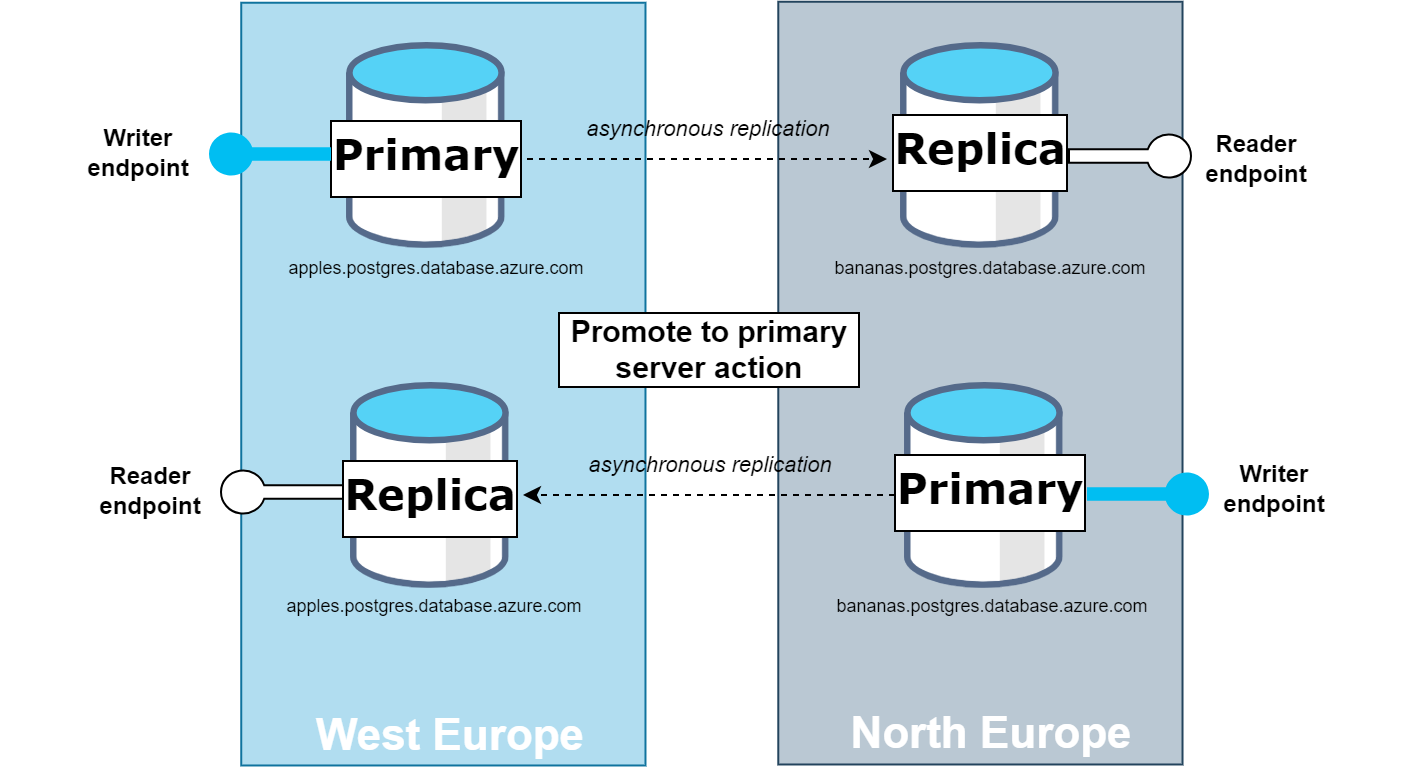
This action elevates a replica to the role of the primary server. In the process, the current primary server is demoted to a replica role, swapping their roles. For a successful promotion, you need to configure a virtual endpoint for both the current primary as the writer endpoint, and the replica intended for promotion as the reader endpoint. The promotion is successful only if the targeted replica is included in the reader endpoint configuration. A user with Microsoft.DBforPostgreSQL/servers/write permission on the source server can perform the switchover operation.
If the primary server has any broken replicas, remove those replicas before initiating the promote to primary server action. During this process, the read replica is promoted to become the new primary server. This operation might cause a brief downtime of approximately 1–3 minutes, depending on the replication lag at the time of promotion (for planned promotions). After the promotion completes, the previous primary server is reconfigured to operate as a read replica.
The following diagram shows the configuration of the servers before the promotion and the resulting state after the promotion operation is successfully completed.
Promote to independent server and remove from replication
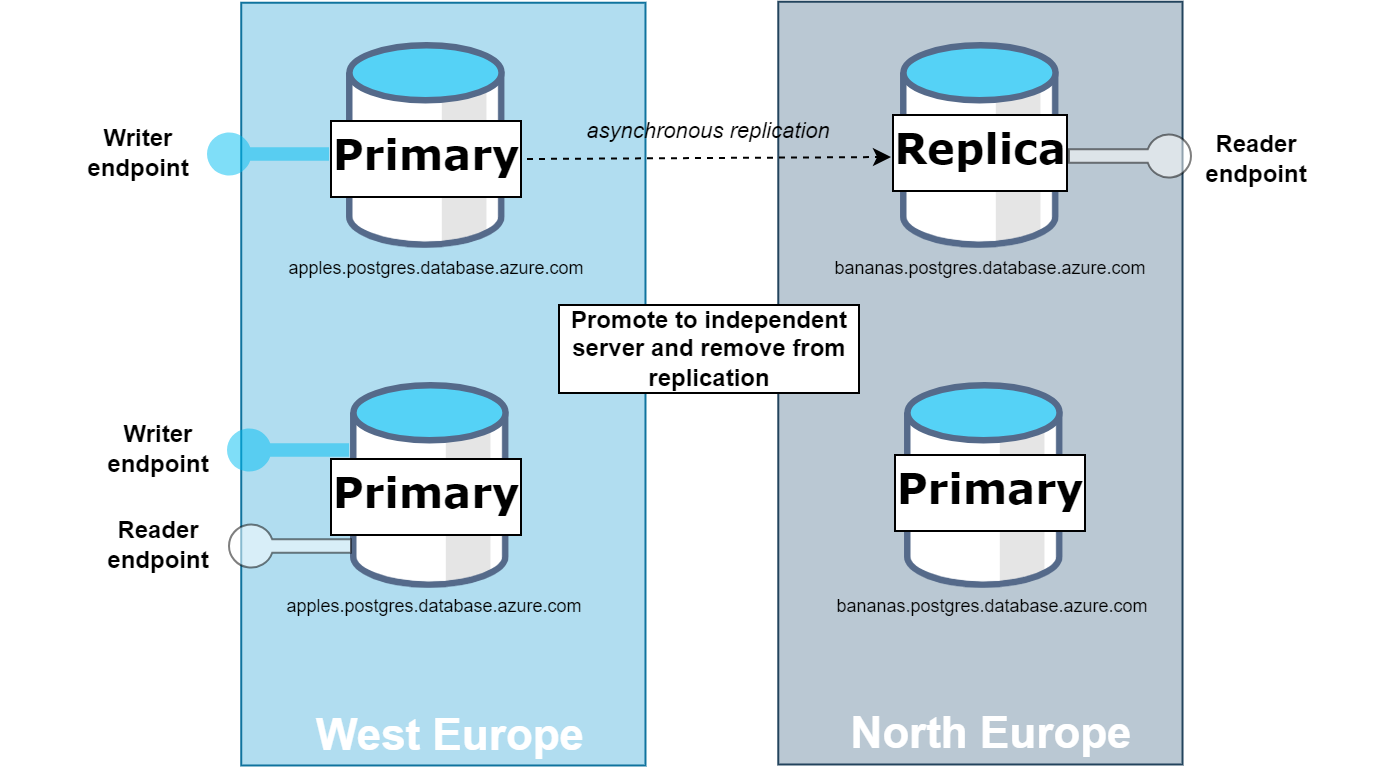
When you choose this option, the replica is promoted to become an independent server and is removed from the replication process. As a result, both the primary and the promoted server function as two independent read-write servers. While you can configure virtual endpoints, they aren't a necessity for this operation. The newly promoted server is no longer part of any existing virtual endpoints, even if the reader endpoint was previously pointing to it. Update your application's connection string to direct to the newly promoted replica if the application should connect to it.
The following diagram shows how the servers are set up before they're promoted and their configuration after successfully becoming independent servers.
Important
The Promote to independent server and remove from replication action is backward compatible with the previous promote functionality.
Important
Server Symmetry: For a successful promotion using the promote to primary server operation, both the primary and replica servers must have identical tiers and storage sizes. For example, if the primary has 2 vCores and the replica has 4 vCores, the only viable option is to use the "promote to independent server and remove from replication" action. Additionally, they need to share the same values for parameters that allocate shared memory.
For both promotion methods, consider these options:
Planned: This option ensures that data is synchronized before promoting. It applies all the pending logs to ensure data consistency before accepting client connections.
Forced: This option is designed for rapid recovery in scenarios such as regional outages. Instead of waiting to synchronize all the data from the primary, the server becomes operational once it processes WAL files needed to achieve the nearest consistent state. If you promote the replica by using this option, the lag at the time you delink the replica from the primary indicates how much data is lost.
Important
The Forced promotion option is designed to address regional outages and, in such cases, it skips all checks - including the server symmetry requirement - and proceeds with promotion. This priority is immediate server availability to handle disaster scenarios. However, using the Forced option outside of region down scenarios isn't allowed if the requirements for read replicas specified in the documentation, especially server symmetry requirement, aren't met, as it could lead to problems such as broken replication.
Learn how to Switch over read replica to primary and promote to independent server and remove from replication.
Configuration management
The control plane treats read replicas as separate servers, so you manage configurations independently. This approach provides flexibility for read scale scenarios. However, when you use replicas for disaster recovery, you must ensure the configuration is as desired.
The promote operation doesn't carry over specific configurations and parameters. Here are some of the notable ones:
- PgBouncer: The built-in PgBouncer connection pooler's settings and status aren't replicated during the promotion process. If you enabled PgBouncer on the primary but not on the replica, it remains disabled on the replica after promotion. To use PgBouncer on the newly promoted server, you must enable it either before or following the promotion action.
- Geo-redundant backup storage: Geo-backup settings aren't transferred. Since replicas can't have geo-backup enabled, the promoted primary (formerly the replica) doesn't have it after promotion. You can only activate the feature when creating the standard server (not a replica).
- Parameters: If their values differ on the primary and read replica, they don't change during promotion. Parameters that influence shared memory size must have the same values on both the primary and replicas. This requirement is detailed in the Parameters section.
- Microsoft Entra authentication: If the primary has Microsoft Entra authentication configured, but the replica uses PostgreSQL authentication, the promotion doesn't automatically switch the replica to Microsoft Entra authentication. The replica retains the PostgreSQL authentication. You need to manually configure Microsoft Entra authentication on the promoted replica either before or after the promotion process.
- High Availability (HA): If you require HA after the promotion, you must configure it on the freshly promoted primary server, following the role reversal.
Considerations
Server states during promotion
In both the planned and forced promotion scenarios, servers (both primary and replica) must be in a Ready state. If a server's status is anything other than Ready (such as Updating or Restarting), the promotion typically can't proceed without problems. However, an exception is made in the case of regional outages.
During such regional outages, you can implement the forced promotion method regardless of the primary server's current status. This approach allows for swift action in response to potential regional disasters, bypassing normal checks on server availability.
If the former primary server fails beyond recovery during the promotion of its replica, the only option is to delete the former primary and recreate the replica server.
Multiple replicas visibility during promotion in nonpaired regions
When you deal with multiple replicas and if the primary region lacks a paired region, special consideration is required. If a regional outage affects the primary, the newly promoted replica doesn't automatically recognize any other replicas. While you can still direct applications to the promoted replica for continued operation, the unrecognized replicas remain disconnected during the outage. These extra replicas reassociate and resume their roles only once the original primary region is restored.
Point-in-time restore during promotion
In both the planned and forced promotion scenarios, the latest automated backups must be available to ensure point-in-time restore (PITR) operations are successful. There's a known issue where the PITR operation might encounter the following error after failover and failback operations. This issue is scheduled to be resolved in an upcoming release. To ensure successful PITR operations to the latest time, wait for the automated backup to complete after a promotion operation.
Error : Point-in-time-restore of server to the period when the siteswap operation for this server was in-progress or when the server was replica is not allowed.
Frequently asked questions
Can I promote a replica if my primary server has high availability (HA) enabled?
Yes, whether your primary server is HA-enabled or not, you can promote its read replica. The ability to promote a read replica to a primary server is independent of the HA configuration of the primary.
If I have an HA-enabled primary and a read replica, and I promote the replica, then switch back to the original primary, is the server still in HA?
No, the promotion process disables HA since Azure Database for PostgreSQL doesn't support HA-enabled read replicas. Promoting a read replica to a primary means that the original primary changes its role to a replica. If you're switching back, you need to enable HA on your original primary server.