Note
Access to this page requires authorization. You can try signing in or changing directories.
Access to this page requires authorization. You can try changing directories.
In this article, you use the conditional k-nearest neighbors (k-NN) algorithm from SynapseML to find visually similar artwork. You query a dataset of art from the Metropolitan Museum of Art in NYC, filtering by culture and medium categories.
Prerequisites
Get a Microsoft Fabric subscription. Or, sign up for a free Microsoft Fabric trial.
Sign in to Microsoft Fabric.
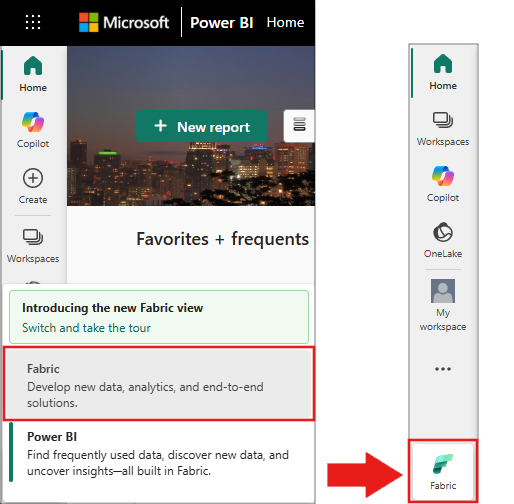
Switch to Fabric by using the experience switcher on the lower-left side of your home page.
- Create a new notebook.
- Attach your notebook to a lakehouse. On the left side of your notebook, select Add to add an existing lakehouse or create a new one.
Import libraries
In the first notebook cell, import the required Python libraries:
from pyspark.sql.types import BooleanType
from pyspark.sql.functions import lit, array, udf
from synapse.ml.nn import ConditionalKNN
from PIL import Image
from io import BytesIO

import requests
import numpy as np
import matplotlib.pyplot as plt
All imports should complete without errors. If you see ModuleNotFoundError, confirm you're using Fabric runtime 1.2 or later.
Load the dataset
The dataset is a parquet file containing artwork metadata from the Metropolitan Museum of Art. Load it into a Spark DataFrame:
df = spark.read.parquet(
    "wasbs://publicwasb@mmlspark.blob.core.windows.net/met_and_rijks.parquet"
)
display(df.drop("Norm_Features"))
The dataset contains approximately 51,000 rows.
Dataset schema
The table contains these columns:
- id: A unique identifier for each piece of art (for example,
388395) - Title: Art piece title as stored in the museum's database
- Artist: Art piece artist as stored in the museum's database
- Thumbnail_Url: URL of a JPEG thumbnail of the art piece
- Image_Url: Website URL of the full art piece image
- Culture: Culture category (for example, japanese, american, italian)
- Classification: Medium category (for example, paintings, ceramics, glass)
- Museum_Page: URL link to the art piece page on the museum website
- Norm_Features: Pre-computed image embedding vector (used for similarity search)
- Museum: The museum that hosts the art piece
Define categories and filter the data
Define the culture and medium categories you want to query. Then filter the dataset to include only artwork that matches your selected categories:
mediums = ["paintings", "glass", "ceramics"]
cultures = ["japanese", "american", "african (general)"]

# For more categories, uncomment the extended lists:
# mediums = ['prints', 'drawings', 'ceramics', 'textiles', 'paintings',
#            'musical instruments', 'glass', 'accessories', 'photographs',
#            'metalwork', 'sculptures', 'weapons', 'stone', 'precious',
#            'paper', 'woodwork', 'leatherwork', 'uncategorized']
# cultures = ['african (general)', 'american', 'ancient american',
#             'ancient asian', 'ancient european', 'ancient middle-eastern',
#             'asian (general)', 'austrian', 'belgian', 'british', 'chinese',
#             'czech', 'dutch', 'egyptian', 'european (general)', 'french',
#             'german', 'greek', 'iranian', 'italian', 'japanese',
#             'latin american', 'middle eastern', 'roman', 'russian',
#             'south asian', 'southeast asian', 'spanish', 'swiss', 'various']

classes = cultures + mediums
medium_set = set(mediums)
culture_set = set(cultures)

small_df = df.where(
    udf(
        lambda medium, culture: (medium in medium_set) or (culture in culture_set),
        BooleanType(),
    )("Classification", "Culture")
)

small_df.cache()
print(f"Filtered dataset row count: {small_df.count()}")
The output shows a count of several thousand rows, depending on the selected categories.
Fit conditional k-NN models
Create two conditional k-NN models - one conditioned on the medium (Classification) and one conditioned on culture. Each model accepts:
- An output column for storing matches
- A features column containing the image embedding vector
- A values column specifying what to return for each match (thumbnail URL)
- A label column indicating the conditioning category
medium_cknn = (
    ConditionalKNN()
    .setOutputCol("Matches")
    .setFeaturesCol("Norm_Features")
    .setValuesCol("Thumbnail_Url")
    .setLabelCol("Classification")
    .fit(small_df)
)
culture_cknn = (
    ConditionalKNN()
    .setOutputCol("Matches")
    .setFeaturesCol("Norm_Features")
    .setValuesCol("Thumbnail_Url")
    .setLabelCol("Culture")
    .fit(small_df)
)
Define matching and visualization methods
Define helper functions to query the models and display results.
The add_matches() function applies a conditional k-NN model across all specified categories, adding a matches column for each:
def add_matches(classes, cknn, df):
    """Apply conditional k-NN for each category label, adding match columns."""
    results = df
    for label in classes:
        results = cknn.transform(
            results.withColumn("conditioner", array(lit(label)))
        ).withColumnRenamed("Matches", "Matches_{}".format(label))
    return results
The plot_img() and plot_urls() functions render query results as an image grid:
def plot_img(axis, url, title):
    """Download and display an image from a URL on a matplotlib axis."""
    try:
        response = requests.get(url, timeout=10)
        response.raise_for_status()
        img = Image.open(BytesIO(response.content)).convert("RGB")
        axis.imshow(img, aspect="equal")
    except Exception as e:
        axis.text(0.5, 0.5, "Image\nunavailable", ha="center", va="center", fontsize=6)
    if title is not None:
        axis.set_title(title, fontsize=10)
    axis.axis("off")


def plot_urls(url_arr, titles, filename):
    """Create a grid visualization of artwork thumbnails and save to file."""
    nx, ny = url_arr.shape

    fig, axes = plt.subplots(ny, nx, figsize=(nx * 5, ny * 5), dpi=150)

    # Reshape required for a single-image query
    if len(axes.shape) == 1:
        axes = axes.reshape(1, -1)

    for i in range(nx):
        for j in range(ny):
            if j == 0:
                plot_img(axes[j, i], url_arr[i, j], titles[i])
            else:
                plot_img(axes[j, i], url_arr[i, j], None)

    plt.tight_layout()
    plt.savefig(filename, dpi=150)
    plt.show()
Run the query and visualize results
Define the test_all() function to orchestrate querying both models and generating visualizations:
def test_all(data, cknn_medium, cknn_culture, test_ids, root):
    """Query both k-NN models for given art IDs and save visualizations."""
    is_match = udf(lambda obj: obj in test_ids, BooleanType())
    test_df = data.where(is_match("id"))

    test_count = test_df.count()
    if test_count == 0:
        print("Warning: No matching art IDs found. Verify IDs exist in the filtered dataset.")
        return None

    print(f"Querying {test_count} artwork(s)...")

    results_df_medium = add_matches(mediums, cknn_medium, test_df)
    results_df_culture = add_matches(cultures, cknn_culture, results_df_medium)

    results = results_df_culture.collect()

    original_urls = [row["Thumbnail_Url"] for row in results]

    culture_urls = [
        [row["Matches_{}".format(label)][0]["value"] for row in results]
        for label in cultures
    ]
    culture_url_arr = np.array([original_urls] + culture_urls)[:, :]
    plot_urls(culture_url_arr, ["Original"] + cultures, root + "matches_by_culture.png")

    medium_urls = [
        [row["Matches_{}".format(label)][0]["value"] for row in results]
        for label in mediums
    ]
    medium_url_arr = np.array([original_urls] + medium_urls)[:, :]
    plot_urls(medium_url_arr, ["Original"] + mediums, root + "matches_by_medium.png")

    return results_df_culture
Now, select sample art IDs from the filtered dataset and run the query:
# Select 3 sample artwork IDs from the filtered dataset
sample_rows = small_df.select("id").take(3)
selected_ids = {row["id"] for row in sample_rows}
print(f"Selected art IDs: {selected_ids}")

# Run the query and generate visualizations
result_df = test_all(small_df, medium_cknn, culture_cknn, selected_ids, root="./")
Two image grids appear inline. The first grid shows the original artwork with nearest neighbors across cultures. The second grid shows nearest neighbors across mediums.
Cleanup
Remove cached data and saved files when you finish exploring:
small_df.unpersist()
import os
for f in ["./matches_by_culture.png", "./matches_by_medium.png"]:
    if os.path.exists(f):
        os.remove(f)
        print(f"Removed {f}")
print("OK Cleanup complete")
Troubleshooting
| Issue | Cause | Resolution |
|---|---|---|
ModuleNotFoundError: No module named 'synapse.ml' |
Notebook not using Fabric runtime | Verify your notebook is attached to a Fabric lakehouse with runtime 1.2+ |
Py4JJavaError during spark.read.parquet(...) |
Network connectivity issue | Confirm your workspace can reach mmlspark.blob.core.windows.net on port 443 |
Empty result from test_all() (0 rows) |
Selected IDs aren't in the filtered dataset | Use small_df.select("id").show(5) to pick valid IDs from the filtered data |
HTTPError or blank images in visualization |
Thumbnail URL no longer accessible | Some thumbnails may become unavailable over time. The plot_img function displays "Image unavailable" for failed downloads. |
OutOfMemoryError during model fitting |
Dataset too large for available memory | Reduce the number of categories in mediums and cultures lists |
| Slow model fitting (>10 minutes) | Large dataset with many categories | Start with fewer categories (3 each), then expand once the pipeline works |
How conditional k-NN works
The conditional k-NN model relies on the BallTree data structure. A BallTree is a recursive binary tree where each node (or "ball") contains a partition of the data points you want to query.
To build a BallTree:
- Determine the "ball" center closest to each data point, based on a specified feature.
- Assign each data point to the nearest ball.
- Repeat recursively, creating a structure that supports binary-tree traversals.
This structure enables efficient k-nearest neighbor lookups at each leaf node.