Note
Access to this page requires authorization. You can try signing in or changing directories.
Access to this page requires authorization. You can try changing directories.
Applies to: ✅ Warehouse in Microsoft Fabric
This article explains the advantages of developing and deploying Fabric Data Warehouse with Fabric's built-in Git integration.
Important
This feature is in preview.
By using Git integration in Fabric, teams can apply modern source control practices to warehouse development. Developers can isolate changes in branches, track schema evolution through commits, collaborate through pull requests, and synchronize updates between Git repositories and Fabric workspaces.
Typical scenarios include:
- Developing schema changes safely in branches and workspaces
- Versioning warehouse objects in Git
- Collaborating across multiple branches and workspaces
- Promoting validated changes between branches
- Keeping workspace items (warehouse and others) aligned with the Git source of truth
To maintain consistency, traceability, and reliability across warehouse development lifecycles, you need to understand these workflows.
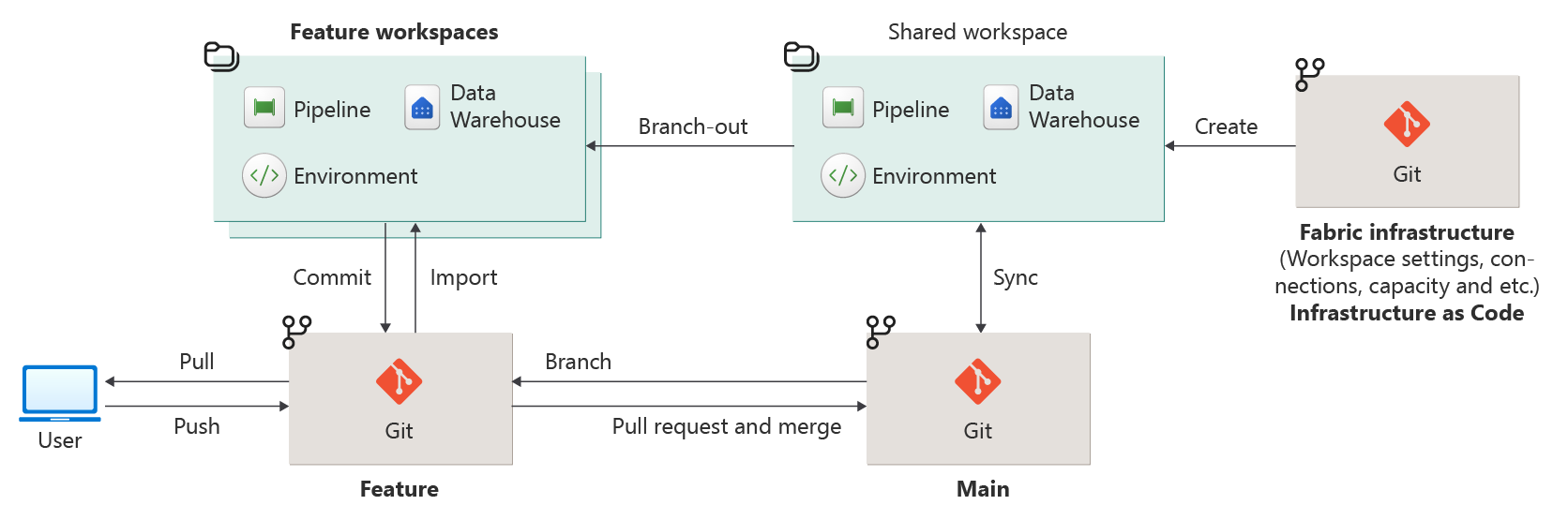
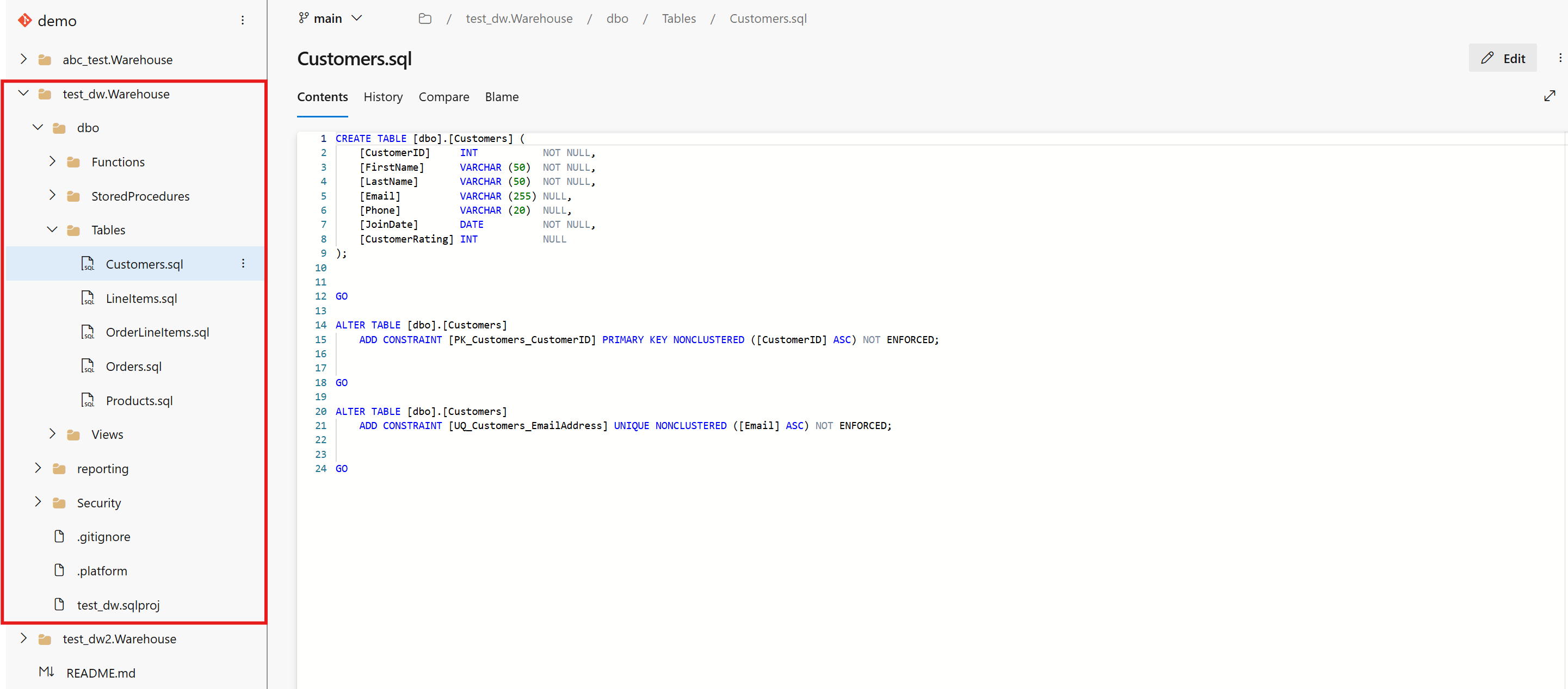
When you connect a Fabric Data Warehouse workspace to Git, you commit warehouse definitions as a database project. This project becomes the authoritative representation of the warehouse schema in source control and serves as the foundation for ongoing development activities. In the source control explorer, the schema appears as individual .sql files.
By using Fabric Git Integration and Fabric Data Warehouse, you can:
- Develop Fabric Data Warehouse with Git Integration.
- Deploy Fabric Data Warehouse using deployment pipelines.
- Deploy and deploy continuously by using the Fabric portal, Git, your own IDE or local development environment, Fabric deployment pipelines, or external continuous integration/continuous deployment (CI/CD) systems, including pipelines in Azure DevOps Services or GitHub.
Comparison
During this synchronization process, Fabric uses DacFx-based incremental schema deployment to apply changes. This approach applies only the relevant schema differences to the warehouse, rather than updating the entire warehouse definition.
Incremental extraction helps reduce unnecessary churn in source control, maintain cleaner schema differences across branches, and support efficient branching and merging workflows. Because the extraction process is schema-aware, it also enables reliable comparison and validation between the workspace state and the Git-tracked definitions.
Standardizing how warehouse schemas are extracted and stored improves consistency across development environments. Schema definitions remain stable across branches, differences more accurately reflect intentional development changes, and source control becomes a dependable baseline for deployment, collaboration, and lifecycle management.
The XMLA.json file itself is excluded from during the Git integration workflows. Fabric excludes this file from commits and updates so the default semantic model metadata isn't unintentionally stored in Git. When synchronizing a workspace from Git, XMLA.json is ignored, which helps avoid conflicts, unintended overwrites, and noise during branch switching or updates from Git.
Limitations in source control
SQL security features such as permissions require a separate export and migration approach.
Cross-item dependencies between warehouses and SQL analytics endpoints aren't currently supported in development workflows. As a result, scenarios that rely on coordinated changes across these items might not work reliably.
Selective commits at the warehouse level aren't currently supported. Changes are committed at the warehouse item level rather than at finer granular object levels.
Version control support for SQL analytics endpoints isn't currently available. This limitation can restrict end-to-end lifecycle management when solutions span both warehouses and SQL analytics endpoints.
Limitations in Git integration
- When two or more warehouse items reference each other, they form a cyclic dependency. The system detects this circular reference during branch-out or Git-to-workspace sync operations, causing these operations to fail. Avoid cyclic dependencies between items.
- Currently, don't create a Dataflow Gen2 with an output destination to the warehouse. A new item named
DataflowsStagingWarehouseappears in the repository and blocks committing and updating from Git. - Cross item dependencies, item sequencing, and synchronization gaps between the SQL analytics endpoint and warehouse impact the "branching out to a new or existing workspace" and "switching to a different branch" workflows during development and continuous integration.
- If an object references another object in the same warehouse by using three-part naming (
database.schema.object), committing or updating from Git can fail. For more information and a workaround, see References to the warehouse's own objects by using a three-part name. - If you change a column that has
IDENTITYdefined, committing or updating from Git can fail untilIDENTITY_INSERTis enabled for the table. - If the repository contains a
.sqlprojfile that pins an olderMicrosoft.Build.SqlSDK version, committing or updating from Git can fail because the older SDK doesn't recognize newer warehouse syntax such asIDENTITYcolumns andCLUSTER BY. For more information and a workaround, see Out-of-date .sqlproj in the Git repository. - If an object references two or more tables in another warehouse without alias-qualifying every column, committing or updating from Git can fail. For more information and a workaround, see Unqualified columns in objects that reference two or more tables in another warehouse.
- If your scripts reference two or more different objects in the same schema of another warehouse and spell the schema name with inconsistent capitalization, committing or updating from Git can fail. For more information and a workaround, see Inconsistent capitalization of schema names.
- Ambiguous column errors whose candidate list contains a
::separator can occur when committing or updating from Git, even when there's no genuine ambiguity. For more information and workarounds, see Ambiguous column errors with duplicate candidate objects.
Unsupported scenarios
The following CI/CD workflows aren't officially supported when warehouses in different workspaces have different collations. Even though these operations might succeed without errors, they can result in metadata errors.
In all of these scenarios, if a collation mismatch occurs, use the Python script scripts/dw-collation-error-update-tmsl/pbi_interactive.py in the Fabric toolbox GitHub repository to update the dataset (TMSL) collation to match the warehouse collation.
| Scenario | Description | Risk |
|---|---|---|
| Deployment pipelines | Promoting warehouse content through pipeline stages (for example, Dev → Test → Prod) where the target warehouse was created with a different collation than the source isn't supported. | Deployment might succeed, but the dataset collation isn't updated to match the target warehouse collation. |
| Branching out to a new or existing workspace | Using Git integration to branch out from an existing workspace to a new or existing workspace where the warehouse has a different collation isn't supported. | Warehouse content is synced, but the collation metadata isn't reconciled. |
| Switching branches on a workspace | Switching to a branch that was associated with a warehouse of a different collation on a Git-connected workspace isn't supported. | Synced content might carry over collation assumptions that don't match the current warehouse. |
| Merging changes between workspaces through branches | Merging Git branches across workspaces where the warehouses have different collations isn't supported. | Merge might succeed at the Git level, but the resulting dataset collation doesn't reflect the target warehouse's collation. |