Note
Access to this page requires authorization. You can try signing in or changing directories.
Access to this page requires authorization. You can try changing directories.
Use Microsoft Entra single sign-on (SSO) to authenticate to the on-premises data gateway and access cloud data sources that rely on Microsoft Entra ID-based authentication. When you configure Microsoft Entra SSO on the on-premises data gateway for an applicable data source, queries run under the Microsoft Entra identity of the user that interacts with the Power BI report.
Azure Virtual Networks (VNets) offer network isolation and security for your resources on the Microsoft cloud. On-premises data gateways help you achieve a secure way to connect to these data sources. Microsoft Entra SSO allows users to see only data that they have access to.
Microsoft Entra SSO is also supported with the VNet data gateway, allowing users to access supported data sources in an Azure virtual network with their Microsoft Entra identity. When Microsoft Entra SSO is enabled, the data source receives the Microsoft Entra identity of the signed-in user and evaluates permissions based on that identity. This approach combines identity-based authorization with secure access to data sources that are reachable through an Azure virtual network
The data sources listed here are supported with Microsoft Entra SSO using an on-premises data gateway behind an Azure VNet:
- Analysis Services
- ADLS Gen1
- ADLS Gen2
- Azure Blobs
- CDPA
- Exchange
- OData
- SharePoint
- SQL Server
- Web
- AzureDevOpsServer
- CDSTOData
- Cognite
- CommonDataService
- Databricks
- EQuIS
- Kusto (when using the newer “DataExplorer” function)
- VSTS
- Workplace Analytics
For more information on SSO, and a list of supported data sources for Microsoft Entra SSO, see Overview of single sign-on for on-premises data gateways in Power BI.
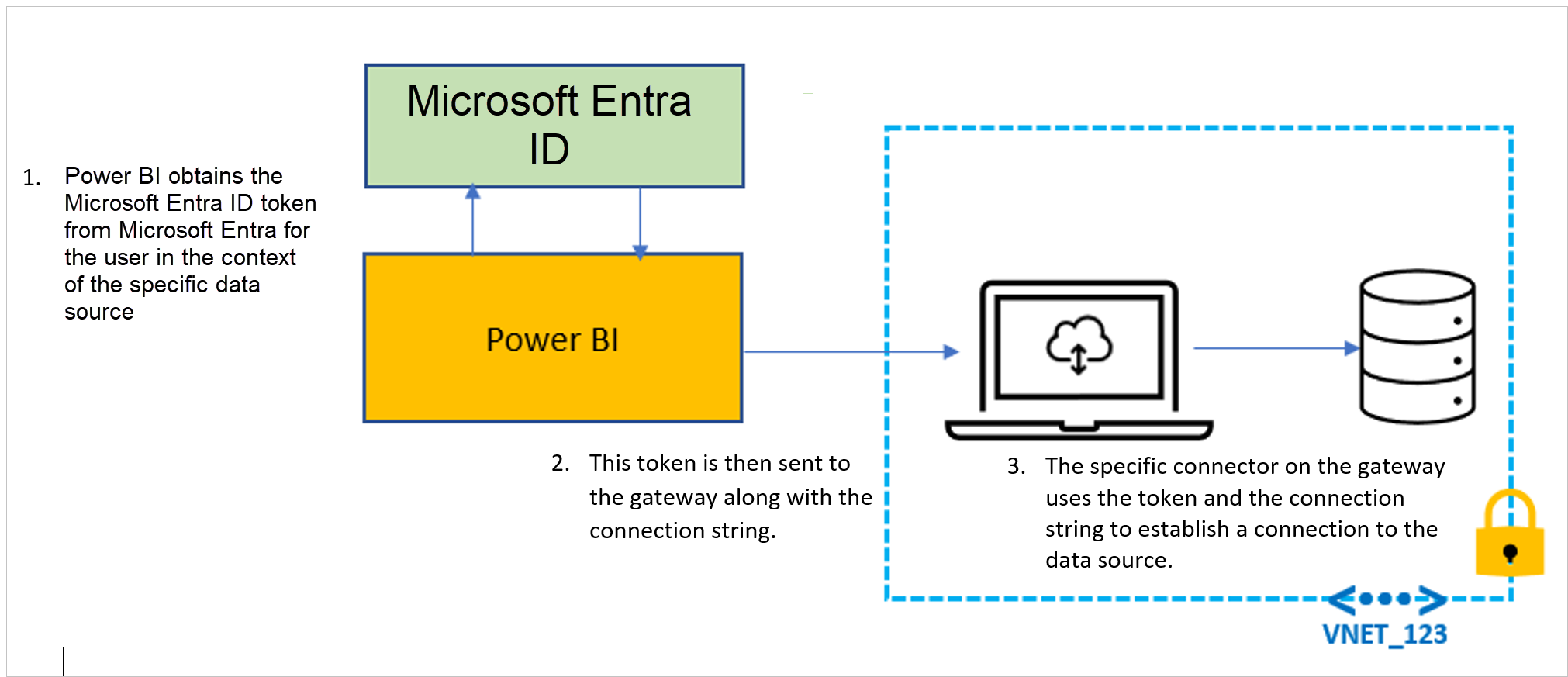
Query steps when running Microsoft Entra SSO
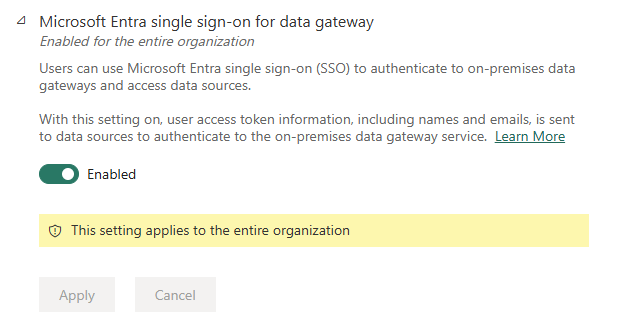
Enable Microsoft Entra single sign-on for on-premises data gateway
Because the Microsoft Entra token of the user passes through the on-premises data gateway, an admin of the on-premises data gateway computer can access these tokens. To ensure a user with malicious intent can't intercept these tokens, the following safeguard mechanisms are available:
- Only Fabric administrators can enable Microsoft Entra SSO for a tenant by enabling the setting in the Microsoft Fabric admin portal. For more information, see Microsoft Entra single sign-on for on-premises data gateways.
- As a Fabric administrator, you can also control who can install on-premises data gateways in your tenant. For more information, see Manage gateway installers.
The Microsoft Entra SSO feature is disabled by default for on-premises data gateways. As a Fabric administrator, you must enable the Microsoft Entra Single Sign-On (SSO) for On-premises data gateway tenant setting in the Admin portal before data sources can use Microsoft Entra SSO on an on-premises data gateway.
The Microsoft Entra SSO flow is token-based and doesn't require Kerberos Constrained Delegation (KCD), domain-joined gateway machines, or elevated gateway service accounts when used with supported connectors. This feature makes Microsoft Entra SSO an alternative to Kerberos-based SSO configurations for applicable data sources.
Enable Microsoft Entra single sign-on for virtual network (VNet) data gateway
Fabric administrators can enable Microsoft Entra single sign-on (SSO) for the virtual network (VNet) data gateway.
Unlike an on-premises data gateway, the VNet data gateway runs in Microsoft-managed infrastructure, so there's no customer-managed gateway computer where a local machine administrator can access gateway processes or tokens. However, administrators should still use tenant-level controls and least-privilege access to ensure only trusted users can configure or use Microsoft Entra SSO through VNet data gateways. The VNet data gateway service passes the Microsoft Entra token of the user, so you need to carefully control access to this capability.
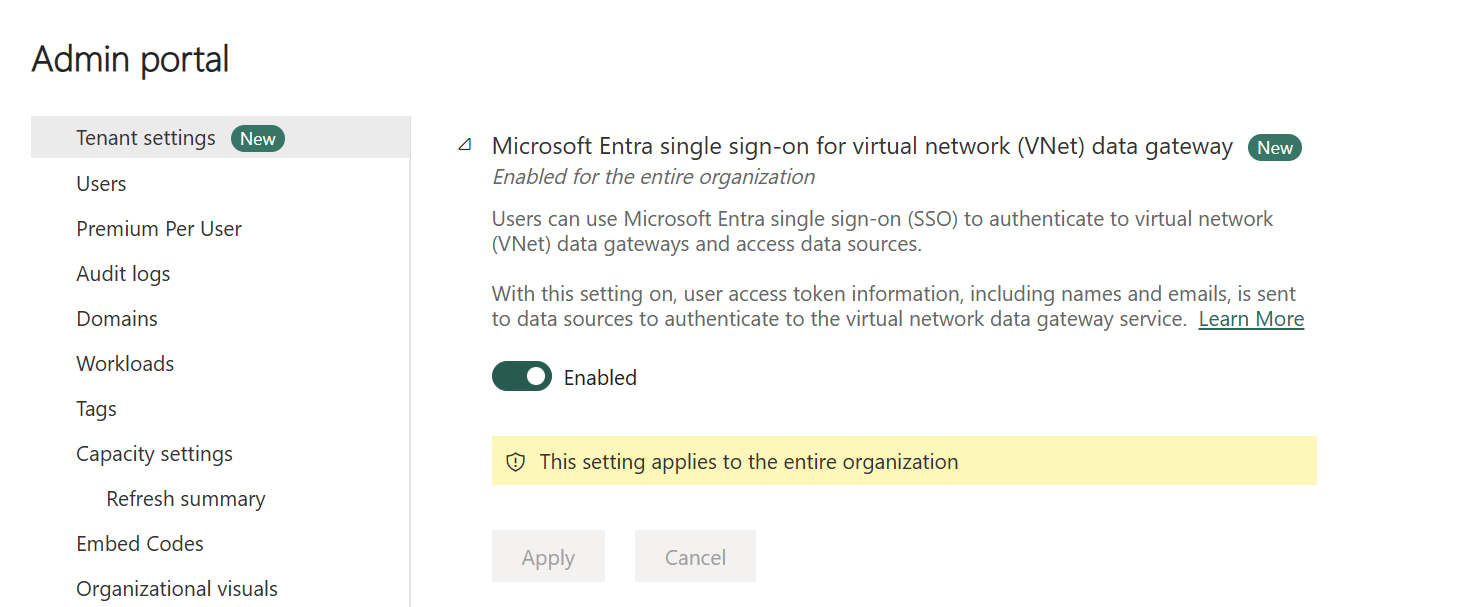
In the Fabric admin portal, select Tenant settings.
Enable Microsoft Entra single sign-on for virtual network (VNet) data gateway, and then select Apply.
Note
This tenant setting is enforced when a data source using Microsoft Entra SSO is created or updated. If the setting is disabled, new configurations and updates that enable Microsoft Entra SSO are rejected. The setting isn’t evaluated at query runtime and doesn’t disable SSO or revoke tokens for existing data sources already configured to use SSO.
The following safeguard mechanisms are available:
Only Fabric administrators can enable Microsoft Entra SSO for the tenant by enabling the corresponding setting in the Microsoft Fabric admin portal. The Microsoft Entra SSO feature is disabled by default. As a Fabric administrator, you must enable the Microsoft Entra Single Sign-On (SSO) setting before data sources can use Microsoft Entra SSO through a VNet data gateway.
Fabric administrators can also control who is allowed to create, manage, and use VNet data gateways in the tenant. Limit access to VNet data gateways and their associated connections to trusted administrators and users who require it for their workloads.