hi barrie,
if your permissions for the subsite were not inherited from the parent site, please check the following settings to troubleshot the issue:
- go to sharepoint admin center > settings > check if the custom script feature is enabled.
note: wait 24 hours for the change to take effect after turning the feature on. for more information, please refer to:
turn scripting capabilities on and off.
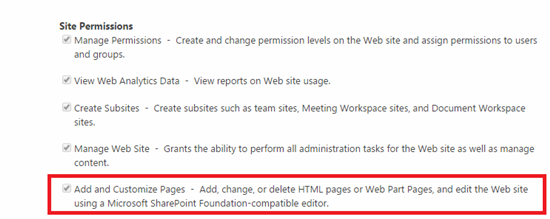
- go to the problematic subsite**> site settings > site permissions > permission levels >** click
“full control” > check if the “add and customize pages - add, change, or delete html pages or web part pages, and edit the web site using a microsoft sharepoint foundation-compatible editor” is selected:
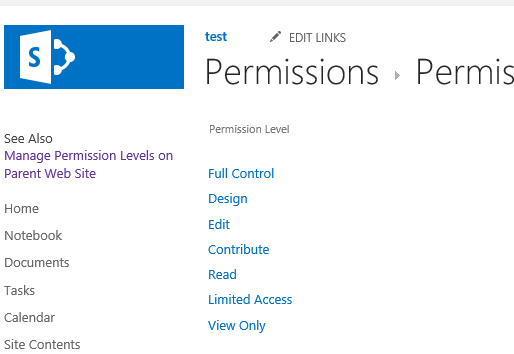
- in the permission levels page, click “see also: manage permission levels on parent web site” to check the
full control permission level.
if the issue persists, to clarify the scenario, can you confirm the following details:
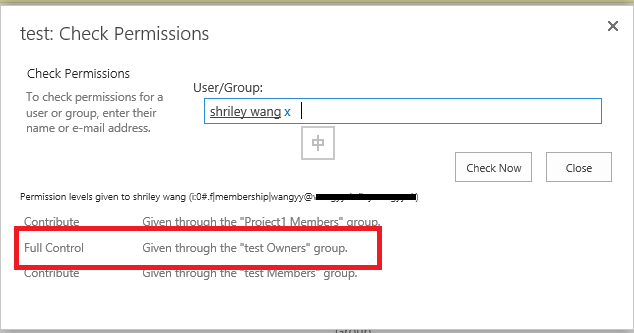
- can you share with us a screenshot about your current permissions of the subsite? to check the permission, please go to the subsite >
settings icon like gear > site settings > site permissions > check permissions > type your current account to the box > check now. if there is no full control permission, please grant the full
control permission via grant permissions.
- create a new subsite in the problematic teamsite to check if you can edit it.
- is the affected team site created with the template provided by sharepoint online or a custom one?
regards,
shirley
' cx='32' cy='32' r='32' /%3E%3Ctext x='50%25' y='55%25' dominant-baseline='middle' text-anchor='middle' fill='%23FFF' %3EA%3C/text%3E%3C/svg%3E)
