Share via

Workflows showing up in Designer but stages are missing

Anonymous
2015-11-09T18:56:16+00:00

our organization is using sharepoint online as part of our office 365 subscription. we hired a sharepoint consultant to create workflows for a few of our lists, which our organization would now like to be able to maintain internally. as our organization's designated sharepoint person, as per our consultant's instructions i downloaded sharepoint designer 2013. 

when i open sharepoint designer and go to the workflows section, i can see four workflows listed (screenshot 1).

i can click to open the workflow and get the screen shown in screenshot 2 (i.e. it appears to give me access, although the lack of any content in this view suggests to me that it's not showing me the right information).
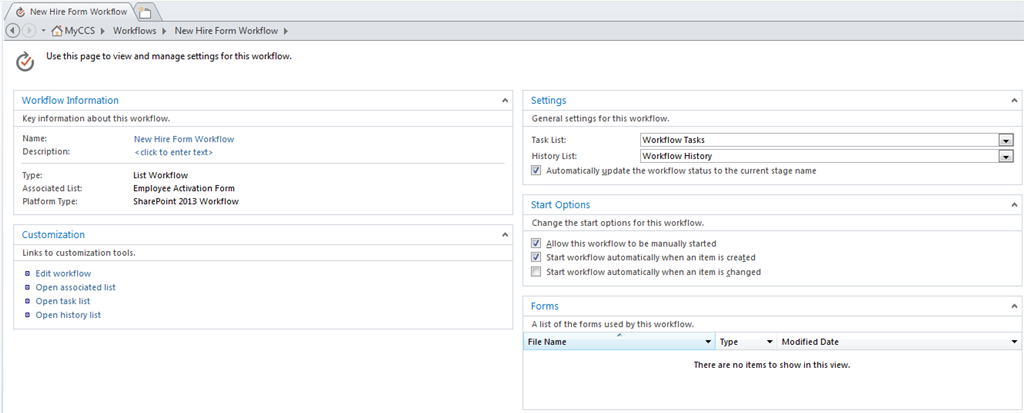
but if i click "edit workflow", none of the workflow steps show up - instead i see a blank page with "insert a stage by using the stage button on the ribbon" (screenshot 3). however, i know that these workflows exist and have stages (because they are active on our site at present - emails go out if someone adds an entry to the list). 

any troubleshooting help you can offer to help me be able to access and edit the existing workflow content would be much appreciated.

for reference, i am an owner of the site collection in question, but am not a site collection admin. 

thanks,

sarah

Microsoft 365 and Office

A comprehensive suite of productivity tools and cloud services that enhance collaboration, communication, and efficiency. Combining classic Office apps with advanced Microsoft 365 features, it supports both personal and business needs

Locked Question. This question was migrated from the Microsoft Support Community. You can vote on whether it's helpful, but you can't add comments or replies or follow the question.

0 comments No comments

Answer accepted by question author

Anonymous
2015-11-13T00:18:35+00:00

Hi Sarah,

Based on the description, since the workflow is functioning, the problem seems to be related to the SharePoint Designer client.

Can you try the update on the computer mentioned in the link:

http://support.microsoft.com/kb/2837633

Also, please refer to the steps mentioned in the following post to clear the SharePoint Designer cache and see the outcome:

https://community.office365.com/en-us/f/154/t/272973  

Regards,

Jerry

Was this answer helpful?

20+ people found this answer helpful.
0 comments No comments

4 additional answers

Sort by: Most helpful
  1. Anonymous
    2015-11-13T12:44:04+00:00

    Downloading the update fixed the problem (I didn't even need to clear the cache). Thanks so much!

    Was this answer helpful?

    4 people found this answer helpful.
    0 comments No comments
  2. Anonymous
    2015-11-12T16:24:34+00:00

    Hi Eric,

    1. Yes, this issue is happening with all four lists we have with workflows
    2. I do not have a previous version installed, and I did download from the Download Center

    3/4. Currently I am the only person on our organization trying to work with Designer, so we don't have another computer with the software nor has a coworker tried to log in. I will see if someone is able to test it on their machine.

    1. Yes, the workflow is currently running.

    Hope that helps,

    Sarah

    Was this answer helpful?

    0 comments No comments
  3. Anonymous
    2015-11-12T04:02:38+00:00

    Hi Sarah,

    Could you provide the result at your convenience?

    Thanks,

    Eric Yang

    Was this answer helpful?

    0 comments No comments
  4. Anonymous
    2015-11-10T03:46:20+00:00

    Hi Sarah,

    The cause of this symptom may vary. Could you try the following steps to troubleshoot it?

    1. Will the same issue happen on another list?

    2. Do you have any previous version of SharePoint Designer on your computer? Did you download SharePoint Designer 2013 from the Download Center: www.microsoft.com/.../details.aspx

    3. If possible, could you try on another computer?

    4. If possible, could you try with another admin account?

    5. Is the workflow currently running on the list?

    Thanks,

    Eric Yang

    Was this answer helpful?

    0 comments No comments