Hi Kurt,
For the first query, it’s not feasible to set group calendar permissions for specific users in Office 365 groups. When you join a group, your email address is automatically added to the distribution list and you gain access to all group information including
the group calendar for scheduling group meetings and events. Thanks for your understanding. Here is a relevant article for your reference:
Learn about Office 365 Groups
Also, you are welcome to vote for the feature via the following link:
https://office365.uservoice.com/forums/286611-office-365-groups/suggestions/15971725-calendar-permissions
For the second one, I have done some tests with Outlook Web App as an example. I found that I can untick the option ‘Send an invitation to the group’ when creating an event in the group calendar and notifications or invitations would not be sent in this case.
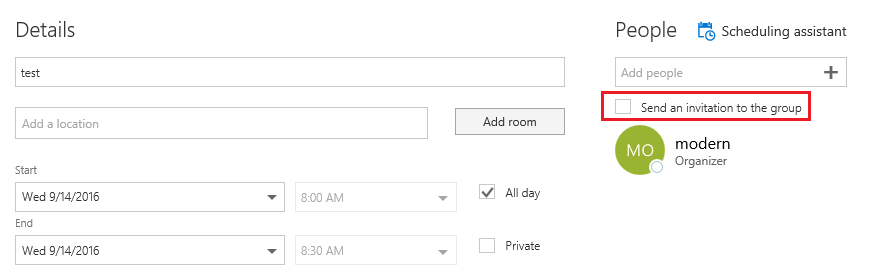
However, if I specified a room while creating the event, the option became greyed out and it’s not feasible to untick the option in this situation:
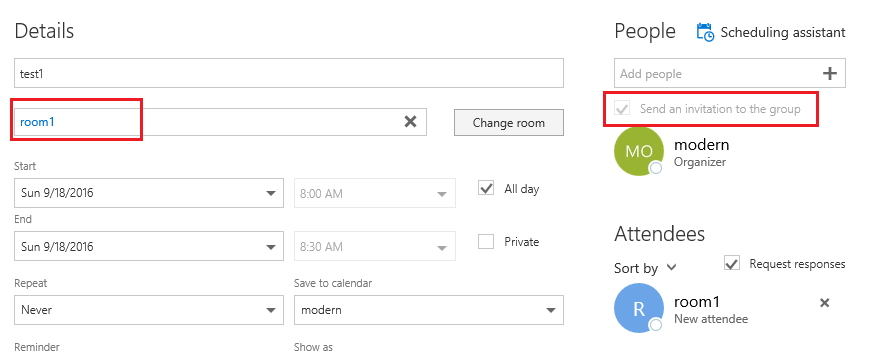
So could you let me know whether you ticked the option while creating those 120 events previously or the option simply could not be modified as you chose rooms at that time?
As for customizing the group menu header, do you want to customize the menu bar in the picture below?

If so, I have done some tests but couldn’t find any official articles about it. Your understanding is highly appreciated. Meanwhile, I suggest you submit feedback for the feature via the link below:
https://office365.uservoice.com/forums/286611-office-365-groups
Let me know if anything is misunderstood.
Thanks,
Sam
' cx='32' cy='32' r='32' /%3E%3Ctext x='50%25' y='55%25' dominant-baseline='middle' text-anchor='middle' fill='%23FFF' %3EA%3C/text%3E%3C/svg%3E)
