Dear Diana Christine,
Good day! Thank you for posting to Microsoft Community. We are happy to help you.
As per your description, it seems that you are trying to lock text/picture placeholders in layouts (under master slides) so that the person using the templates can edit the text but not move the placeholders around.
If the understanding above is right, as per the searching and testing on our side, we're afraid that there's no out of box way to achieve this requirement currently. We do understand the inconvenience caused and apologize for it.
Personally, I completely agree with you, this is indeed a good addition to the current experience of Master slides in PowerPoint. It would be definitely ideal if we could lock text and picture placeholders with ability to edit text. Thank you for bringing thing to our attention.
I sincerely recommend you vote for this similar idea in PowerPoint Feedback Community:
Lock content placeholders in the master · Community (microsoft.com)
lock option · Community (microsoft.com)
Product Team is in-charge of the feedback site, and they are constantly checking the comments and feedback from our customer. Many features have been developed or improved based on users' comment.
Additionally, we've found that this might be achieved in Office Insider version 2104, for your reference: Lock objects in PowerPoint for Windows (office.com)
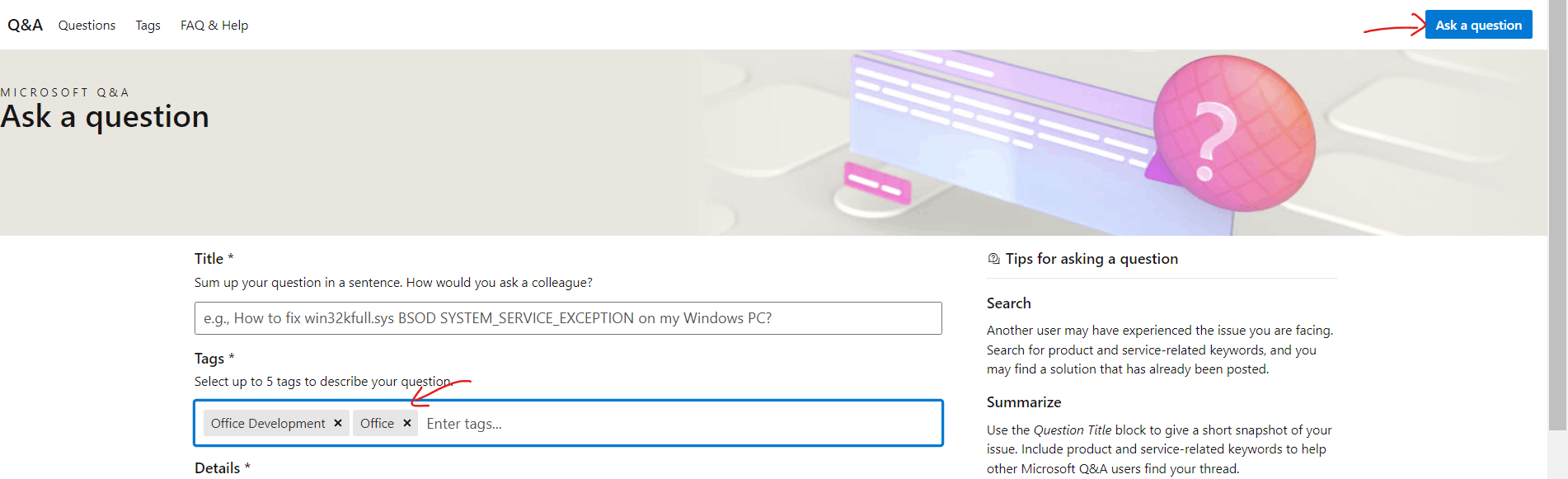
If you are willing, to check if there is any customized way to lock the placeholders, you may try to post this question to Microsoft Q&A Community, it's the dedicated channel handling Office customization and development queries. You may use Office tag and Office Development tag as shown below when asking question.
Members and engineers over there are proficient in the knowledge of PowerPoint customization queries. They will focus on the specific situation on your side and provide specific suggestions for you.
Thanks for your understanding and cooperation! Hope you keep safe and healthy always.
Sincerely,
Rhoda | Microsoft Community Moderator
' cx='32' cy='32' r='32' /%3E%3Ctext x='50%25' y='55%25' dominant-baseline='middle' text-anchor='middle' fill='%23FFF' %3EA%3C/text%3E%3C/svg%3E)

