Microsoft Security | Microsoft Entra | Microsoft Entra External ID
Managing external identities to enable secure access for partners, customers, and other non-employees

This browser is no longer supported.
Upgrade to Microsoft Edge to take advantage of the latest features, security updates, and technical support.
' cx='32' cy='32' r='32' /%3E%3Ctext x='50%25' y='55%25' dominant-baseline='middle' text-anchor='middle' fill='%23FFF' %3ENF%3C/text%3E%3C/svg%3E)
I have used Azure AD B2C User Flow to login a user in my application.
I have added the [Authorize] Attribute on my Controller Action Method.
[Authorize]
public IActionResult AuthenticateUser()
{
       return RedirectToAction("LoginUser", profile);
}
Here is my ConfigureServices Method in Startup.cs (just for reference)
public void ConfigureServices(IServiceCollection services)
{

          services.AddAuthentication(OpenIdConnectDefaults.AuthenticationScheme)
          .AddMicrosoftIdentityWebApp(Configuration, "AzureAd")
          .EnableTokenAcquisitionToCallDownstreamApi(new string[] { "" })
          .AddDownstreamWebApi("MyApi", Configuration.GetSection("MyApi"))
          .AddInMemoryTokenCaches();
}
Now user login is working fine, and then I try to logout user like this:
    public IActionResult LogoutUser()
    {
        try
        {

            HttpContext.SignOutAsync(OpenIdConnectDefaults.AuthenticationScheme);
            HttpContext.SignOutAsync(CookieAuthenticationDefaults.AuthenticationScheme);

        }
        catch { }
        finally
        {
            HttpContext.Session.Clear();
        }

        string logoutUrl = "https://MY_WEB_APP.b2clogin.com/MY_WEB_APP.onmicrosoft.com/b2c_1_ss_signin_signup_uf/oauth2/v2.0/logout?post_logout_redirect_uri=https://MY_WEB_APP.com/my_logout_redirect_url";

        return Redirect(logoutUrl);
    }
But after logout when I get back to the AuthenticateUser Action method in my application it automatically authenticates the user I just sign out from.
May be its because of browser cache that is automatically signing the user again on the User Flow Login Page.
Managing external identities to enable secure access for partners, customers, and other non-employees
A set of technologies in .NET for building web applications and web services. Miscellaneous topics that do not fit into specific categories.
' cx='32' cy='32' r='32' /%3E%3Ctext x='50%25' y='55%25' dominant-baseline='middle' text-anchor='middle' fill='%23FFF' %3ESM%3C/text%3E%3C/svg%3E)
Hi @Noshairwan Farooq ,
Thanks for reaching out.
I am glad you are able to resolve your issue and thank you for posting your solution so that others experiencing the same thing can easily reference this! Since the Microsoft Q&A community has a policy that "The question author cannot accept their own answer. They can only accept answers by others", I'll repost your solution in case you'd like to "Accept" the answer.
Also, alternative would be to redirect using &prompt=loginin your auth url will revoke your login request without user session.
Thanks,
Shweta
I would accept this but the answer seems to be incomplete.
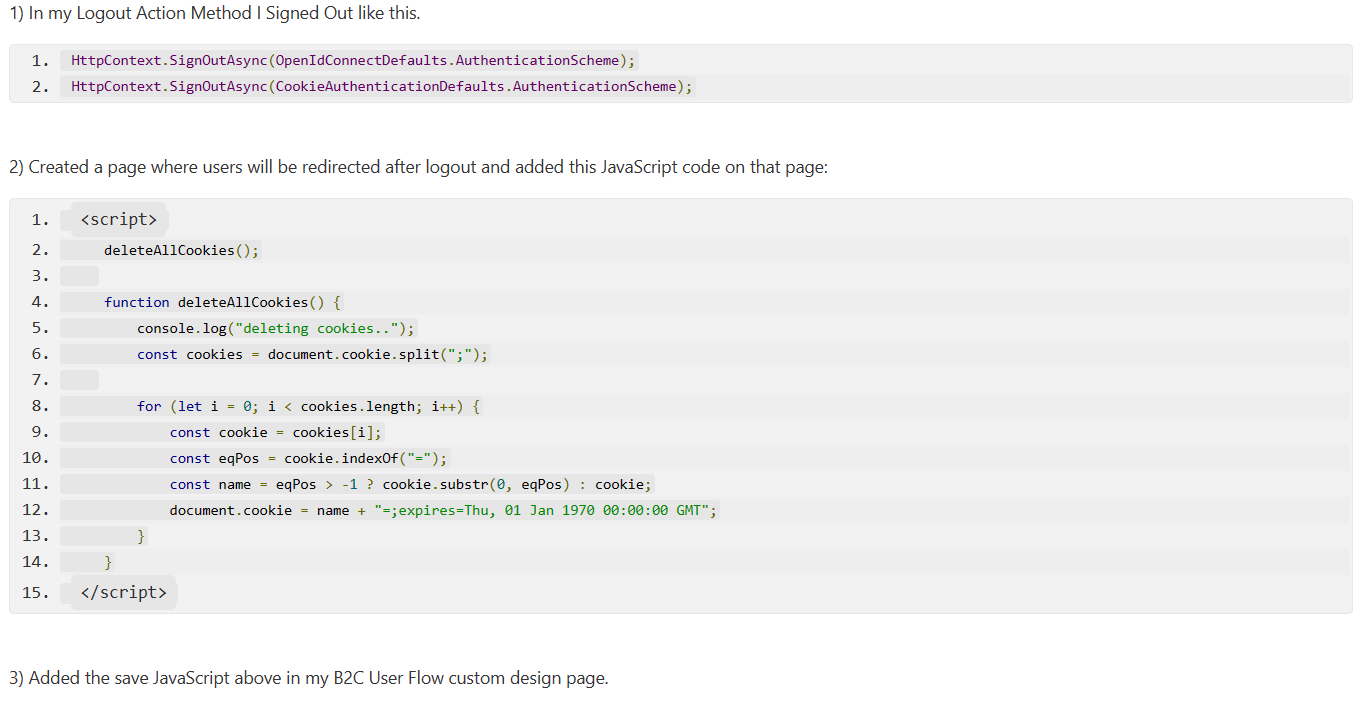
I solved my problem with following fix.
2) Created a page where users will be redirected after logout and added this JavaScript code on that page:
<script>
    deleteAllCookies();

    function deleteAllCookies() {
        console.log("deleting cookies..");
        const cookies = document.cookie.split(";");

        for (let i = 0; i < cookies.length; i++) {
            const cookie = cookies[i];
            const eqPos = cookie.indexOf("=");
            const name = eqPos > -1 ? cookie.substr(0, eqPos) : cookie;
            document.cookie = name + "=;expires=Thu, 01 Jan 1970 00:00:00 GMT";
        }
    }
</script>
3) Added the save JavaScript above in my B2C User Flow custom design page.