Dear Vincent,
Here are some ways you can try at your side.
- If the file is saved locally, you can try whether you can go to the AutoRecover file location such as C:\Users\username\AppData\Roaming\Microsoft\PowerPoint\ to see whether you can find some file versions.
- If the file is enabled with AutoSave (How do I turn on AutoSave? - Microsoft Support), I suggest you go to OneDrive for Business or SharePoint Online where the file is saved and see whether you can find some file versions. I also suggest you try checking them in the first-level recycle bin and the second-level recycle bin in OneDrive for Business or SharePoint Online.
If no, please don't worry. We have a specific channel trying to help the users recover their lost data in OneDrive for Business or SharePoint Online.
If you aren't the administrator, I suggest you contact the administrator in your school and let him follow the steps in Get support - Microsoft 365 admin | Microsoft Learn to open a support ticket to our related team as soon as possible.
About admin roles in the Microsoft 365 admin center - Microsoft 365 admin | Microsoft Learn
How do I find my Microsoft 365 admin? - Microsoft Support
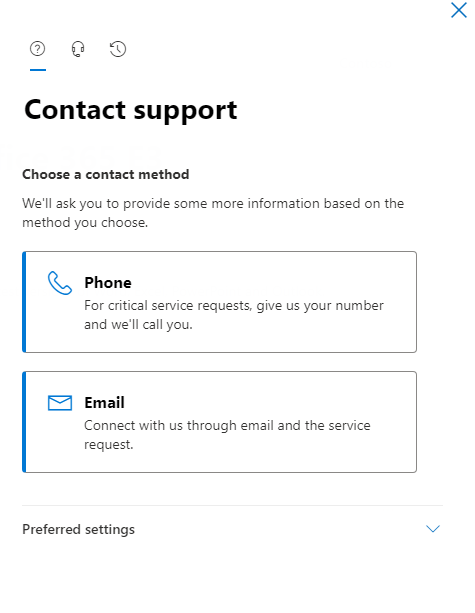
The administrator should be able to open the support ticket from Help & support in the Microsoft 365 admin center.
Then you can select the Phone support or the Email support as follows.
To simplify the process, I'd like to summarize the issue as follows.
Issue Symptom:
===============
Can't recover the files saved in OneDrive for Business or SharePoint Online.
Issue Environment:
=================
OneDrive for Business or SharePoint Online
What users have done:
=================
Try checking them in the first-level recycle bin and the second-level recycle bin in OneDrive for Business or SharePoint Online.
Next Step:
==================
Open a support ticket to our related team to recover the lost data.
Thanks for your effort and hope that the data can be soon recovered by our related team.
Sincerely
Cliff | Microsoft Community Moderator
' cx='32' cy='32' r='32' /%3E%3Ctext x='50%25' y='55%25' dominant-baseline='middle' text-anchor='middle' fill='%23FFF' %3EA%3C/text%3E%3C/svg%3E)
