Share via

New Outlook Desktop. Automatically saving attachments and uploading the files to OneDrive as zip files

Stephanie Hernandez 20 Reputation points
2025-09-10T16:24:02.3833333+00:00

In the New Outlook desktop app, when the user selects the “Save all to OneDrive” option for email attachments, Outlook automatically compresses the files into a single .zip archive before uploading. This behavior differs from the previous Outlook experience, where attachments could be saved individually without compression.

Requested Solution: User requests a configuration or feature update that allows attachments to be saved or uploaded to OneDrive individually and uncompressed, even when selecting multiple files, restoring the behavior available in the legacy Outlook experience

Outlook | Windows | New Outlook for Windows | For business

4 answers

Sort by: Most helpful
  1. Hani-N 7,750 Reputation points Microsoft External Staff Moderator
    2025-09-15T20:32:44.6533333+00:00

    Hi @Stephanie Hernandez,  

    I hope you are having a great day. 

    I'm reaching out again to follow up on your issue and check if everything has been resolved. My goal is to ensure your experience remains smooth and hassle-free. If you're still encountering any problems or have run into new challenges, please let me know which steps you're currently stuck on and happy to provide further help whenever you need it.  

    If you have any further questions, feel free to tag me in your reply so I can assist you directly. 

    Looking forward to your update. 


    As other users will also be searching for guidance in this community, clicking “Accept Answer” and giving it an upvote would be a wonderful way to amplify your impact. Your action not only helps others with similar questions find the right solution faster, it also highlights your role in shaping a more helpful and informed community.  

    Thank you again for your kind words, your thoughtful engagement, and for being such a valuable part of this space. Your contribution truly makes a difference!  

    Note: Please follow the steps in our documentation to enable email notifications if you want to receive notifications related to this thread.  

    0 comments No comments

  2. Hani-N 7,750 Reputation points Microsoft External Staff Moderator
    2025-09-12T21:05:22.39+00:00

    Good day @Stephanie Hernandez

    Hope things are running smoothly on your end.  

    Following up on the support thread we've been working on. I hope the information I shared in my previous answer resolve the issue you were facing. If you are still facing the same issue or need assistance with anything else, kindly respond to this email, and I will be happy to help. 

    We want to make sure everything is working as expected and that your experience remains uninterrupted. 

    Thank you for your patience and understanding throughout the troubleshooting process.  

    I look forward to hearing from you soon. 


    As other users will also be searching for guidance in this community, clicking “Accept Answer” and giving it an upvote would be a wonderful way to amplify your impact. Your action not only helps others with similar questions find the right solution faster, it also highlights your role in shaping a more helpful and informed community.  

    Thank you again for your kind words, your thoughtful engagement, and for being such a valuable part of this space. Your contribution truly makes a difference!  

    Note: Please follow the steps in our documentation to enable email notifications if you want to receive notifications related to this thread.  

    0 comments No comments

  3. Deleted

    This answer has been deleted due to a violation of our Code of Conduct. The answer was manually reported or identified through automated detection before action was taken. Please refer to our Code of Conduct for more information.


    Comments have been turned off. Learn more

  4. Hani-N 7,750 Reputation points Microsoft External Staff Moderator
    2025-09-10T17:25:10.48+00:00

    Hi @Stephanie Hernandez

    Thank you so much for reaching out Microsoft Q&A Forum and sharing your experience with the new Outlook desktop app. We truly appreciate your attention to detail and the time you took to let us know how the current behavior differs from the legacy version.  

    On behalf of the Outlook team, I want to extend a heartfelt thank you for your thoughtful feedback regarding the new Outlook desktop experience. Your attention to detail and willingness to speak up on behalf of the community truly make a difference, and we deeply appreciate it. 

    You've highlighted an important change: in the new Outlook, when selecting “Save all to OneDrive,” attachments are automatically compressed into a single .zip file before uploading. This differs from the legacy Outlook experience, where attachments could be saved individually and uncompressed. 

    Your suggestion to restore the option to save multiple attachments individually (without compression) is incredibly valuable. It reflects a real need from users and helps us better understand how to improve the product for everyone. 

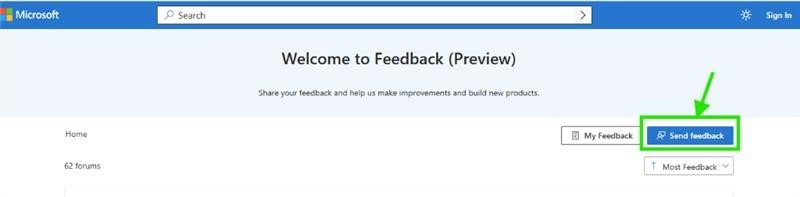
    While this behavior is currently by design in the new Outlook, we absolutely encourage you to share your suggestion directly with our product team. You can do so through our official feedback portal here: Microsoft 365 Feedback Hub →Send Feedback→ Describe your proposal in detail    User's image Every piece of feedback is reviewed, and yours could help shape future updates to Outlook. 
    Sharing your experience through this channel is one of the most impactful ways to advocate for changes that benefit not only you, but the broader Outlook community as well. 

    Thank you again for your thoughtful engagement, your patience, and for bringing this to our attention. 

    While I’m unable to change the product’s current design, please don’t hesitate to reach out if you have any other questions about how it works today, I’m always here to help! 

    Best regards, 


    As other users will also be searching for guidance in this community, clicking “Accept Answer” and giving it an upvote would be a wonderful way to amplify your impact. Your action not only helps others with similar questions find the right solution faster, it also highlights your role in shaping a more helpful and informed community. 

    Thank you again for your kind words, your thoughtful engagement, and for being such a valuable part of this space. Your contribution truly makes a difference! 

    Note: Please follow the steps in our documentation to enable email notifications if you want to receive notifications related to this thread. 

    0 comments No comments

Your answer

Answers can be marked as 'Accepted' by the question author and 'Recommended' by moderators, which helps users know the answer solved the author's problem.