Share via

Outlook not sending body of Zoom invite to recipient

Gary Brown 0 Reputation points
2025-10-15T19:16:00.82+00:00

When I use the Outlook Zoom add-in to schedule a meeting, it's not sending the body of the Zoom invitation containing the meeting link to the recipient. How do i fix this?

Outlook | Windows | Classic Outlook for Windows | For home
0 comments No comments

13 answers

Sort by: Most helpful
  1. Gary Brown 0 Reputation points
    2025-10-16T20:54:53.4433333+00:00

    Killian - I'm at wits end. I've tried everything you suggested and it's still not working. Even your manual workaround "Copy the Zoom meeting link from the Zoom app and paste it into the Outlook invite body before sending." didn't work which shocked me. Invitees are still getting an email without the body of the Zoom invitation but a convoluted Google maps or Google calendar email about the Zoom meeting.

    I would LOVE to remove the Zoom add-in and reinstall it in my Outlook 365 desktop client but it says this is used my multiple users and requires an administrator. I AM the administrator but when I right click on the Outlook icon and choose "Run as administrator", it still tells me it requires an administrator!! Can you help me on this?

    And I'm afraid to toggle the "Try the new Outlook" because last time I did that, it put all my emails in the cloud (or something like that - it's been awhile) and I had to reverse this with help from MS.

    If you can help, please do! Thanks.

    0 comments No comments

  2. Anonymous
    2025-10-15T23:04:26.91+00:00

    Hi @Gary Brown,

    Thank you for the detailed update and screenshots.

    Based on what you shared, the issue seems to be on the recipient side, since the full Zoom invite body appears in your Sent Items. This often points to how the recipient’s email client (like Gmail in your screenshot) is rendering the message rather than Outlook failing to send it.Below are a few things you can check and try:

    1/ Recipient’s email client behavior:

    Gmail sometimes collapses or hides rich-text content from third-party add-ins. Ask the recipient to click “View entire message” or check the .ics attachment for full details.

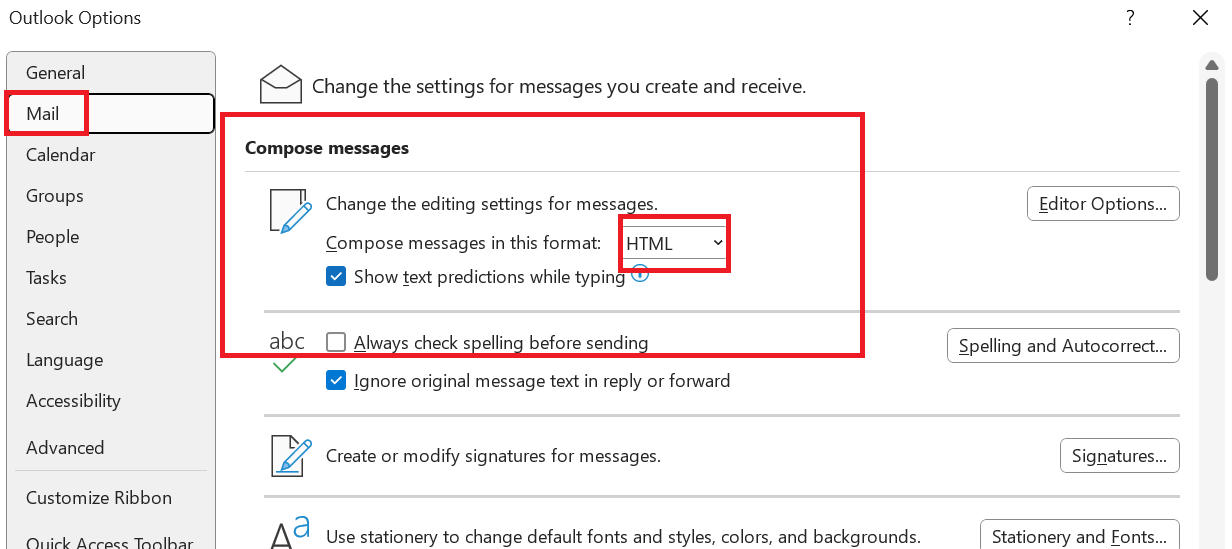
    2/ Send as plain text or HTML:

    In Outlook, try switching the message format to HTML (File > Options > Mail > Compose messages in this format). This can prevent stripping of embedded content.
    User's image

    3/ Test with another recipient or account:

    Send a Zoom invite to a different email address (e.g., Outlook.com or another corporate account) to confirm if the issue is Gmail-specific.

    4/ Reinstall Zoom add-in with admin rights:

    Even though you’re an admin, Outlook sometimes requires running as Administrator for add-in changes. Close Outlook, right-click the Outlook icon, select Run as Administrator, then try removing/reinstalling the Zoom add-in.

    5/ Use Zoom desktop app to generate invite:

    Schedule the meeting in Zoom, then copy the full invite text into Outlook. It’s a workaround but ensures recipients see the link.

    6/ Check Zoom settings:

    In Zoom web portal, under Settings > Meeting > Schedule Meeting > Scroll down to find the option "Include meeting link in invite"

    Make sure it’s toggled ON.

    Please note that our first response may not fully resolve the issue right away. With your input and additional details, we can work together to identify the best solution.

    I hope these steps help. Give them a try and let me know how it goes. If the problem persists, we’ll continue troubleshooting together.

    Thank you for your patience and understanding.

    If you have any questions, don’t hesitate to reach out. I look forward to hearing back from you.


    As other users will also be looking for information in this community, please click on "Accept Answer" and feel free to vote for this answer. Your valuable vote will definitely help other users with similar questions to find the right channel and useful information more easily. 

    Thank you for your kind words. 

    Note: Please follow the steps in our documentation to enable email notifications if you want to receive notifications related to this thread. 


  3. Gary Brown 0 Reputation points
    2025-10-15T21:15:28.37+00:00

    Killian,

    Attached are screenshots of what Zoom invite recipients are seeing. PII Removed

    Thanks for your help.

    0 comments No comments

  4. Gary Brown 0 Reputation points
    2025-10-15T20:17:56.5933333+00:00

    Killian,

    1. Zoom desktop add-in for Outlook 365 desktop client.
    2. All recipients
    3. The body of the meeting invitation including the meeting link is in my sent folder. It's only missing when the recipient opens the email.

    I've restarted Outlook several times and the Zoom add in is active. Since this is Outlook 365 desktop client, it's updated automatically.

    I'd love to show you some screenshots but don't know how to attach them here. Whenever I try to delete and reinstall the Zoom add-in from Outlook, Outlook says I can't do this unless I'm an administrator. But I AM the administrator. Believe it or not, I began my career as a programmer so I'm not unfamiliar with softward.

    I can copy the body of the invitation into an Outlook meeting invitation but this should be unnecessary. I've used Zoom for years and never had this problem before. You're help is so appreciated!

    0 comments No comments

  5. Anonymous
    2025-10-15T20:05:53.83+00:00

    Hi @Gary Brown,

    Thank you for posting your question in the Microsoft Q&A forum.

    To help us narrow down the problem, could you please answer the following questions:

    1/ Are you using the Zoom Outlook desktop add-in or the web add-in?

    2/ Does the issue happen for all recipients or only certain ones?

    3/ When you open the sent invite in your Sent Items, is the Zoom link missing there too, or only for the recipient?

    While you check that, here are some quick fixes you can try right away:

    1/ Restart Outlook and re-enable the Add-in:

    Go to File > Options > Add-ins and make sure the Zoom add-in is active.

    User's image

    If it’s disabled, enable it and restart Outlook.

    2/ Update both Outlook and Zoom add-in:

    Outdated versions often cause sync issues. Install the latest updates for both.

    3/ Switch to the Zoom desktop plugin:

    If you’re using the web add-in, try the desktop plugin, it’s generally more reliable for invitation details.

    4/ Manual workaround:

    Copy the Zoom meeting link from the Zoom app and paste it into the Outlook invite body before sending.

    Please understand that our initial response does not always resolve the issue immediately. However, with your help and more detailed information, we can work together to find a solution. 

    I hope this information is helpful. Please follow these steps and let me know if it works for you. If these steps don’t resolve it, let me know the answers to the questions above so we can dig deeper.

    Thank you for your patience and your understanding. If you have any questions, please feel free to reach out. 

    I'm looking forward to your reply. 


    As other users will also be looking for information in this community, please click on "Accept Answer" and feel free to vote for this answer. Your valuable vote will definitely help other users with similar questions to find the right channel and useful information more easily. 

    Thank you for your kind words. 

    Note: Please follow the steps in our documentation to enable email notifications if you want to receive notifications related to this thread. 

    0 comments No comments

Your answer

Answers can be marked as 'Accepted' by the question author and 'Recommended' by moderators, which helps users know the answer solved the author's problem.