Share via

I updated my surface pro 3 with the new updates since 08/2025 - kb5063709 - issues battery/laptop shuts off/keyboard not working

Shay 0 Reputation points
2025-12-16T20:05:03.57+00:00

So i first started having issues with my surface pro 3. Ever since the hotfix kb5063709. I found a way to get rid of the update . Through a lengthy process. Dont remember it now. But had to mount it. Using the .iso file. Etc. And iw as able to turn off wifi to prevent auto updates. However, it ended up autoupdating again. And been struggling to figure out how to rid it because after the newer updates, which also auto updated, I am no longer able to prevent autoupdates from stopping. I can uninstall the update but when having to shutdown to restart. During both in midst of shutting down and restarting. Something begins to auto update. Ive tried many things. yet it still doesn't let me uninstall the update completely. so by the time I get back in after restart, it says I am unable to uninstall. battery life is so messed up now. Dies when full even when shut off properly ? Laptop keeps shutting off . Heats up. Just one issue after another. And now after the latest update - I cannot even find the kb5063709 hot fix. how do I get rid of the previous updates ? ive tried a number of things. Lost my patience at this point. Considering never to come back to Microsoft after being such a loyal customer and most of ALL , in what world does an update sound like a good idea that prevents users from being able to use their surface pro 3 type cover keyboard from workinf after an update? Honestly. Make it make sense. Need help. Current cumulative update is: kb5066791, kb5066747. This issue began with the hot fix kb5063709 around in 06/2025 . Found a way to uninstall it. But after auto update in 08/2025 . My keyboard stopped working. And having all these heating issues. Ive never had before these updates. I want to download the .iso file but it keep getting redirected to the wrong downloading file. Not sure where to download that huge file and what other steps to take to get the correct windows 10 iso file. to mount it. Because something along those lines fixed my keyboard issues. And was able to uninstall kb5063709 without being overrided even though installments used to work only if the internet was connected. Now, even on airplane mode, it autoupdates. Ridiculous.


Moved from: Community Center | Discuss the Q&A site | Site bug or problem

Surface | Surface Pro | Performance and maintenance
0 comments No comments

2 answers

Sort by: Most helpful
  1. Barb Bowman 80,700 Reputation points MVP Volunteer Moderator
    2025-12-17T16:01:32.9866667+00:00

    Shay,

    You can try the official Windows 10 downloadable recovery image for your Surface Pro 3, however, if the cursor/arrow keys on the typecover don't work to navigate the UEFI https://support.microsoft.com/en-us/surface/how-do-i-use-the-bios-uefi-on-surface-pro-3-and-earlier-devices-0f5953d2-befa-3617-a0e5-9735945af774 it is most likely an issue that can't be fixed with software, as the UEFI loads without loading Windows drivers, etc. (And we've seen this happen, although it was rare on SP3's). The SP3 was released in 2014, and is 11 years old. There is really no official support from Microsoft (and Windows 10 reached end of life in October).

    1 person found this answer helpful.

  2. Jess-Q 9,915 Reputation points Microsoft External Staff Moderator
    2025-12-17T14:46:37.6066667+00:00

    Hi @Shay

    Thank you for posting your question in the Microsoft Q&A forum.  

    Regarding your issue, I understand how frustrating it is when a Surface Pro 3 suddenly refuses to detect the Type Cover or starts draining battery after an update. These symptoms usually point to the firmware (EC + UEFI) getting stuck in a bad hardware state, or Windows reinstalling incompatible drivers after updates. 

    Here are a few steps you can try: 

    1. Hardware Reset 

    Often, the battery drains and keyboard "not found" issues are caused by the system’s firmware being stuck in a bad state. This reset clears the hardware cache without deleting your files: 

    • Shut down the Surface. 
    • Press and hold the Volume Up and Power buttons simultaneously for 15 seconds. (The screen may flash the logo; keep holding for the full 15 seconds). 
    • Release and wait 10 seconds, then turn the device back on. 

    For more details, please refer to: How to reset your Surface device

    1. Use the correct Recovery Image 

    If the issue persists, "mounting" a standard Windows ISO often fails because it lacks the specific Surface Pro 3 drivers. You need the official factory recovery image: Surface Recovery Image Download

    • Note: You will need your serial number (found under the kickstand). 
    • The Fix: This image restores the specific Surface Pro Embedded Controller Firmware required to manage the battery and the Type Cover port correctly. 
    1. Prevent Auto-Updates 

    To stop the device from overriding your settings and "self-healing" the update service during restarts, you must disable the service recovery triggers: 

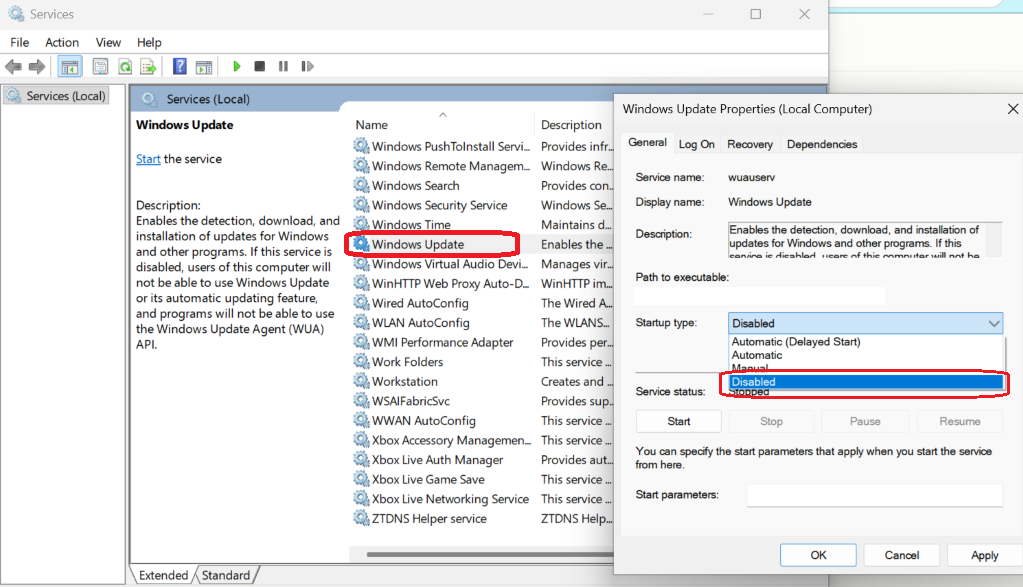
    • Press Win + R, type services.msc, and press Enter. 
    • Locate Windows Update, right-click it, and select Properties. 
    • Set "Startup Type" to Disabled. 
    •  User's image
    •  
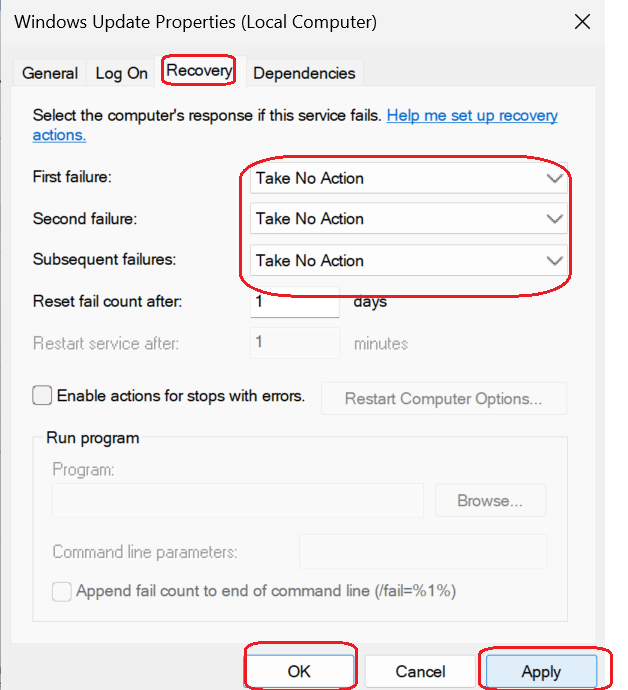
    • Go to the Recovery tab and change "First failure," "Second failure," and "Subsequent failures" to Take No Action. 
    •  User's image
    • Click Apply and OK. 
    1. Driver Refresh 

    If you get back into Windows and the keyboard still doesn't work: 

    • Open Device Manager (Win + X > Device Manager). 
    • Expand Keyboards and Surface Type Cover Filter Device. 
    • Right-click and uninstall it (do not delete driver software). 
    • Restart the Surface. 

    Hopefully it will help work with your issue and if you have any other questions or need further assistance, feel free to ask.


    If the answer is helpful, please click "Accept Answer" and kindly upvote it. If you have extra questions about this answer, please click "Comment".     

    Note: Please follow the steps in our documentation to enable e-mail notifications if you want to receive the related email notification for this thread. 


Your answer

Answers can be marked as 'Accepted' by the question author and 'Recommended' by moderators, which helps users know the answer solved the author's problem.