Hi @ChrisKenyon,
Welcome to Microsoft Q&A forum and thank you very much for reaching out to us.
Based on your description, may I know if the same issue occurs when user is using the signature on New Outlook or Outlook Web? Have you tested a simplified signature (with only one element from the original, either the font, link or picture) to isolate the problem?
If possible, please share a screenshot of the signature and the fonts used for the signature in Outlook via a private message I sent toward you. This allows me to test the signature on my end and find solution tailor to the user issue.
In the meantime, you can try out these common troubleshooting steps below for Outlook signature:
Rule Out Add-ins:
If Outlook have add-ins, it can inject custom styles or HTML into emails, causing Outlook to throw style-related errors.
To check, you can Start Outlook in Safe Mode, this will disable all COM add-ins and customizations:
Close Outlook, then press Window + R and input: Outlook.exe /safe, press Enter.
Reset Outlook’s Email Template:
From my research, Outlook uses Word’s rendering engine. The template file NormalEmail.dotm stores default styles. If the file is corrupted or contains invalid style names, the error might appear.
To check, you can close Outlook, then press Window + R and input: %appdata%\Microsoft\Templates, press Enter. Locate NormalEmail.dotm file (and Normal.dotm if present)

Once you locate them, you can rename the file such as NormalEmailOld.dotm .
After that, you can reopen Outlook and draft or send a new email. Outlook will regenerate fresh templates.

For more information, you can check out this Microsoft Article here.
Remove Stationery/Themes:
Stationery and themes often reference custom styles. If those styles are missing or invalid, Outlook throws the error.
To check, you can go to File > Options > Mail > Stationery and Fonts. Under Theme, select No Theme, this will also uncheck Use theme’s font.
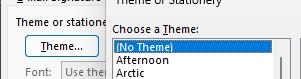
Set fonts manually to a standard option like Calibri.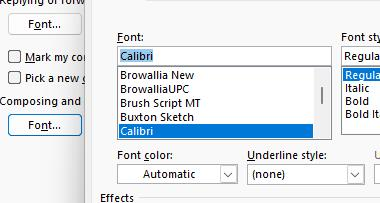
For more information, you can check on this Microsoft Article here.
I hope this help. Looking forward to your response.
If the answer is helpful, please click "Accept Answer" and kindly upvote it. If you have extra questions about this answer, please click "Comment".
Note: Please follow the steps in our documentation to enable e-mail notifications if you want to receive the related email notification for this thread.
' cx='32' cy='32' r='32' /%3E%3Ctext x='50%25' y='55%25' dominant-baseline='middle' text-anchor='middle' fill='%23FFF' %3ECK%3C/text%3E%3C/svg%3E)

' cx='32' cy='32' r='32' /%3E%3Ctext x='50%25' y='55%25' dominant-baseline='middle' text-anchor='middle' fill='%23FFF' %3EJG%3C/text%3E%3C/svg%3E)
' cx='32' cy='32' r='32' /%3E%3Ctext x='50%25' y='55%25' dominant-baseline='middle' text-anchor='middle' fill='%23FFF' %3ESG%3C/text%3E%3C/svg%3E)
' cx='32' cy='32' r='32' /%3E%3Ctext x='50%25' y='55%25' dominant-baseline='middle' text-anchor='middle' fill='%23FFF' %3EKN%3C/text%3E%3C/svg%3E)
' cx='32' cy='32' r='32' /%3E%3Ctext x='50%25' y='55%25' dominant-baseline='middle' text-anchor='middle' fill='%23FFF' %3EPS%3C/text%3E%3C/svg%3E)
' cx='32' cy='32' r='32' /%3E%3Ctext x='50%25' y='55%25' dominant-baseline='middle' text-anchor='middle' fill='%23FFF' %3EAS%3C/text%3E%3C/svg%3E)
' cx='32' cy='32' r='32' /%3E%3Ctext x='50%25' y='55%25' dominant-baseline='middle' text-anchor='middle' fill='%23FFF' %3EK%3C/text%3E%3C/svg%3E)