Hello @zequion ,
Welcome to Microsoft Q&A forum.
Can you first open VS Installer > Modify > Individual components > Cloud, database, and server and confirm that IIS Express option is selected?
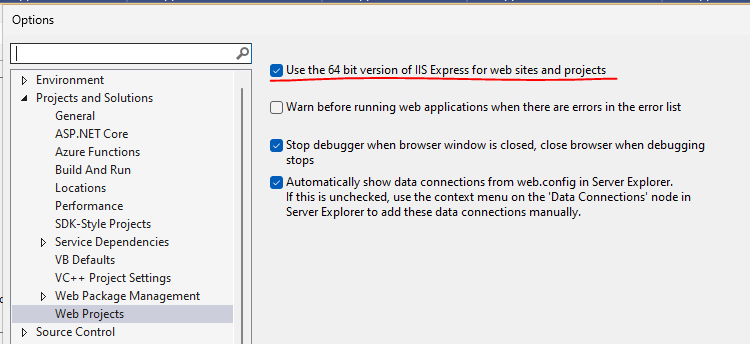
I think there’s another option which may meet your requirement: Tools > Options > Projects and Solutions > Web Projects > Use the 64 bit version of IIS Express for web sites and projects.
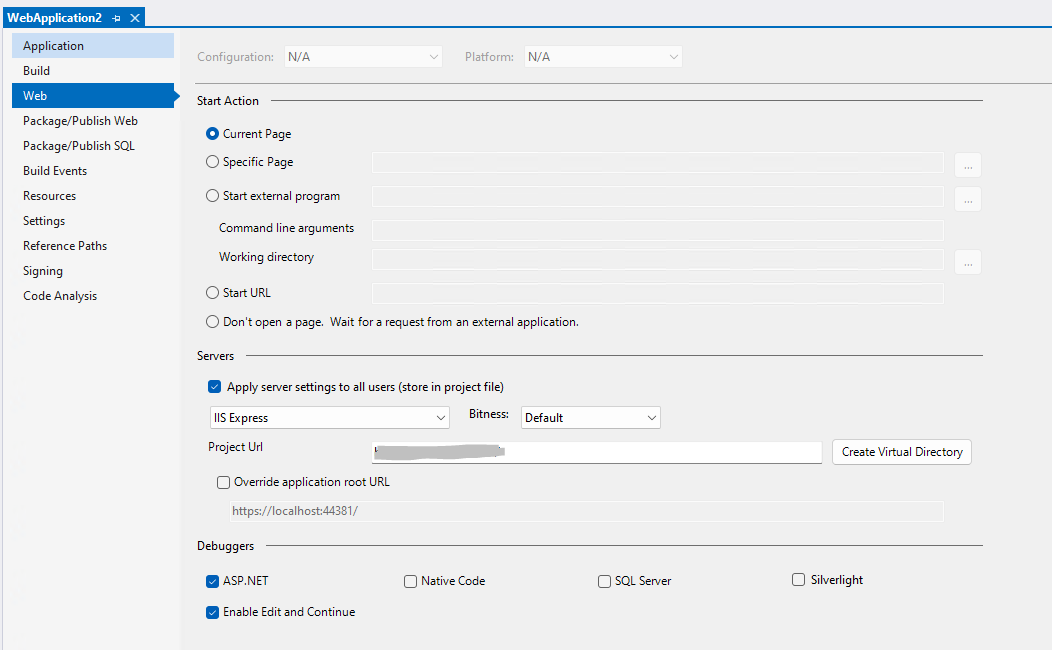
Besides, I tried to create an asp .net web application, but the property page looks not quite like yours, can you confirm that you created an "ASP .NET Web Application (.NET Framework)" project? If you are using other project templates please let us know the project template name.
Sincerely,
Tianyu
If the answer is the right solution, please click "Accept Answer" and kindly upvote it. If you have extra questions about this answer, please click "Comment".
Note: Please follow the steps in our documentation to enable e-mail notifications if you want to receive the related email notification for this thread.
' cx='32' cy='32' r='32' /%3E%3Ctext x='50%25' y='55%25' dominant-baseline='middle' text-anchor='middle' fill='%23FFF' %3EZ%3C/text%3E%3C/svg%3E)
' cx='32' cy='32' r='32' /%3E%3Ctext x='50%25' y='55%25' dominant-baseline='middle' text-anchor='middle' fill='%23FFF' %3ETS%3C/text%3E%3C/svg%3E)
' cx='32' cy='32' r='32' /%3E%3Ctext x='50%25' y='55%25' dominant-baseline='middle' text-anchor='middle' fill='%23FFF' %3ERA%3C/text%3E%3C/svg%3E)
' cx='32' cy='32' r='32' /%3E%3Ctext x='50%25' y='55%25' dominant-baseline='middle' text-anchor='middle' fill='%23FFF' %3ELB%3C/text%3E%3C/svg%3E)