Outlook | Windows | New Outlook for Windows | For business
Using New Outlook on Windows for professional communication and productivity

This browser is no longer supported.
Upgrade to Microsoft Edge to take advantage of the latest features, security updates, and technical support.
' cx='32' cy='32' r='32' /%3E%3Ctext x='50%25' y='55%25' dominant-baseline='middle' text-anchor='middle' fill='%23FFF' %3EWB%3C/text%3E%3C/svg%3E)
The flag to set a reminder for the recipient does not appear to be available in New outlook, desktop version. Where might I find it?
Using New Outlook on Windows for professional communication and productivity
This was a very valuable tool in past versions of office. If it is not available, how can one suggest adding it back?
' cx='32' cy='32' r='32' /%3E%3Ctext x='50%25' y='55%25' dominant-baseline='middle' text-anchor='middle' fill='%23FFF' %3ELL%3C/text%3E%3C/svg%3E)
I found the feature to be able to flag for others key in reminding employees of crucial deadlines. Please add it back to the new outlook.
Answer accepted by question author
' cx='32' cy='32' r='32' /%3E%3Ctext x='50%25' y='55%25' dominant-baseline='middle' text-anchor='middle' fill='%23FFF' %3EVH%3C/text%3E%3C/svg%3E)
Dear @William B,
Thank you for posting your question in the Microsoft Q&A forum.
I understand that transitioning from Classic Outlook to New Outlook can be intimidating and frustrating, especially regarding the feature changes. However, this feature is currently limited in the New Outlook experience. While you can still flag emails for your own follow-up, the option to set a reminder that pops up for the recipient is not yet available.
Therefore, I recommend you try this workaround:
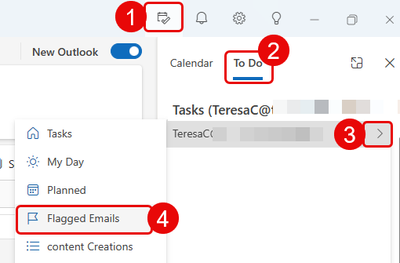
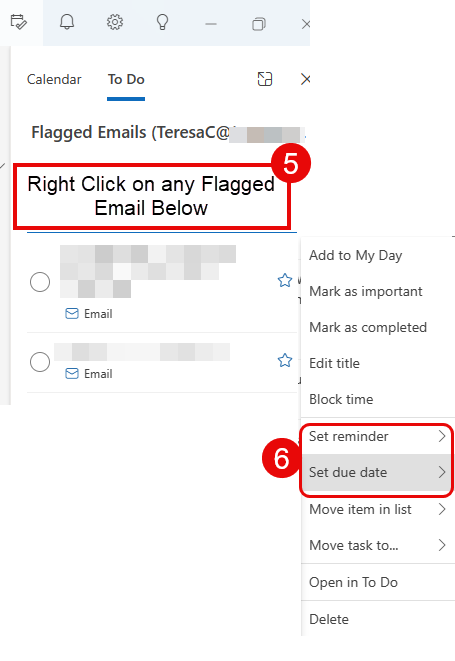
You can access your flagged emails via the MyDay icon located in the top menu. Here are the steps to set reminders, due dates, and more.
As a forum moderator, I agree that this feature is not only important, but it’s also a highly requested improvement that would significantly enhance users 'productivity, especially for managing collaborative tasks and ensuring timely responses.
Therefore, I highly recommend submitting your feedback directly with Microsoft via the Help > Feedback option in Outlook or to Microsoft Ideas · Community, where our product development team can know your requirements and ideas for product improvements. With requirements like this increase, the problem may well be released in the near future.
Note: As Microsoft Community moderators, please note that we are not involved in product design decisions and do not have direct access to the development roadmap, we want to assure you that your feedback has been acknowledged and is valued.
I hope this information is helpful. If you have any questions, please feel free to reach out.
Thank you for your patience and understanding. I'm looking forward for your reply.
If my answer is helpful, please click "Accept Answer" and kindly upvote it. If you have extra questions about this answer, please click "Comment".
Note: Please follow the steps in our documentation to enable e-mail notifications if you want to receive the related email notification for this thread.
I appreciate your input. I will be sure to add the request as directed! Have a great weekend!
' cx='32' cy='32' r='32' /%3E%3Ctext x='50%25' y='55%25' dominant-baseline='middle' text-anchor='middle' fill='%23FFF' %3EJT%3C/text%3E%3C/svg%3E)
I don't use the option of flagging emails for follow up by recipients often, but when I do it is crucial. Very disappointing that it isn't available.
Dear @Jennifer Takyi,
I agree that this feature is not only important, but it’s also a highly requested improvement that would significantly enhance users 'productivity. I highly recommend submitting your feedback directly with Microsoft via the Help > Feedback option in Outlook or to Microsoft Ideas · Community, where our product development team can know your requirements and ideas for product improvements.
Note: As Microsoft Community moderators, please note that we are not involved in product design decisions and do not have direct access to the development roadmap, we want to assure you that your feedback has been acknowledged and is valued.