Share via

microsoft project makes a screen shot of the activity

Stepanets, Mikhail 20 Reputation points
2026-05-21T11:58:40.5666667+00:00

microsoft project has a bug - it makes a screenshot of the activity (UID 25422) and pastes it in the Gantt chart area. How can i get rid of this permanently? Many thanks

User's image

Microsoft 365 and Office | Project | For business | Windows
0 comments No comments

Answer accepted by question author

Jess-Q 11,325 Reputation points Microsoft External Staff Moderator
2026-05-22T15:10:05.0533333+00:00

Hi @Stepanets, Mikhail

Thank you for the details information 

Here are a few steps you can try next: 

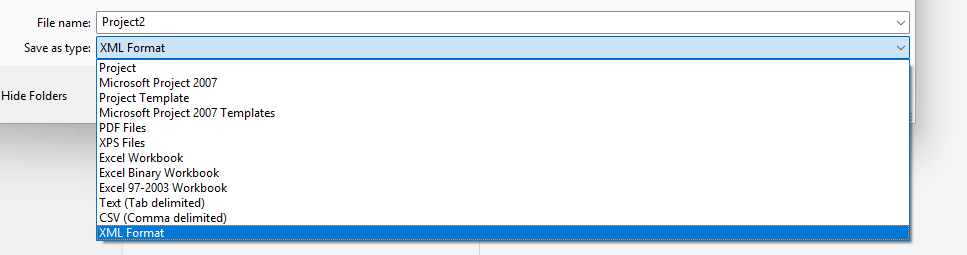
  1. Save the file as XML  
  • Open the problematic .mpp file. Go to File > Save As. Choose a location and change the "Save as type" dropdown to XML Format (*.xml). Save it. 
  • User's image
    • Completely close the current project file.
  • Open MS Project with a blank screen. Go to File > Open and browse to the .xml file you just created (you may need to change the file type filter in the open dialog to see XML files). 
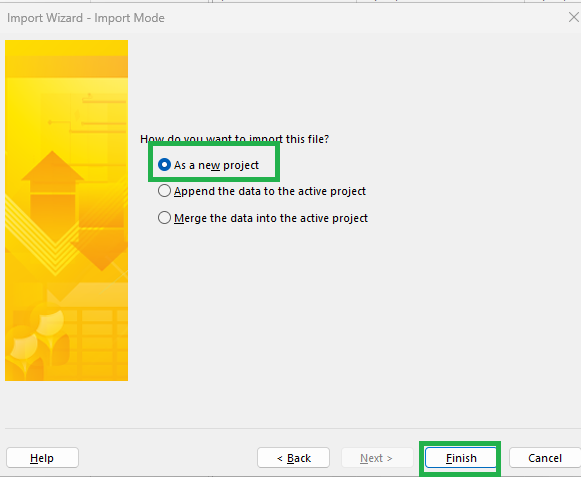
  • When the Import Wizard appears, choose "As a new project". 
  • User's image
  • Check the Gantt chart area to see if the screenshot is entirely gone. If the file is clean, go to File > Save As and save it back as a standard Project (*.mpp) file. 

Note: You may lose some highly customized visual formatting (like specific bar colors you changed manually outside of the default styles), but the structural data will be intact. 

 2. Overwriting the Corrupted View via Organizer 

If the corruption is isolated specifically to the Gantt Chart view rather than the whole file, you can replace the corrupted view with a clean, default version from your global template (Global.mpt). 

  • Open your problematic project file. 
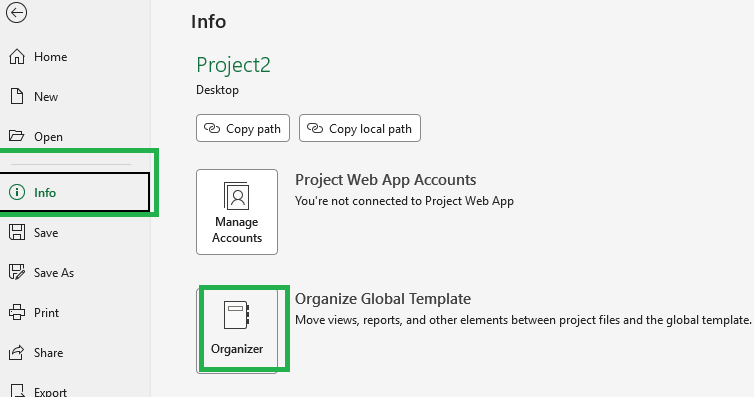
  • Navigate to File > Info > Organizer (or View > Macros > Organizer depending on your exact version). 
  • User's image
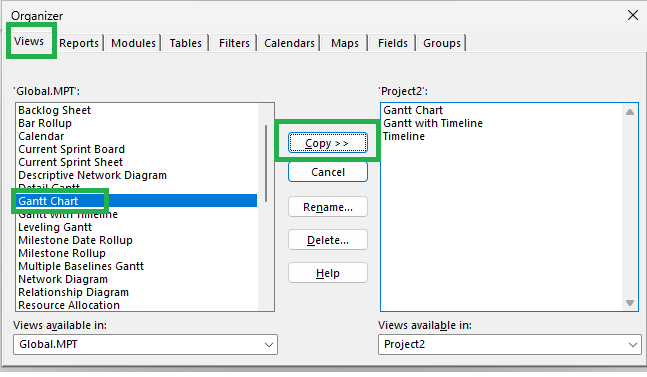
  • Select the Views tab. 
  • On the left side (which should display Global.mpt), locate Gantt Chart. 
  • User's image
    • On the right side (which should display your current project file), you will also see Gantt Chart. 
  • Select Gantt Chart on the left side (Global.mpt) and click the Copy >> button in the middle to push it to the right side (your project). 
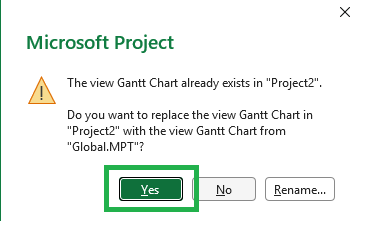
  • Project will warn you that the view already exists and ask if you want to overwrite it. Click Yes. 
  • User's image
  • Close the Organizer, save your file, and restart Project to see if the screenshot has been deleted.

For more details, please refer to: Copy reports, calendars, and views in Project desktop

Hopefully it will help resolve your issue effectively. 

Was this answer helpful?

1 person found this answer helpful.
0 comments No comments

2 additional answers

Sort by: Most helpful
  1. Jess-Q 11,325 Reputation points Microsoft External Staff Moderator
    2026-05-25T14:51:36.09+00:00

    Hi @Stepanets, Mikhail,

    It has been a while and I am writing to see how things are going with this issue. Have you had a chance to check the replies provided? Any update would be appreciated.

    Was this answer helpful?

    1 person found this answer helpful.

  2. Jess-Q 11,325 Reputation points Microsoft External Staff Moderator
    2026-05-21T13:54:50.8466667+00:00

    Hi @Stepanets, Mikhail

    Regarding your issue, may I kindly ask a few questions to help understand it better. 

    • Could you help clarify what you mean by "it makes a screenshot of the activity and pastes it in the Gantt chart area"? 
      • Do you mean Microsoft Project is automatically generating a screenshot of the activity and placing it in the Gantt chart area on its own without you doing anything? 
      • Or do you see a screenshot/image already there that you are unable to select or delete? If it keeps reappearing, when exactly does it happen every time you open the file, when you switch views, when you print, or after a specific action? 
    • Does this happen every time you open the file, or only after performing certain actions (e.g., printing, switching views, saving)? 
    • Is this issue limited to this specific .mpp file only, or does it also happen with other project files? 
    • Are there any embedded objects, images, or notes attached to the task 

    Hope to hear back from you soon.   


    Note: Please follow the steps in our documentation to enable e-mail notifications if you want to receive the related email notification for this thread.   

    Was this answer helpful?


Your answer

Answers can be marked as 'Accepted' by the question author and 'Recommended' by moderators, which helps users know the answer solved the author's problem.